Hello,
I apologize for the issue you are facing with automating the focus keyword in your multisite setup. While the general steps to automate the insertion of focus keywords are outlined in the article you referenced, the folder structure can indeed vary in a multisite environment.
Here’s a brief overview of how you can automate the focus keyword:
-
Navigate to Theme File Editor: In your WordPress Dashboard, go to Appearance → Theme File Editor or Tools → Theme File Editor, depending on your theme type.
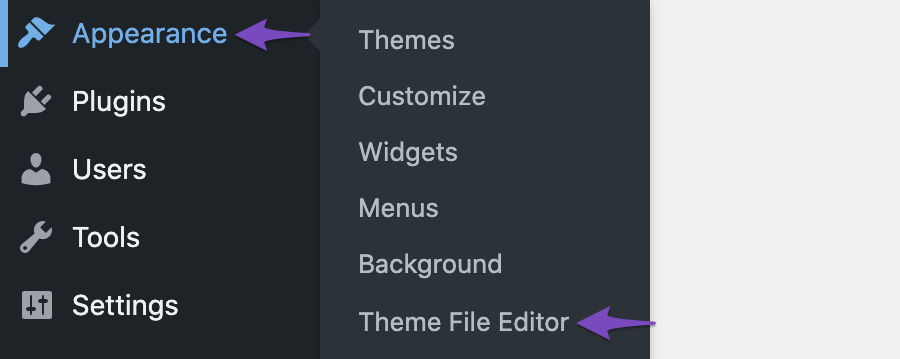
-
Add Code Snippet: You will need to add a specific code snippet to your theme’s rank-math.php file. This file is typically located in your theme’s directory. If you’re using a child theme, make sure to edit the child theme’s rank-math.php file instead.
-
Use the Correct Code: Depending on whether you want to set the focus keyword based on post titles, categories, or tags, you can use one of the provided code snippets from the article. For example, to set the post title as the focus keyword:
/**
* Function to automatically update the focus keyword with the post title
*/
function update_focus_keywords() {
   $posts = get_posts(array(
       'posts_per_page' => -1,
       'post_type' => 'post'
   ));
   foreach ($posts as $p) {
       update_post_meta($p->ID, 'rank_math_focus_keyword', strtolower(get_the_title($p->ID)));
   }
}
add_action('init', 'update_focus_keywords');
-
Save Changes: After adding the code, click Update File to save your changes.
If your folder structure is different and you’re unable to locate the rank-math.php file, please provide more details about your setup, and we can assist further. Alternatively, you can reply to this ticket, and a human agent from the Rank Math Support team will take over and provide more tailored assistance.
Thank you for raising this concern!
Sources:
How to Automate the Insertion of Focus Keyword » Rank Math
theme file editor option under appearance does not exist for a subsite for a multisite network, and I am unable to find it in the theme settings as a superadmin.
Please advise.
Hello,
In this case, you can manage your file via cPanel and update your theme files there instead.
If you need assistance managing your website files, you can get in touch with your web host to apply the filter on your subsite.
Looking forward to helping you.
So I just copy paste the code at the bottom of the file?
Hello,
Here is how to add a filter to your site: https://rankmath.com/kb/wordpress-hooks-actions-filters/
Hope that helps. Let us know if you need any other assistance.
Hello,
Since we did not hear back from you for 15 days, we are assuming that you found the solution. We are closing this support ticket.
If you still need assistance or any other help, please feel free to open a new support ticket, and we will be more than happy to assist.
Thank you.




