Assistance Required: Persistent Google Search Console Integration Issue and Addi

#890760
  • Resolved merajshayesteh
    Rank Math free

    Dear Support Team,

    I hope this message finds you well. I am following up on an ongoing issue I’ve been experiencing with integrating Google Search Console into Rank Math. Previously, I had granted access, and your team kindly reviewed the issue. Unfortunately, the problem remains unresolved, and I am reaching out for further assistance.

    Issue Details: Despite trying various methods, including reconnecting and reconfiguring Google Search Console, Rank Math still shows a connection issue. The Search Console section remains disconnected or does not fetch data as expected. While the system schedules a future data fetch, the connection does not fully integrate, preventing me from accessing vital SEO data.

    Here’s what we have tried so far:

    Verified Google Search Console property and ensured correct access permissions.
    Reconnected Rank Math multiple times and ensured the proper site URL was linked.
    Reviewed potential plugin conflicts by deactivating other SEO or analytics plugins.
    Additionally, there are some other errors related to the Image ALT attributes on the homepage, and I would appreciate help resolving them as well.

    Next Steps: I am granting you access to my WordPress backend again so that you can investigate the issue thoroughly. I hope you can look into this and help resolve these issues permanently.

    Please let me know if you need any additional information or steps from my end to facilitate this.

    Thank you for your continued support!

    Kind regards,
    Meraj Shayesteh Dar
    ExcellentTire.com

Viewing 1 replies (of 1 total)
  • Hello,

    We apologize for the ongoing issues you are facing with the Google Search Console integration in Rank Math. Thank you for providing detailed information about the steps you’ve already taken to resolve the problem.

    To address the connection issue, please ensure that you have added the correct site URL to Google Search Console and verified it. You can refer to our guide on adding a URL property to the Search Console for assistance.

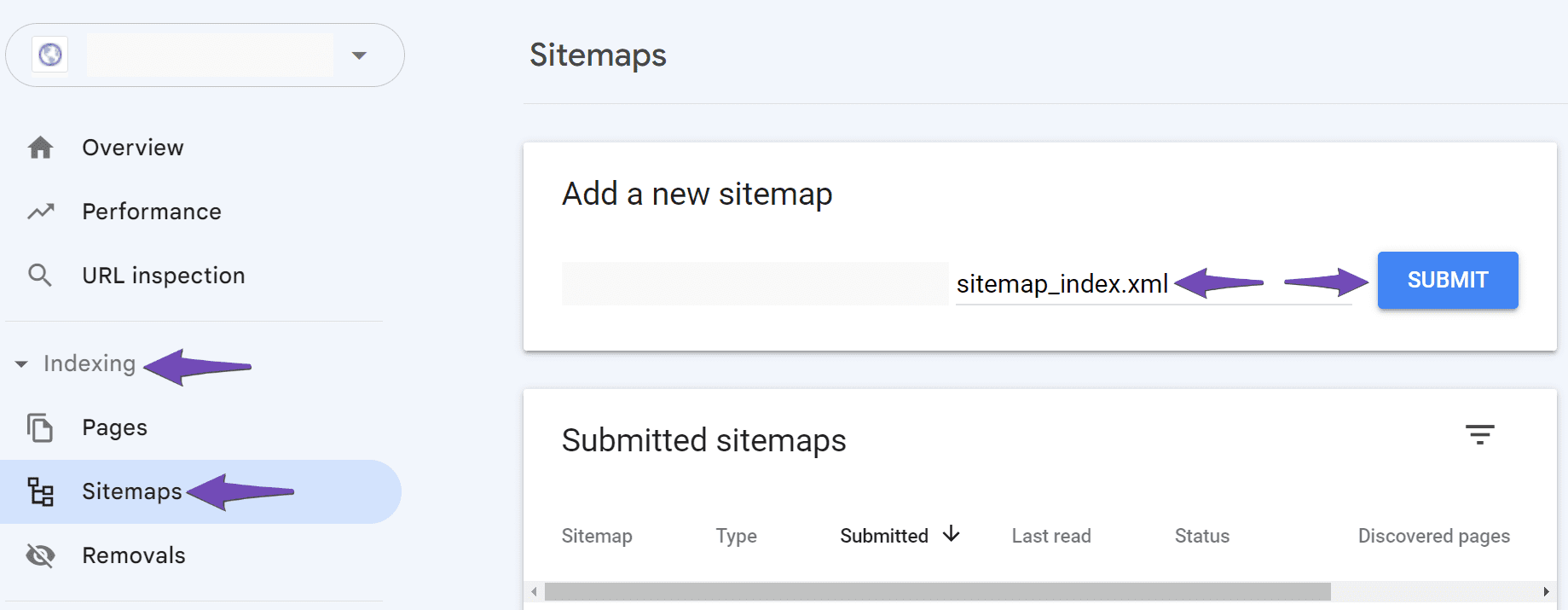
    Additionally, make sure to add your sitemap to Google Search Console by navigating to Indexing → Sitemaps and pasting the correct sitemap URL in the Add a new sitemap field. Ensure there are no spaces in the sitemap URL, as this can lead to a "Couldn’t fetch" error. If you continue to experience issues, try adding a forward slash before the sitemap URL and click SUBMIT again.

    Add the sitemap to Google Search Console

    If the problem persists, it may be due to Google not yet fetching the sitemap. In this case, we recommend waiting for Google to process it, as they can find and fetch your URLs without a sitemap as well.

    Regarding the errors related to Image ALT attributes on your homepage, we suggest checking that all images have appropriate ALT text assigned. This is important for SEO and accessibility.

    If you still encounter issues after following these steps, please reply to this ticket, and a human agent from our support team will take over and assist you further.

    Thank you for your patience, and we look forward to resolving these issues for you!

    Sources:
    Troubleshooting the “Couldn’t Fetch” Error in Google Search Console » Rank Math

    This is an automated reply from Rank Math Support Bot. If you need further assistance, please reply to this topic and a human support agent will reply to you shortly.

    Hello,

    Since we did not hear back from you for 15 days, we are assuming that you found the solution. We are closing this support ticket.

    If you still need assistance or any other help, please feel free to open a new support ticket, and we will be more than happy to assist.

    Thank you.

Viewing 1 replies (of 1 total)

The ticket ‘Assistance Required: Persistent Google Search Console Integration Issue and Addi’ is closed to new replies.