Hello,
I apologize for the issue you are facing with the analytics in Rank Math. It sounds like there may be a configuration issue causing the discrepancy between Rank Math and Google Analytics.
Here are a few steps you can take to troubleshoot this issue:
-
Check Google Analytics Property: Ensure that you are using the correct Google Analytics property (Universal or GA4). You can find more information on how to connect with the correct version in our dedicated tutorial.
-
Enable Install Analytics Code: Make sure that you have enabled the Install Analytics Code option in Rank Math. This is necessary for Rank Math to track your site’s performance correctly.
-
Rebuild Index for Analytics: If you notice that the Rank Math SEO score shown in the Analytics module is incorrect or if there are multiple entries of the same post, you can rebuild the index. Go to Rank Math > Status & Tools > Database Tools > Rebuild Index for Analytics. Ensure you are using Rank Math in Advanced mode.

-
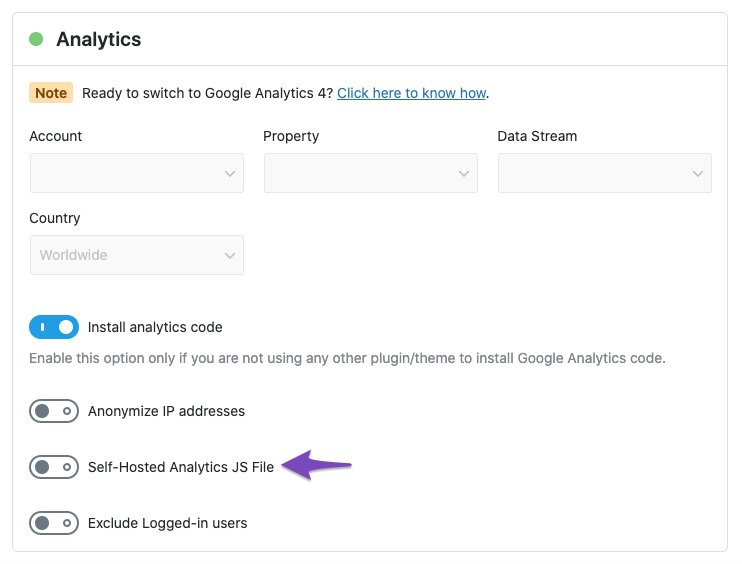
Self-Hosted Option: If you are using the self-hosted option for analytics, please note that live tracking will not occur, and it may take 24 to 48 hours for data to be processed. You can check this setting under WordPress Dashboard > Rank Math SEO > General Settings > Analytics.
If you’ve gone through these steps and are still experiencing issues, please reply to this ticket with any additional details or errors you might be encountering, and a human agent from our support team will assist you further.
Thank you for raising this concern!
Sources:
What to Do When Rank Math Analytics Shows Zero Search Traffic » Rank Math
What to Do When Rank Math Analytics Shows Zero Search Traffic » Rank Math
This is an automated reply from Rank Math Support Bot. If you need further assistance, please reply to this topic and a human support agent will reply to you shortly.
Hello,
Since we did not hear back from you for 15 days, we are assuming that you found the solution. We are closing this support ticket.
If you still need assistance or any other help, please feel free to open a new support ticket, and we will be more than happy to assist.
Thank you.


