Hello,
Lamentamos que estés enfrentando problemas con las analíticas de Rank Math en tu sitio de WordPress. A continuación, te proporcionamos algunos pasos que podrías seguir para intentar resolver este problema:
-
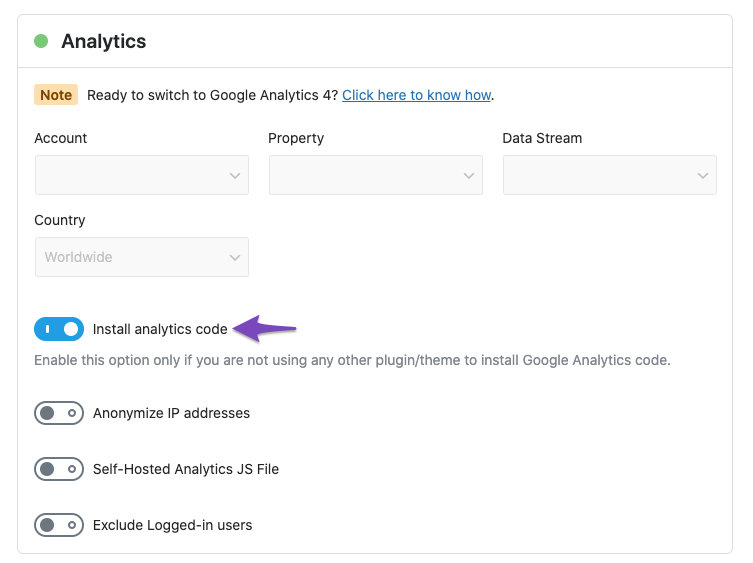
Verifica la Conexión con Google Analytics: Asegúrate de que el código de seguimiento de Google Analytics esté correctamente implementado en tu sitio. Puedes buscar el ID de medición que comienza con G-XXXXXX en el código fuente de tu página. Si no está presente, necesitarás habilitar la opción Instalar código de Analytics en la configuración de Rank Math.
-
Revisa la Configuración de Rank Math: Ve a WordPress Dashboard → Rank Math SEO → General Settings → Analytics y asegúrate de que todas las configuraciones estén correctamente configuradas.
-
Rebuild Index for Analytics: Si el puntaje SEO de Rank Math mostrado en el módulo de análisis es incorrecto o hay múltiples entradas del mismo post, puedes intentar reconstruir el índice. Ve a Rank Math → Status & Tools → Database Tools → Rebuild Index for Analytics. Asegúrate de estar usando Rank Math en modo avanzado.

-
Esperar el Procesamiento de Datos: Ten en cuenta que puede tomar entre 24 y 48 horas para que Google Analytics procese los datos después de realizar cambios.
-
Verifica Errores en la Implementación: Utiliza la herramienta Tag Assistant de Google para verificar si el código de Analytics se ha agregado correctamente al frontend de tu sitio.
Si después de seguir estos pasos aún no ves datos en las analíticas, te recomendamos que respondas a este ticket y un agente humano del equipo de soporte de Rank Math tomará tu caso y te ayudará a resolverlo.
Gracias por plantear tu preocupación y esperamos que esto te ayude a solucionar el problema.
Hello,
Thank you for contacting us and sorry for any inconvenience that might have been caused due to that.
For initial troubleshooting, you can try to follow this guideline and see if that works for you: https://rankmath.com/kb/delete-old-analytics-data/
If the issue persists, please follow the steps below to create a troubleshooting log so that we can check the issue further for you.
1. At first add the following filter to your website:
add_filter( 'rank_math/analytics/log_response', '__return_true' );
Here is a guide you can follow to add the filter:
https://rankmath.com/kb/wordpress-hooks-actions-filters/
2. After adding the filter, please run the pending Scheduled Action from your WordPress Dashboard > Tools > Scheduled Actions > Pending or you can try visiting the following URL:
https://yourdomain.com/wp-admin/tools.php?page=action-scheduler&status=pending
This is how it should look like:

When some actions have completed running, please check the Analytics log under wp-content/uploads/rank-math and share that with us. You can upload the log file using this tool.
Let us know how it goes. Looking forward to helping you.
Thank you.
Hello,
Since we did not hear back from you for 15 days, we are assuming that you found the solution. We are closing this support ticket.
If you still need assistance or any other help, please feel free to open a new support ticket, and we will be more than happy to assist.
Thank you.



