Hello,
We apologize for the issue you are facing with the redirection of your AMP pages. If you do not see the "Add New Redirect" option, it may be due to the Redirection module not being activated in Rank Math.
Here’s how you can redirect all AMP pages to non-AMP pages:
-
Navigate to Redirections: Ensure that you have installed and activated the Redirection module from your WordPress Dashboard under Rank Math SEO.
-
Add a New Redirection: Once the module is activated, you should see the option to add a new redirection. Click on Add New to set up your redirect.
-
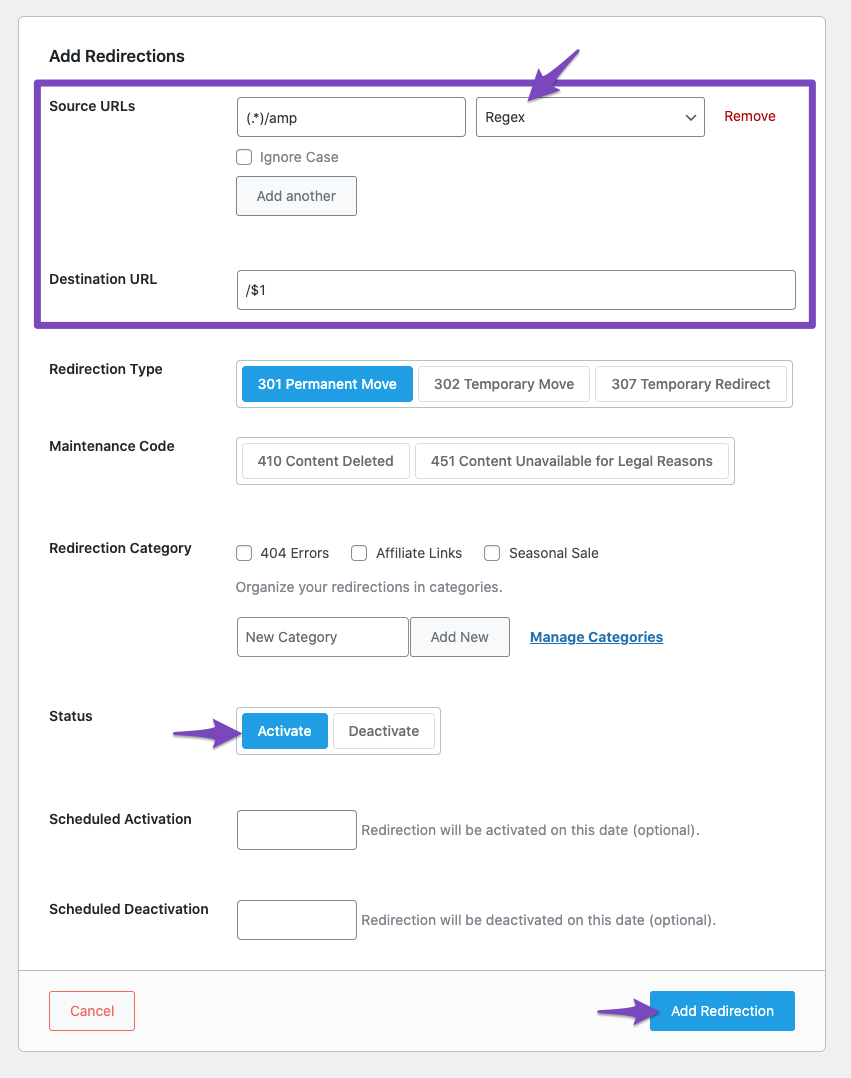
Create a Regex Redirection: To redirect all AMP URLs back to the regular URLs, use the following settings:
- Regex Source URL:
(.*)/amp
- Destination URL:
/$1
- Make sure to activate the redirect by clicking on Add Redirection.
Here’s how it looks inside Rank Math:
If you still cannot find the option or face any other issues, please reply to this ticket, and a human agent from our support team will assist you further. Thank you for raising this concern!
Sources:
Redirect all AMP pages to non-AMP pages » Rank Math
Hello,
Thank you for contacting Rank Math
You seemed to have marked this ticket as resolved.
We’re just following up with you to see if you have any other questions or concerns that we can assist you with. Or, if your issue has been resolved, please let us know so we can mark this ticket as closed.
Thank you for choosing Rank Math.
Thank you, all resolved I think.
Hello,
We’re glad that this issue is already resolved.
If you have any other concerns, please don’t hesitate to contact us anytime so we can assist you further.
Looking forward to helping you.




