
-
Hi, in the wordpress dashboard i get zero. What am i missing? please see this url
https://imgur.com/a/JEdbo2C.website is bravomotor.id

-
Hello, we apologize for the issue you are facing with seeing zero search traffic in your WordPress dashboard. There could be several reasons for this, but it is often due to an incorrect configuration with Rank Math or Google Analytics.
Here are some steps you can take to troubleshoot the issue:
-
Check the Google Analytics Property You Use: Ensure that you are using the correct version of Google Analytics (Universal or GA4). Make sure you have added the Google Analytics code to your website. If you are not using any other plugins to add the code, you can enable the Install analytics code option in Rank Math.
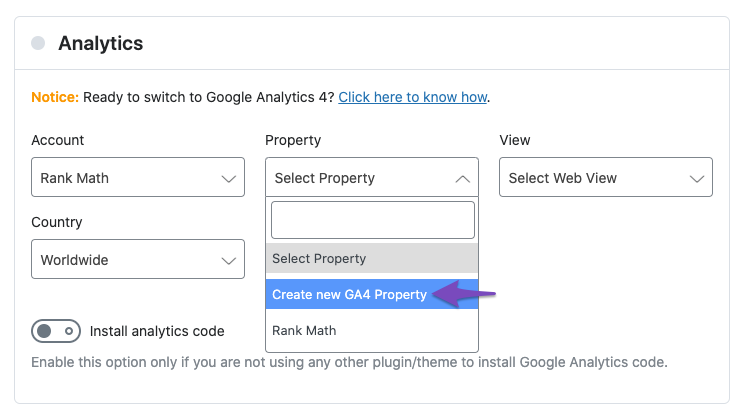
You can find a dedicated tutorial on how to integrate Rank Math with GA4. -
Update to the Latest Version of Rank Math: Ensure that you are using the latest version of Rank Math. You can check for updates by navigating to Plugins → Installed Plugins in your WordPress dashboard. If there are updates available, click the update now link below the plugin.
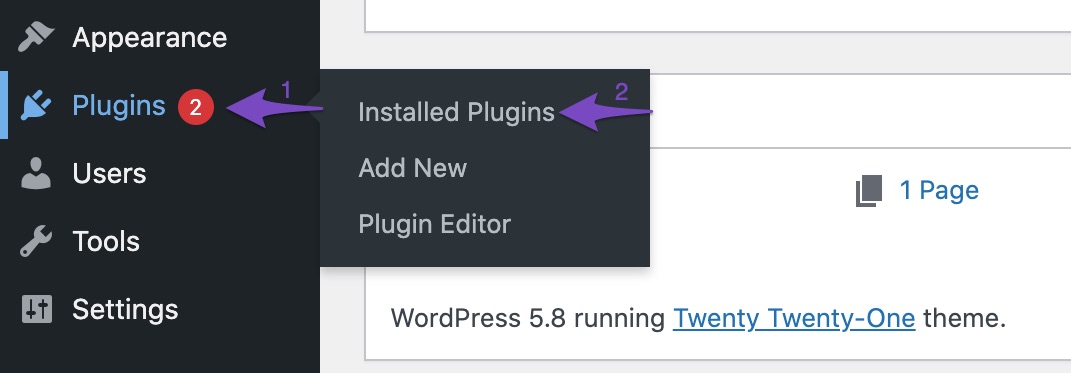
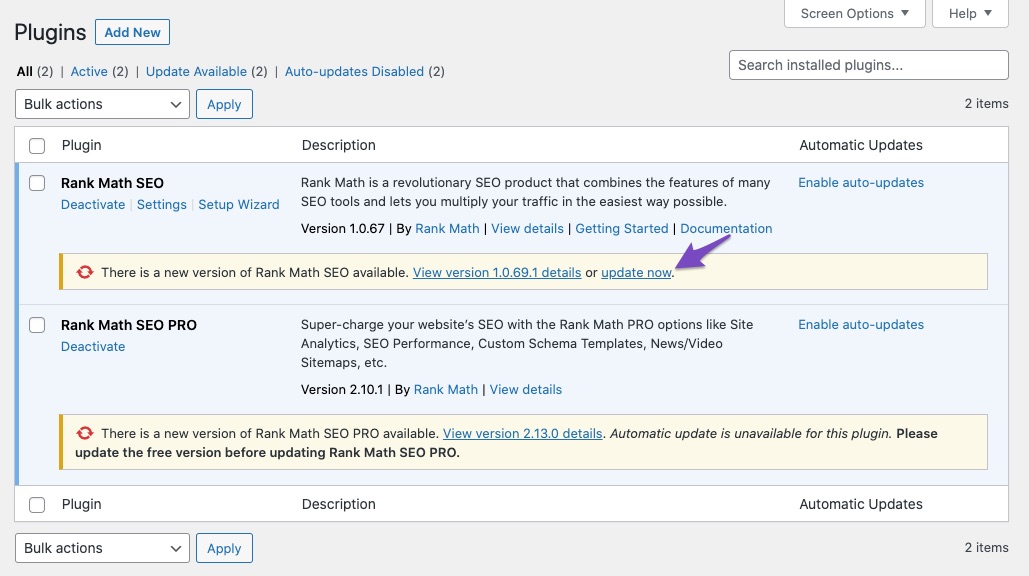
-
Copy System Info to Clipboard: If the data is still not appearing, go to Rank Math SEO → Status & Tools → System Status and click Copy System Info to Clipboard. You can then reply to this ticket and include the system info so that our support expert can look into the issue.
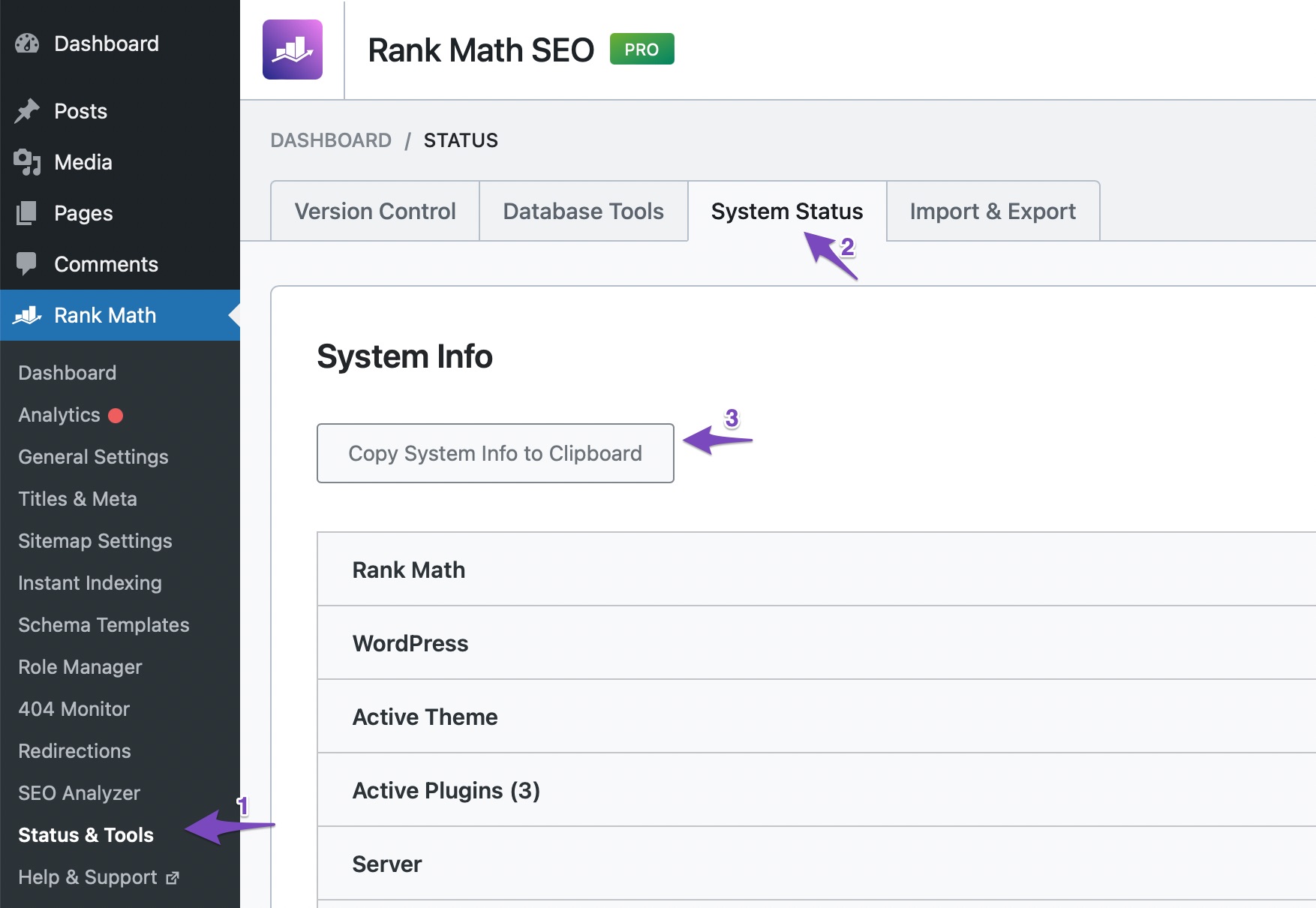
If you continue to experience issues after following these steps, please reply to this ticket, and a human agent from the Rank Math Support team will assist you further. Thank you for raising this concern!
Sources:
What to Do When Rank Math Analytics Shows Zero Search Traffic » Rank Math### rank-math ### version: 1.0.227.1 database_version: 1 plugin_plan: Free active_modules: woocommerce, acf, sitemap, link-counter, local-seo, redirections, rich-snippet, seo-analysis, analytics, image-seo refresh_token: Token exists permissions: Search Console: Given rank_math_404_logs: 32 KB rank_math_redirections: 288 KB rank_math_redirections_cache: 176 KB rank_math_internal_links: 3 MB rank_math_internal_meta: 2 MB rank_math_analytics_gsc: 80 KB rank_math_analytics_objects: 2 MB rank_math_analytics_inspections: 1 MB ### wp-core ### version: 6.6.2 site_language: id_ID user_language: en_US timezone: Asia/Jakarta permalink: /%postname%/ https_status: true multisite: false user_registration: 1 blog_public: 1 default_comment_status: open environment_type: production user_count: 36 dotorg_communication: true ### wp-dropins (3) ### advanced-cache.php: true maintenance.php: true object-cache.php: true ### wp-active-theme ### name: Blocksy Child (blocksy-child) version: undefined author: Creative Themes author_website: (undefined) parent_theme: Blocksy (blocksy) theme_features: core-block-patterns, widgets-block-editor, post-thumbnails, automatic-feed-links, responsive-embeds, html5, title-tag, custom-logo, lifterlms-sidebars, boostify-header-footer, rank-math-breadcrumbs, fl-theme-builder-headers, fl-theme-builder-footers, fl-theme-builder-parts, editor-styles, editor-style, editor-color-palette, editor-gradient-presets, menus, align-wide, customize-selective-refresh-widgets, header-footer-elementor, woocommerce, wc-product-gallery-lightbox, wc-product-gallery-zoom, widgets theme_path: /home/bravomot/public_html/wp-content/themes/blocksy-child auto_update: Disabled ### wp-parent-theme ### name: Blocksy (blocksy) version: 2.0.66 author: CreativeThemes author_website: https://creativethemes.com theme_path: /home/bravomot/public_html/wp-content/themes/blocksy auto_update: Disabled ### wp-mu-plugins (1) ### WP Shifty Loader: author: (undefined), version: (undefined) ### wp-plugins-active (34) ### Add coupon by link / URL coupons for Woocommerce: version: 1.1.47, author: PI Websolution, Auto-updates enabled Advanced Custom Fields PRO: version: 6.3.6, author: WP Engine, Auto-updates enabled Advanced Database Cleaner PRO: version: 3.2.9, author: Younes JFR., Auto-updates enabled Blocksy Companion (Premium): version: 2.0.66, author: CreativeThemes, Auto-updates enabled Delete Me: version: 3.2, author: Clinton Caldwell, Auto-updates enabled Elementor: version: 3.24.0, author: Elementor.com, Auto-updates enabled EWWW Image Optimizer: version: 7.8.0, author: Exactly WWW, Auto-updates enabled FiboSearch - AJAX Search for WooCommerce (Pro): version: 1.28.1, author: FiboSearch Team, Auto-updates enabled Headers Security Advanced & HSTS WP: version: 5.0.40, author: 🐙 Andrea Ferro, Auto-updates disabled Joinchat: version: 5.1.7, author: Creame, Auto-updates enabled MalCare WordPress Security Plugin - Malware Scanner, Cleaner, Security Firewall: version: 5.73, author: MalCare Security, Auto-updates enabled Media Cloud: version: 4.6.4, author: interfacelab, Auto-updates enabled Nextend Social Login: version: 3.1.14, author: Nextendweb, Auto-updates enabled PDF Invoices & Packing Slips for WooCommerce: version: 3.8.6, author: WP Overnight, Auto-updates enabled Photo Reviews for WooCommerce: version: 1.2.12, author: VillaTheme, Auto-updates enabled Quickcreator: version: 0.0.6, author: Quickcreator, Auto-updates enabled Rank Math SEO: version: 1.0.227.1, author: Rank Math, Auto-updates enabled Redis Object Cache: version: 2.5.3, author: Till Krüss, Auto-updates enabled Reviews and Rating - Google Reviews: version: 5.5, author: Noah Hearle, Design Extreme, Auto-updates enabled Shop as Client for WooCommerce: version: 3.6.1, author: PT Woo Plugins (by Webdados), Auto-updates enabled TablePress: version: 2.4.2, author: Tobias Bäthge, Auto-updates enabled WooCommerce: version: 9.2.3, author: Automattic, Auto-updates enabled Woocommerce - Xendit: version: 5.1.2, author: Xendit, Auto-updates disabled WooCommerce Cart Abandonment Recovery: version: 1.3.0, author: CartFlows Inc, Auto-updates enabled WooCommerce Cart Share & Save: version: 3.2.1, author: WeCreativez, Auto-updates enabled WooCommerce Photo Reviews Premium: version: 1.3.14, author: VillaTheme, Auto-updates disabled Woongkir: version: 1.3.12, author: Sofyan Sitorus, Auto-updates enabled WPCode Lite: version: 2.2.1, author: WPCode, Auto-updates enabled WP Login & Register using JWT: version: 2.8.0, author: miniOrange, Auto-updates enabled WP Mail SMTP: version: 4.1.1, author: WP Mail SMTP, Auto-updates enabled WP Rocket: version: 3.16.4, author: WP Media, Auto-updates disabled WP Shifty: version: 1.0.13, author: SWTE, Auto-updates disabled WPvivid Backup Plugin: version: 0.9.106, author: WPvivid Team, Auto-updates enabled WPvivid Plugins Pro: version: 2.2.27, author: wpvivid.com, Auto-updates enabled ### wp-server ### server_architecture: Linux 4.18.0-553.8.1.lve.el8.x86_64 x86_64 httpd_software: LiteSpeed php_version: 7.4.33 64bit php_sapi: litespeed max_input_variables: 1000 time_limit: 300 memory_limit: 512M max_input_time: 300 upload_max_filesize: 256M php_post_max_size: 256M curl_version: 7.87.0 OpenSSL/1.1.1w suhosin: false imagick_availability: true pretty_permalinks: true htaccess_extra_rules: true current: 2024-09-12T09:24:36+00:00 utc-time: Thursday, 12-Sep-24 09:24:36 UTC server-time: 2024-09-12T16:24:33+07:00 ### wp-database ### extension: mysqli server_version: 10.6.18-MariaDB-cll-lve client_version: 10.6.18-MariaDB max_allowed_packet: 268435456 max_connections: 151 ### wp-constants ### WP_HOME: undefined WP_SITEURL: undefined WP_CONTENT_DIR: /home/bravomot/public_html/wp-content WP_PLUGIN_DIR: /home/bravomot/public_html/wp-content/plugins WP_MEMORY_LIMIT: 256M WP_MAX_MEMORY_LIMIT: 512M WP_DEBUG: false WP_DEBUG_DISPLAY: false WP_DEBUG_LOG: false SCRIPT_DEBUG: false WP_CACHE: true CONCATENATE_SCRIPTS: undefined COMPRESS_SCRIPTS: undefined COMPRESS_CSS: undefined WP_ENVIRONMENT_TYPE: Undefined WP_DEVELOPMENT_MODE: undefined DB_CHARSET: utf8 DB_COLLATE: undefined ### wp-filesystem ### wordpress: writable wp-content: writable uploads: writable plugins: writable themes: writable fonts: not writable mu-plugins: writableHello,
Please follow the steps below to delete old analytics data and start a fresh import on your WordPress dashboard > Rank Math > Status & Tools > Database tool tab:

After rebuilding the analytics index of posts, go to Rank Math > General Settings > Analytics, and under “Analytics Database”, click “Update Data Manually”.
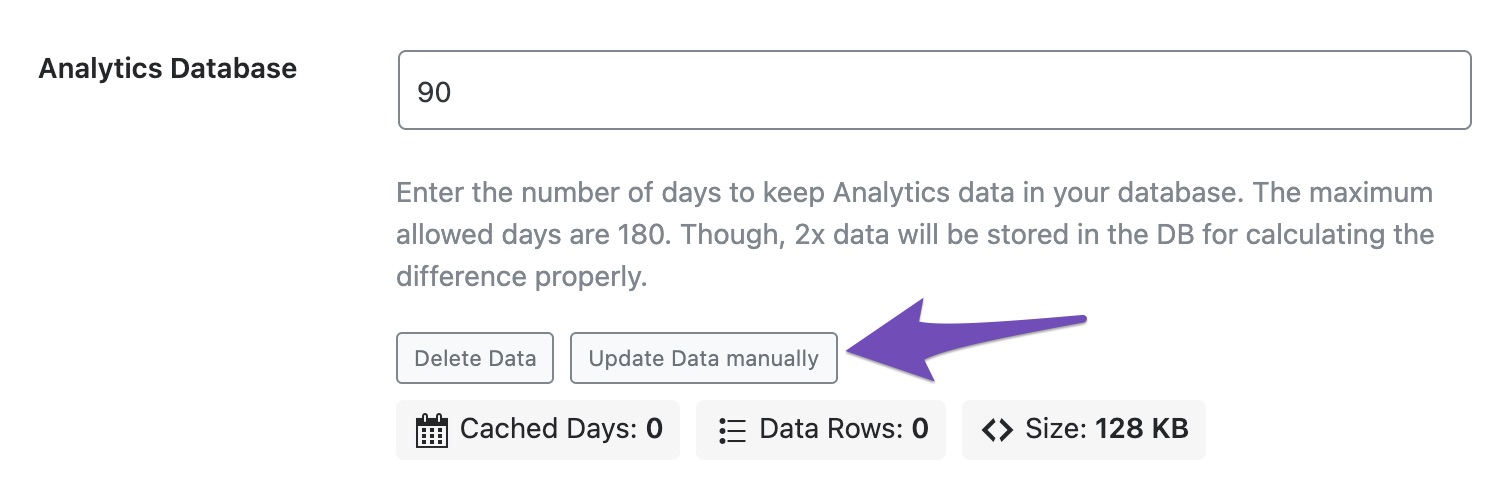
Your analytics data should be updated to the latest after that.
Let us know how this goes.
it says fetching in progress. it has been several hours
Hello,
In this case, we might need to take a closer look at the settings. Please edit the first post on this ticket and include your WordPress logins in the designated Sensitive Data section.
Please do take a complete backup of your website before sharing the information with us.
It is completely secure and only our support staff has access to that section. If you want, you can use the below plugin to generate a temporary login URL to your website and share that with us instead:
https://wordpress.org/plugins/temporary-login-without-password/
You can use the above plugin in conjunction with the WP Security Audit Log to monitor what changes our staff might make on your website (if any):
https://wordpress.org/plugins/wp-security-audit-log/
We really look forward to helping you.
Hello,
Since we did not hear back from you for 15 days, we are assuming that you found the solution. We are closing this support ticket.
If you still need assistance or any other help, please feel free to open a new support ticket, and we will be more than happy to assist.
Thank you.
-



The ticket ‘always get zero’ is closed to new replies.