
-
i add name off my website in local seo with rank math but in cherche result show url of my website

-
Hello, we apologize for the issue you are facing with your website’s name not displaying correctly in search results. To ensure that Google displays your site name instead of the URL, you need to add your site name to the structured data properly.
Here’s how you can do it using Rank Math:
-
Enable the Schema Module:
- Navigate to WordPress Dashboard → Rank Math SEO and enable the Schema module.
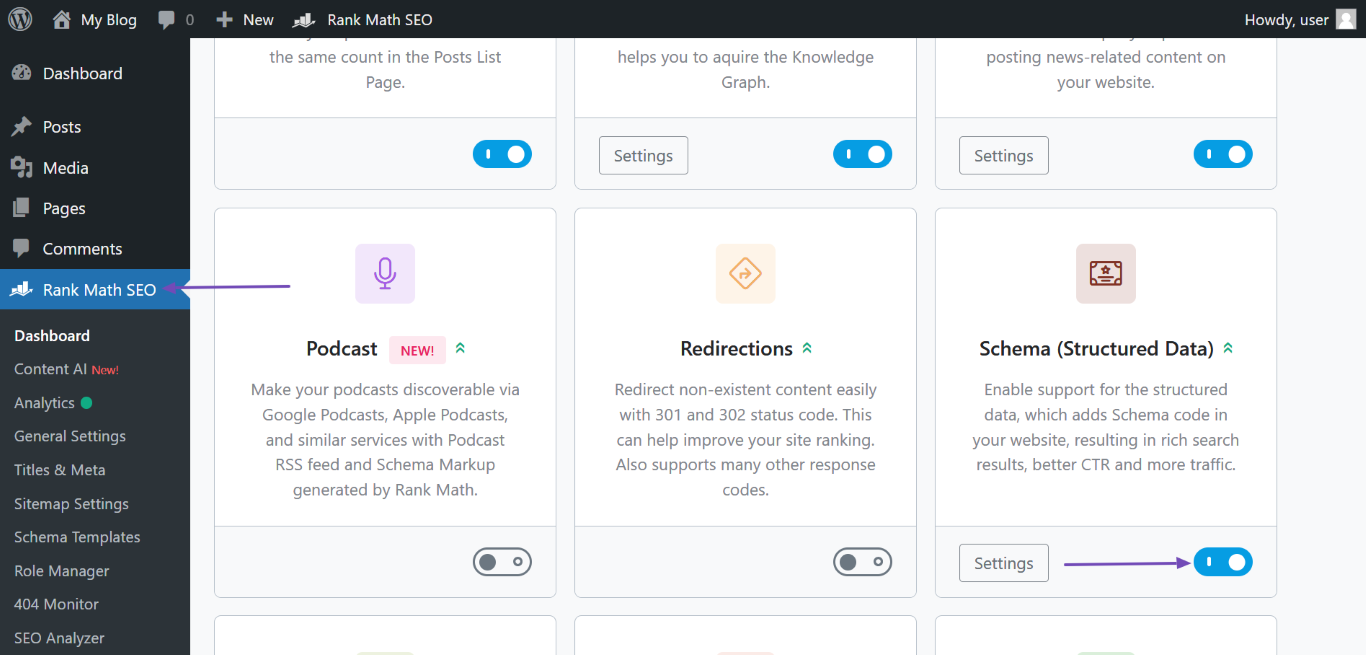
- Navigate to WordPress Dashboard → Rank Math SEO and enable the Schema module.
-
Set Your Site Name:
- Go to Rank Math SEO → Titles & Meta → Local SEO.
- Fill in the required fields, especially the Website Name field where you should enter your site name.
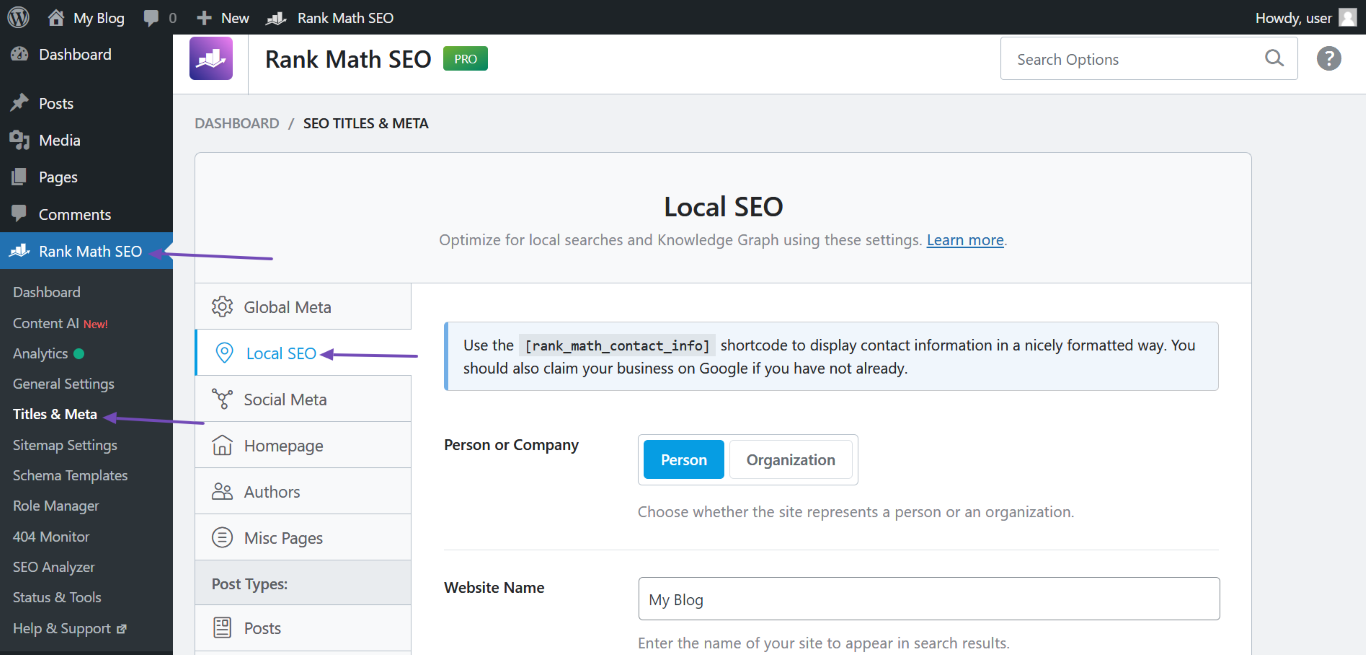
-
Save Changes:
- After entering the necessary information, scroll down and click Save Changes.
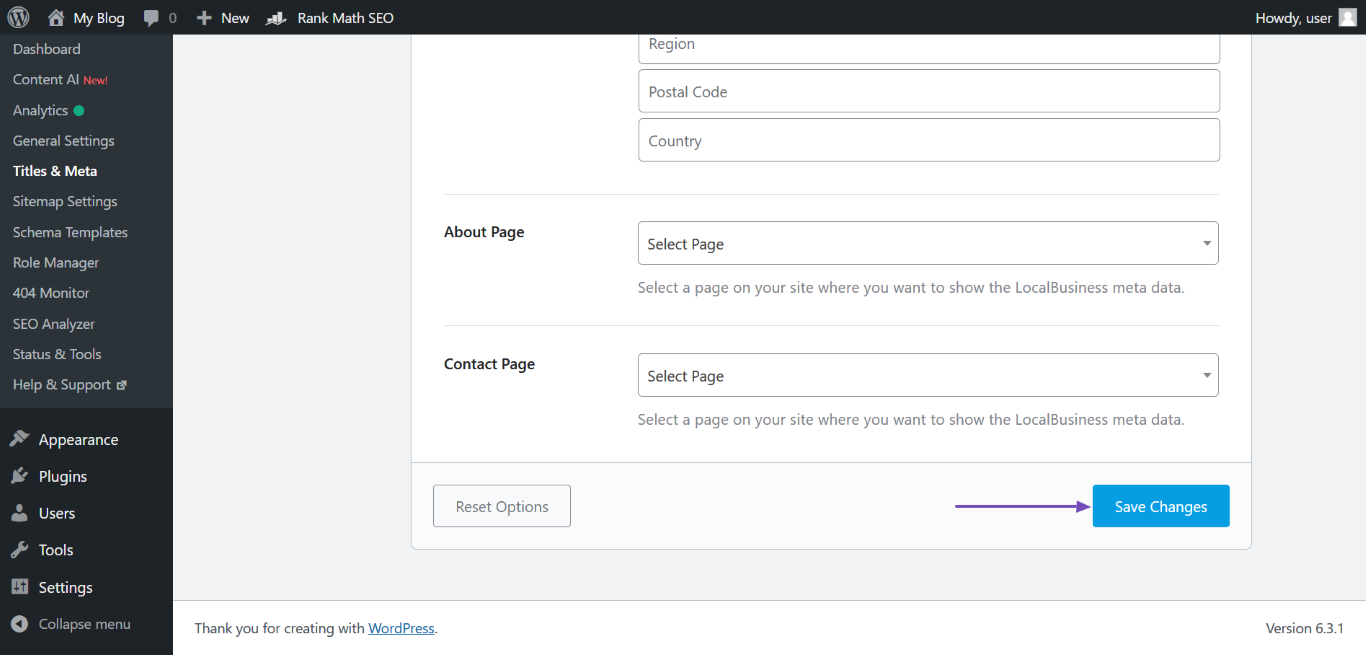
- After entering the necessary information, scroll down and click Save Changes.
-
Check Other Locations:
- Ensure that your site name is also included in your homepage’s title tag, H1 header tag, and Open Graph metadata, as these are other places Google checks for your site name.
- You can refer to this guide on how to set a homepage meta title and description using Rank Math.
After making these changes, it may take some time for Google to crawl your site again and update the search results. Thank you for raising this concern, and we hope this helps resolve the issue!
Sources:
Why Google Displays URL Instead of Site Name in SERP? » Rank Math
Using Rank Math’s Local SEO Module » Rank Mathim add site name in Rank Math SEO → Titles & Meta → Local SEO but still show url in serche result after month
Hello,
Thank you for contacting us and sorry for any inconvenience that this issue might have caused.
We understand that you are facing an issue where Google Search Results display your domain as the site name instead of the actual site name.
There are various sources that Google uses to define your site name on SERPs:
1 . og:site_name
2 . WebSite structured data (Schema)
3 . Content in title elements
4 . Heading elements (H1, H2, etc)Rank Math automatically incorporates the og:site_name meta tag and the WebSite Schema on your page.
This aids Google in understanding and displaying your desired site name.
To address this and encourage Google to display the sitename instead of domain please follow these steps:
1 . Ensure that your website’s
<title>tag on the homepage reflects sitename accurately.2 . Update the og:site_name meta tag to add sitename within Rank Math settings.
3 . Double-check that your logo alt text and other significant areas on your site mention the sitename.
4 . Make sure internal links within your site use sitename rather than the domain.
5 . After making these adjustments, utilize the URL Inspection Tool in Google Search Console to request indexing for your homepage.
6 . Ensure sitename is consistently represented across all online profiles, directories, and other platforms.
7 . If you’ve rebranded or changed the name in the past, verify there’s no legacy content, old sitemaps, or outdated pages sending conflicting signals to Google.
8 . Remember, you’ll need patience as Google re-crawls and re-indexes your site. It might take some time before these updates reflect in the SERPs.
It’s important to note that while these steps can guide Google, the final site name display in SERPs is determined by Google’s algorithm, based on what it deems relevant and user-friendly.
You can further understand this by reviewing Google’s documentation on site-name: Google Site Names Documentation.
https://developers.google.com/search/docs/appearance/site-namesWe hope that helps, and please don’t hesitate to get in touch if you have any other questions.
Hello,
Since we did not hear back from you for 15 days, we are assuming that you found the solution. We are closing this support ticket.
If you still need assistance or any other help, please feel free to open a new support ticket, and we will be more than happy to assist.
Thank you.
-


The ticket ‘Add Site Name to Website Structured Data’ is closed to new replies.