Hello,
We apologize for the issue you are facing with your website’s sitemap and the impact it has on your SEO. It can be frustrating when new posts are not being indexed due to sitemap issues. Here are some steps you can take to troubleshoot and resolve the "Couldn’t fetch sitemap" error:
1. Validate Your Sitemap
First, ensure that your sitemap is correctly configured. You can validate your sitemap using the Validate XML Sitemap tool. Enter your sitemap URL (e.g., `https://rankmath.com/kb/check-plugin-conflicts/) and click VALIDATE SITEMAP. If there are any issues, the tool will provide feedback.

2. Ensure the Sitemap is Located in the Root Folder
Make sure your sitemap is located in the root folder of your WordPress installation. The correct URL should look like this:
`https://rankmath.com/kb/check-plugin-conflicts/
3. Check Indexing Settings
Ensure that your posts are set to index. Go to Rank Math SEO → Titles & Meta and check the Robots Meta settings. Make sure the Index checkbox is enabled for your posts.

4. Add the Correct Sitemap to Google Search Console
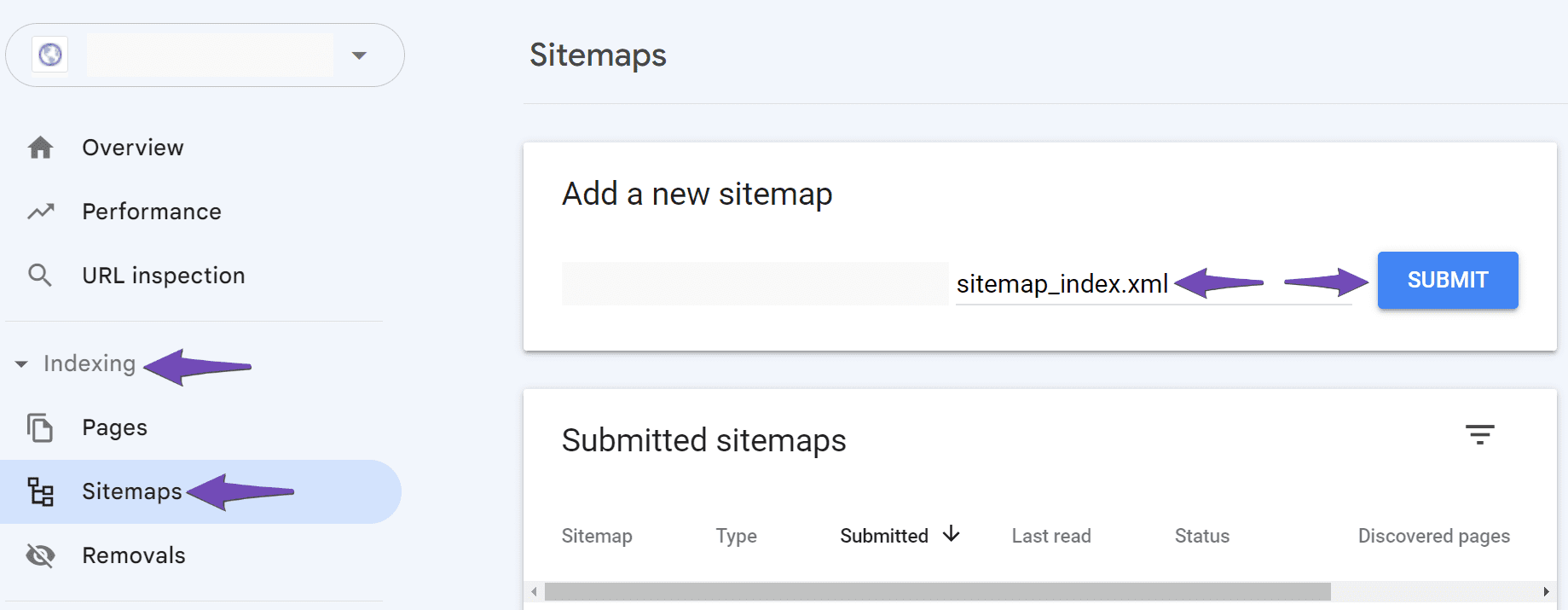
In Google Search Console, navigate to Indexing → Sitemaps. Paste your sitemap URL in the Add a new sitemap field and click SUBMIT. Ensure there are no spaces in the URL.
5. Wait for Google to Fetch Your Sitemap
If you have followed all the above steps and are still facing the "Couldn’t fetch" error, it may take some time for Google to fetch your sitemap. You can do nothing but wait for Google to process it.
If you continue to experience issues after trying these steps, please reply to this ticket, and a human agent from our support team will assist you further. Thank you for raising this concern, and we hope to help you resolve it soon!
Sources:
Troubleshooting the “Couldn’t Fetch” Error in Google Search Console » Rank Math
Rank Math Sitemap Issues and Their Fixes » Rank Math
I have followed the above mentioned steps alreay, & wached the tutorial on rankmath youtube channel as well. But still I am facing this issue. Please help me out & assign me a human suppport agent so that I can get valuable information!
Hello,
We’ve checked your site, and you only have 1 post under /blog/:
https://shillongteerupdate.com/blog/
Which is already included in your post-sitemap:
https://shillongteerupdate.com/post-sitemap.xml
You should remove all your submitted sitemaps and resubmit your main sitemap only /sitemap_index.xml.
Once done, give Google some time to recrawl your sitemap and wait for the “Last read” date column to be updated as well.
Looking forward to helping you.
I’ll definitely apply the above methods. But I have another question which is my clicks & impressions also known as traffic is also going down. Why is that happening?
Hello,
Here are some reasons why your site might be experiencing a decline in impressions and clicks on Google.
1. Seasonal Fluctuations: Certain industries or topics experience natural fluctuations in search volume throughout the year. If your website or content is related to a specific seasonal trend or event, the decline in impressions and clicks may be due to a decrease in search interest during this period.
2. Algorithm Updates: Google frequently updates its search algorithms, which can impact the visibility of websites in search results. If there have been recent algorithm changes, it’s possible that your website’s ranking has been affected, leading to a decline in impressions.
https://rankmath.com/blog/google-algorithm-update-recovery/
3. Technical Issues: It’s important to ensure that your website is properly indexed by search engines and that there are no technical issues preventing Google from crawling and indexing your pages. Check for any errors or warnings in the Google Search Console that could be affecting your site’s visibility.
4. Competitor Activity: Increased competition from other websites or changes in their SEO strategies can impact your impressions. If competitors are optimizing their content better or generating more relevant backlinks, it could lead to a decline in your impressions.
To identify the specific reason for the decline in impressions, it’s essential to analyze your website’s performance, conduct a thorough review of your SEO strategy, and monitor changes in search trends and competitors. You can use this guide to run an SEO audit on your site: https://rankmath.com/blog/seo-audit/
Let us know how it goes. Looking forward to helping you.
Thank you.
Hello,
Since we did not hear back from you for 15 days, we are assuming that you found the solution. We are closing this support ticket.
If you still need assistance or any other help, please feel free to open a new support ticket, and we will be more than happy to assist.
Thank you.




