
-
Hi
My Setup Wizard not picking my registered website. Could you please assist.

-
Hello,
We apologize for the issue you are facing with the Setup Wizard not completing and not picking your registered website. This can sometimes happen due to various reasons such as caching issues or conflicts with other plugins.
To troubleshoot this, we recommend the following steps:
- Clear your browser cache and try accessing the Setup Wizard again.
- Disable any caching plugins temporarily to see if that resolves the issue.
- Ensure that you are using the latest version of Rank Math by checking for updates in your WordPress dashboard.
- If you have skipped the Setup Wizard previously, you can rerun it by navigating to WordPress Dashboard → Rank Math SEO → Dashboard → Setup Wizard tab.
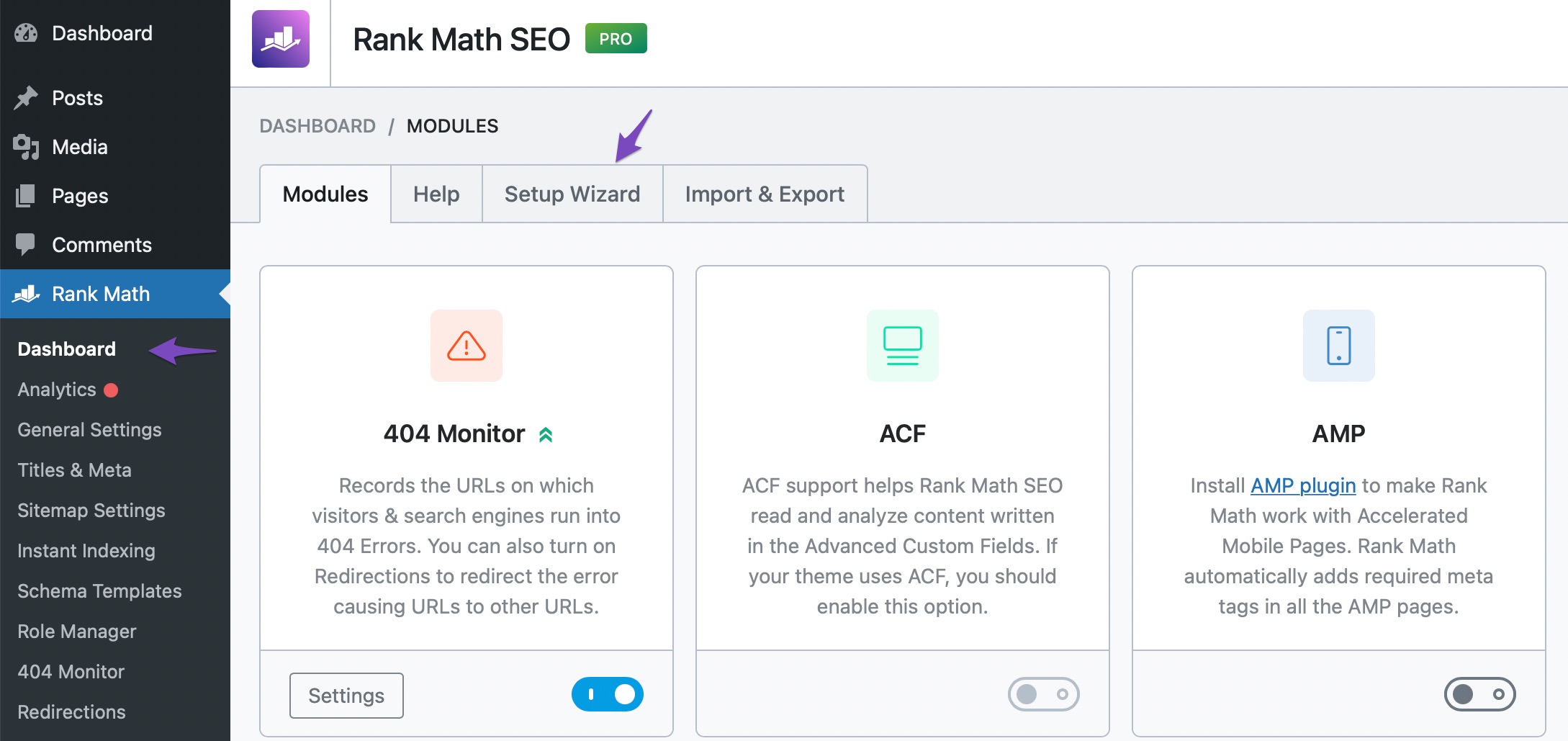
If the problem persists after trying these steps, please reply to this ticket, and a human agent from the Rank Math Support team will take over and assist you further. Thank you for raising this concern!
I have done that and it did not work
Hello,
Thank you for contacting us and sorry for any inconvenience that might have been caused due to this issue.
Please confirm that the WordPress Address (URL) and Site Address (URL) are the same in WordPress Dashboard > Settings > General. Both need to be the same for the Plugin to function smoothly.
If they were the same, then add this filter to your website:
/**
* Filter whether we need to check for URL mismatch or not.
*/
add_filter( 'rank_math/registration/do_url_check', '__return_false' );
Here’s how you can add the filter: https://rankmath.com/kb/wordpress-hooks-actions-filters/
Once done, please clear your website’s cache, and reconnect your Rank Math account one more time.
Let us know how this goes. Please let us know if you have further questions or concerns.
Thank you.
Hi – I tried clearing my website’s cache, and reconnect Rank Math account one more time after adding that filter and it didn’t work
Hello,
Can you please share a screenshot of the issue by using any image-sharing tool like https://imgur.com/upload so that we can check this further for you?
Looking forward to helping you.
Thank you.
Ok – please find the attached screenshot on https://imgur.com/a/dZCsohS as yu can see my website is not on dropdown. however it is under connected websites https://imgur.com/a/LOdELlO
Hello,
Please confirm you have a verified Google Search Console and Google Analytics property on the Google account you connected. Please double-check that the Google account you connected has a functional Google Search Console and Google Analytics property. If you do not have a Google Search Console property, you can create one by following this guide. You can also sign up for Google Analytics here.
Looking forward to helping you resolve this issue.
Hi – I have managed to manually make sure I set up Google Search Console and Google Analytics. I still cant link up here, is it a problem https://imgur.com/a/oaOy2Pg
sorted – thank you
Hello,
We are glad to be of help.
Do you still need our assistance with anything else or can we go ahead to close the ticket?
We look forward to helping you.
Thank you.
Hello,
Since we did not hear back from you for 15 days, we are assuming that you found the solution. We are closing this support ticket.
If you still need assistance or any other help, please feel free to open a new support ticket, and we will be more than happy to assist.
Thank you.



The ticket ‘Setup Wizard not completing’ is closed to new replies.