Hello,
We apologize for the issue you are facing with saving changes in the Content AI tool of Rank Math. To resolve this, please try refreshing your Content AI credits. You can do this by navigating to your WordPress Dashboard and following these steps:
- Go to Rank Math.
- Click on General Settings.
- Select Content AI.
- Look for the option to refresh your credits and click on it.
Here’s a screenshot for reference:

Once you have refreshed the credits, try using the Content AI tool again and see if you can save your changes successfully.
If the issue persists, please reply to this ticket, and a human agent from the Rank Math Support team will assist you further. Thank you for bringing this to our attention!
Hi, I dont se what you mean,
It doesn´t work
Thanks
Hello,
Thank you for contacting us. We apologize for any inconvenience this issue may have caused.
For initial troubleshooting, please check if you are using a Firewall as it may prevent saving the changes.
If you are using a Firewall, please whitelist this route:
/wp-json/rankmath/v1/updateMeta
You can check this link for more information:
https://rankmath.com/kb/meta-data-not-saving/
Let us know how this goes.
Hello,
You can use the keyboard shortcut Ctrl + Shift + J on your Windows 11 to open the Chrome console panel.
If you are unable to do this, we can check for you. Please share your website URL so we check what is causing the issue on your website.
We look forward to hearing from you.
Thank you.
hi,
I have open the Chrome console panel,
what shall I do now?
I have anoteher question, about seo, I score 87/100 and the things to fix is
Site wide plugins auto-update option is disabled on your site – but it´s not possible to fix it
Some images on your homepage have no alt attribute.
its the two pictures in the foot , two logos
There are one or more issues with the number of links on your homepage:
Too few internal links (6).
internal: 6
external: 7
There are 5 Pages published posts where the primary focus keyword does not appear in the post title.
but I dont have any posts?
Hello,
Switch to the “Console” tab as shown in the screenshot below and try saving changes you’ve made with our AI tool. If there’s any error showing up under the Console tab, please share a screenshot of it here with us.
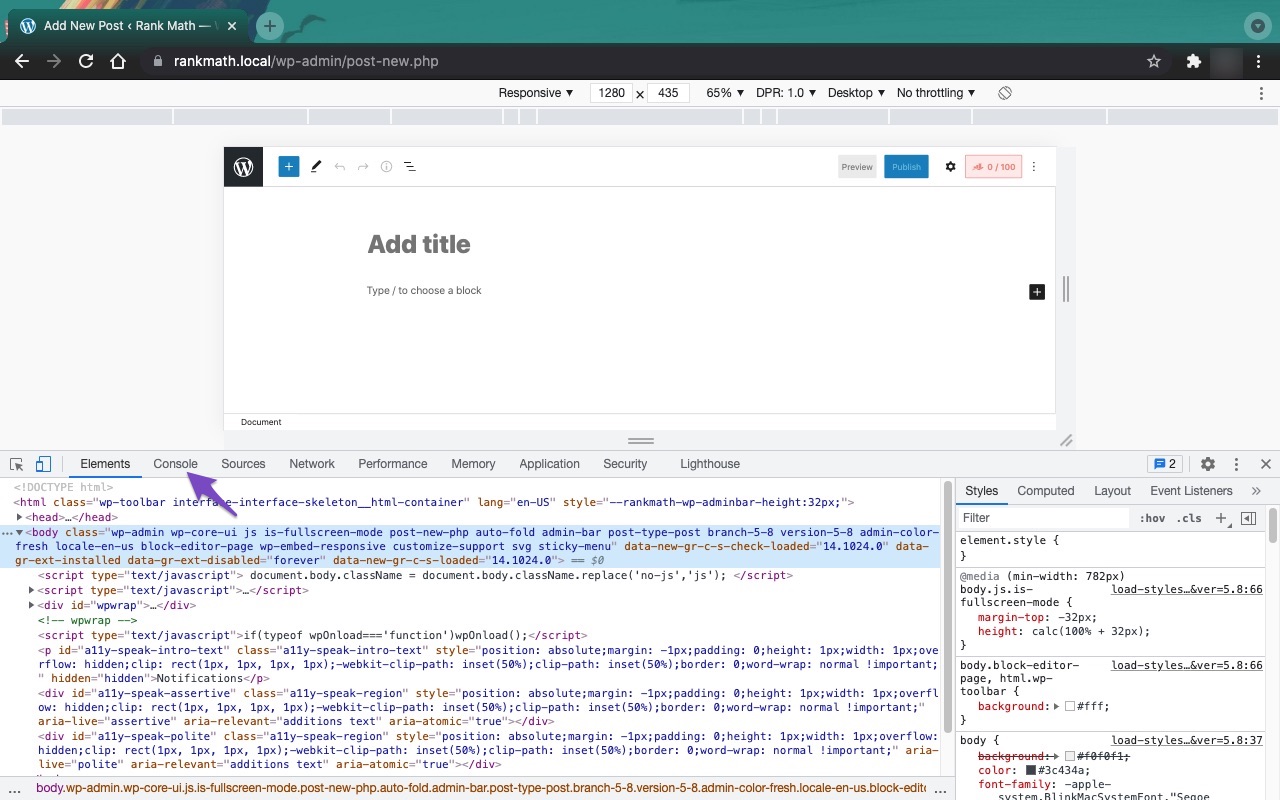
As for your question about the SEO score, please follow this guide to address each failed tests you see from your end: https://rankmath.com/kb/seo-analysis/
If some of those tests have already been addressed but Rank Math still reporting a failed test, please clear your website caches, remove the transients, clear the SEO Analyzer data in the database tools (WordPress Dashboard > Rank Math > Status & Tools > Database Tools), and re-run the Analyzer again.
Looking forward to helping you.
please How do I send the printscreen
Hello,
You can upload the screenshots using the following tool and share the generated link here with us: https://imgur.com/upload
We look forward to helping you.
Thank you.
Hello,
We might need to take a closer look at the settings. Please edit the first post on this ticket and include your WordPress & FTP logins in the designated Sensitive Data section.
Please do take a complete backup of your website before sharing the information with us.

It is completely secure and only our support staff has access to that section. If you want, you can use the below plugin to generate a temporary login URL to your website and share that with us instead:
https://wordpress.org/plugins/temporary-login-without-password/
You can use the above plugin in conjunction with the WP Security Audit Log to monitor what changes our staff might make on your website (if any):
https://wordpress.org/plugins/wp-security-audit-log/
Looking forward to helping you.
Thank you.
Hello,
Since we did not hear back from you for 15 days, we are assuming that you found the solution. We are closing this support ticket.
If you still need assistance or any other help, please feel free to open a new support ticket, and we will be more than happy to assist.
Thank you.





