Hello,
We apologize for the issue you are facing with Content AI showing an internal server error. This can sometimes happen due to various reasons, including server overload or connectivity issues.
Here are a few steps you can try to resolve the issue:
-
Refresh Your Credits: Sometimes, refreshing your Content AI credits can help. You can do this by going to WordPress Dashboard → Rank Math → General Settings → Content AI and clicking the refresh icon. 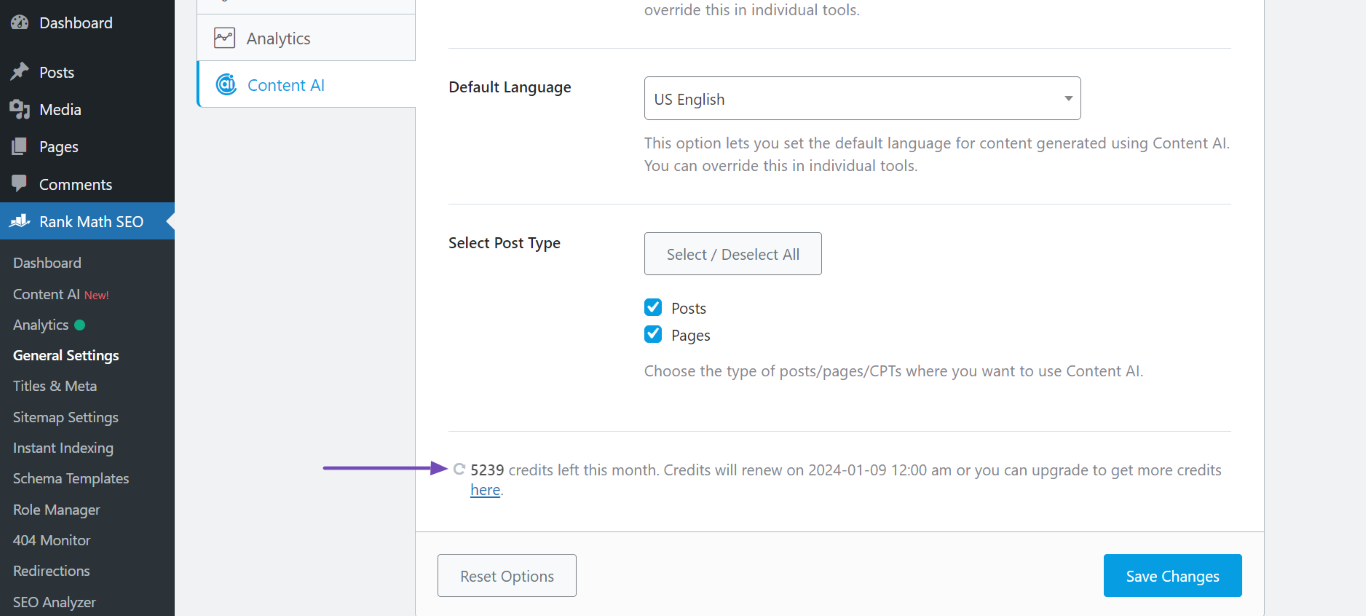
-
Check Your Subscription: Ensure that your Content AI subscription is active and that your website is properly connected to Rank Math.
-
Wait and Retry: If the server is temporarily overloaded, waiting a few minutes before trying again may resolve the issue.
If the problem persists after trying these steps, please reply to this ticket, and a human agent from the Rank Math Support team will assist you further.
Thank you for raising this concern!
Sources:
Resolving Content AI Related Issues » Rank Math
Hello,
Thank you for contacting us and sorry for any inconvenience that might have been caused due to that.
Please try to follow the steps mentioned in this guideline and see if that works for you:
https://rankmath.com/kb/how-to-restore-missing-content-ai-credits/
If the issue persists, please check if you see any error while refreshing the credits. If you see any error, please share that with us so that we can check the issue further for you.
Let us know how it goes. Looking forward to helping you.
Hello,
Since we did not hear back from you for 15 days, we are assuming that you found the solution. We are closing this support ticket.
If you still need assistance or any other help, please feel free to open a new support ticket, and we will be more than happy to assist.
Thank you.



