Hello,
We apologize for the issue you are facing with the critical error on specific pages of your website when using Rank Math Pro alongside Elementor. Thank you for providing detailed information about the problem and your troubleshooting steps.
It seems that the conflict arises after updating the Elementor plugin, which is not uncommon. To further investigate and confirm the conflict, we recommend following these steps:
-
Troubleshooting Mode: Navigate to the Troubleshooting Mode in the top bar of Rank Math. This allows you to enable or disable plugins one by one to identify the conflicting plugin.
- Hover over the plugins section and click on any one of the plugins to enable it.
- Try reproducing the issue after each activation.
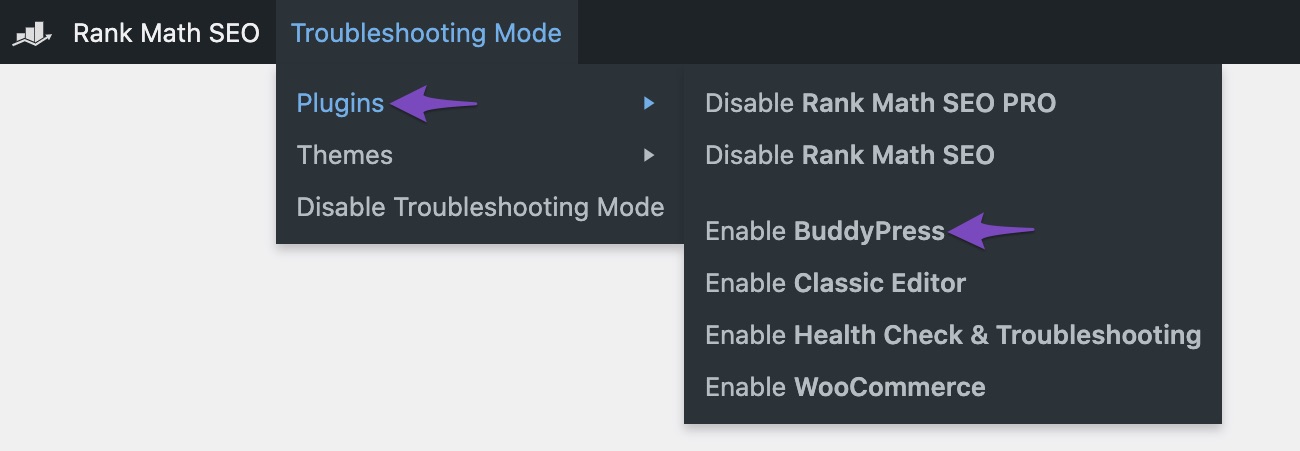
- If the issue occurs after activating a specific plugin, that plugin is likely causing the conflict.
-
Check for Theme Conflicts: If the issue persists even when only Rank Math and Elementor are active, try switching to a default WordPress theme (like Twenty Twenty-One) to see if the problem continues. This can help determine if the theme is contributing to the conflict.
-
Contact Elementor Support: Since the issue seems to be related to an update in Elementor, it may be beneficial to reach out to their support team as well. They might have insights or fixes for compatibility issues with Rank Math Pro.
-
Provide Details: If you identify a specific plugin or theme causing the conflict, please let us know, and we will do our best to assist you further.
If you need any more assistance or have further questions, feel free to reply to this ticket, and a human agent from our support team will take over and provide additional help.
Thank you for your understanding!
Hello,
Thank you for contacting us and sorry for any inconvenience that might have been caused due to that.
We have already fixed the issue in the latest version of the Rank Math PRO (v3.0.78) plugin: https://rankmath.com/changelog/
If you’re not able to see the update, please clear Rank Math’s transients from WP Dashboard > Rank Math > Status & Tools > Database Tools > Remove Rank Math Transients: https://rankmath.com/kb/rank-math-status-and-tools/#rank-math-transients
You can also manually update the plugin by following this guideline: https://rankmath.com/kb/update-rank-math-manually/
However, you’re currently using the Rank Math PRO plugin on your websites, but the account you have used to open this ticket is the Rank Math free version.
Please search and forward a receipt from FastSpring.com so we can locate your account and verify it.
Let us know how it goes. Looking forward to helping you.
Hello,
Since we did not hear back from you for 15 days, we are assuming that you found the solution. We are closing this support ticket.
If you still need assistance or any other help, please feel free to open a new support ticket, and we will be more than happy to assist.
Thank you.



