Hello,
We apologize for the issue you are facing with the "Couldn’t fetch" error for your sitemap on the .click TLD. This error can be caused by various factors, and it’s important to ensure that your sitemap is correctly configured. Here are some steps you can follow to troubleshoot this issue:
1. Validate Your Sitemap
Make sure your sitemap is correctly configured by validating it using the Validate XML Sitemap tool. If there are no issues detected, you should see a success message.

2. Ensure the Sitemap is Located in the Root Folder
Check that your sitemap is located in the root folder of your WordPress installation. The URL should look like this:
https://yourdomainname.com/sitemap_index.xml
3. Check Index Settings
Ensure that your posts are set to index. Go to Rank Math SEO → Titles & Meta and enable the Index checkbox in the Robots Meta settings.

4. Flush the Cache
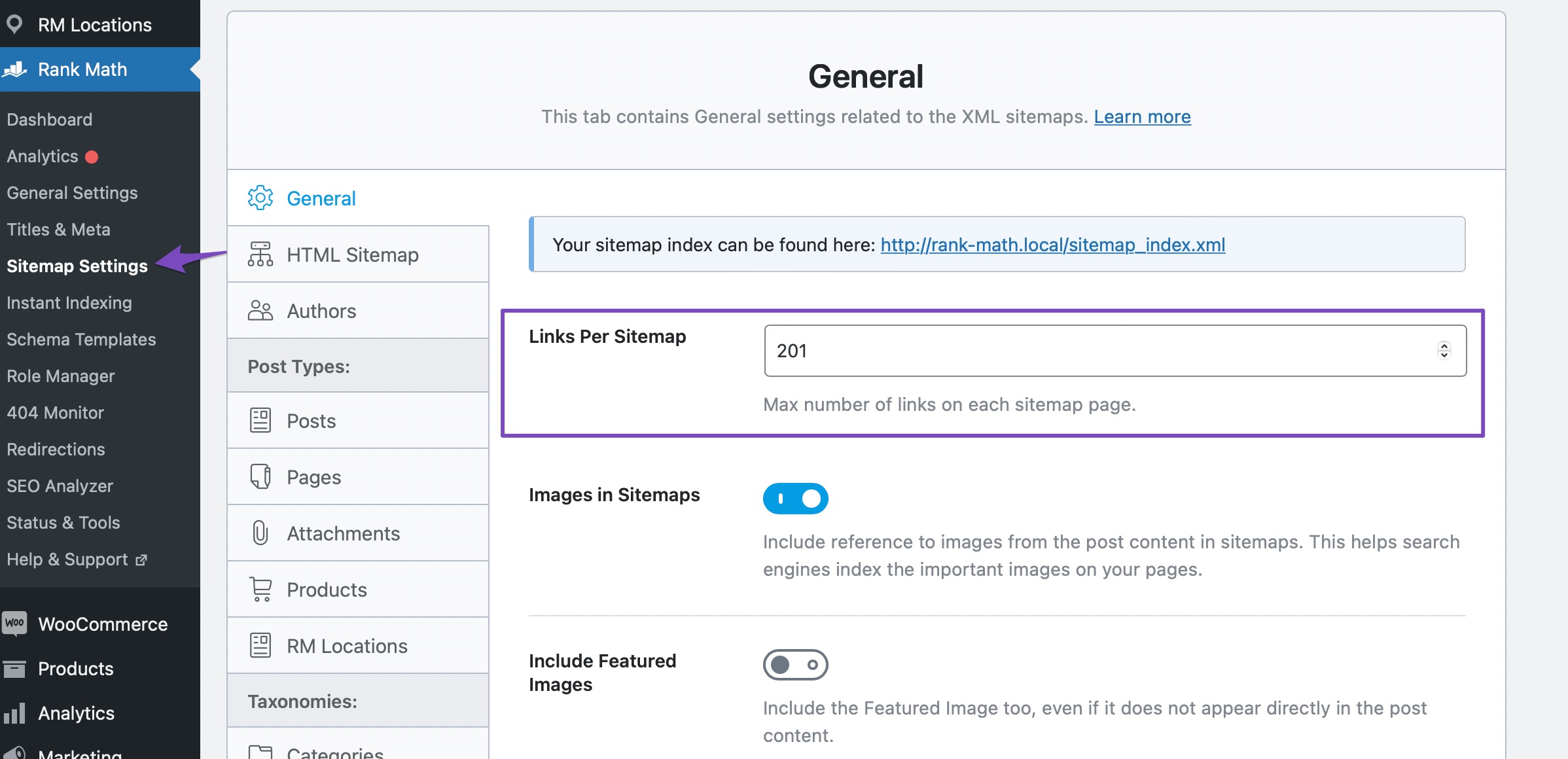
If your sitemap appears outdated, flush the sitemap cache by increasing the value of Links Per Sitemap in Rank Math SEO → Sitemap Settings and then save changes.
5. Add the Correct Sitemap to Google Search Console
Make sure you are submitting the correct version of your sitemap in Google Search Console. If you have multiple variations of your site (http vs https, www vs non-www), ensure you have added all variations.
6. Wait for Google to Fetch
Sometimes, it may take time for Google to fetch your sitemap, especially if it’s a new domain or if there are issues on Google’s end.
If you have followed all these steps and are still experiencing issues specifically with the .click TLD, it might be worth checking if there are any restrictions or issues related to that specific TLD with your hosting provider or domain registrar.
If you continue to face difficulties, please reply to this ticket, and a human agent from the Rank Math Support team will assist you further. Thank you for raising this concern!
Sources:
Troubleshooting the “Couldn’t Fetch” Error in Google Search Console » Rank Math
plz i need your help to resolve my issue
Hello,
Thank you for your query and we are so sorry about the trouble this must have caused.
If following this guide doesn’t work, please share the affected website URL here so we can take a closer look at it.
Looking forward to helping you.
Hello,
I have updated the sensitive data as requested. Can you please check further?
Thank you.
Hello,
We checked your website’s sitemap and it seems to be loading without any issues.
Please remove all your sitemaps from your GSC and try submitting this instead: https://example.com/?sitemap=1
Replace example.com with your domain name.
If the issue persists, please share the screenshot from the Google Search Console about the error. You can share the screenshot with us using this tool: https://imgur.com/upload
Let us know how that goes. Looking forward to helping you.
https://imgur.com/rF2CNLf
here is the link. I have followed all of your instruction but still that error. because of this google is not indexing my pages and my website is zero from 3 months.
Hello,
We can’t find any issues with your sitemap. It loads fine in the browser, validates fine in an XML sitemap validator, and returns a 200 status code when checking it in the HTTP status checker. See screenshots:


Please follow the steps below:
1. Flush the Sitemap cache by following this video screencast:
https://i.rankmath.com/pipRDp
2. Exclude the Sitemap files of the Rank Math plugin in your caching plugin. The cache could be via a plugin or from the server. For plugins or Cloudflare, please follow this article:
https://rankmath.com/kb/exclude-sitemaps-from-caching/
3. Apply the following filter code to your site.
add_filter( 'rank_math/sitemap/enable_caching', '__return_false');
Here’s how you can add filter to your WordPress site:https://rankmath.com/kb/wordpress-hooks-actions-filters/
4. Remove all your sitemaps from your Google Search Console and re-submit the primary sitemap again (https://example.com/sitemap_index.xml).
If the issue persists, do let us know and we’ll investigate this issue further.
Looking forward to helping you.
Hello,
Since we did not hear back from you for 15 days, we are assuming that you found the solution. We are closing this support ticket.
If you still need assistance or any other help, please feel free to open a new support ticket, and we will be more than happy to assist.
Thank you.




