Hello,
We apologize for the issue you are facing. Regarding the settings for tags in Rank Math, it is generally recommended to set tags to noindex. This is because tags can often lead to duplicate content issues and thin content, which may dilute your website’s authority in the eyes of search engines.
If you believe that your tags add significant value to your visitors and should be indexed, you can choose to set them to index. However, it’s important to consider that having too many indexed tags can lead to potential SEO issues.
To adjust the settings for tags, you can navigate to Rank Math SEO → Titles & Meta and check the settings under the Post tab for tags. Here’s a visual reference:
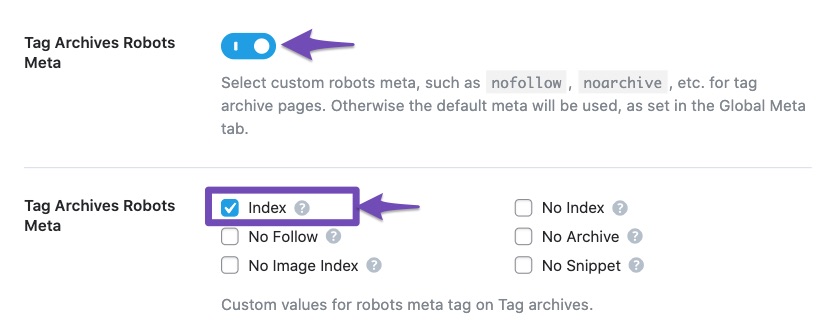
After making your changes, don’t forget to click the Save Changes button at the bottom of the page.
If you have further questions or need more specific guidance, please reply to this ticket, and a human agent from the Rank Math Support team will assist you further.
Thank you for raising this concern!
Sources:
Fix Excluded by NoIndex Tag – Google Search Console Status » Rank Math
How to Fix Submitted URL Marked ‘NoIndex’ Error » Rank Math
Include Featured Images, is it recommended to enable or disable it?
Hello,
Yes, it is recommended to enable that option.
If your posts/pages contain featured images, that option helps those images to be included in your sitemap for search engines to crawl them.
As you know, the featured image may or may not show up in the post depending on how you set it up, and this setting lets you control if you want to include them in the sitemap.
Looking forward to helping you.
Hello,
Since we did not hear back from you for 15 days, we are assuming that you found the solution. We are closing this support ticket.
If you still need assistance or any other help, please feel free to open a new support ticket, and we will be more than happy to assist.
Thank you.




