Hello,
We apologize for the issue you are facing with the SEO titles and descriptions not updating. Thank you for providing detailed information about the steps you’ve already taken.
Since you’ve already checked for plugin conflicts and JavaScript-related errors, here are a few additional steps you can try:
1. Check Cloudflare Settings
If you are using Cloudflare, it may be blocking some requests that Rank Math needs to update the SEO metadata. You can create page rules in Cloudflare to whitelist the necessary Rank Math URLs. Here’s how:
- Go to your Cloudflare dashboard.
- Under the Rules tab, click on Create Page Rule.
- Enter the following paths (replace
example.com with your domain):
*example.com/wp-json/rankmath/v1/updateMeta**example.com/wp-json/rankmath/v1/updateSchemas**example.com/wp-json/rankmath/v1/updateRedirection**example.com/wp-json/rankmath/v1/getFeaturedImageId**example.com/wp-json/rankmath/v1/getHead*
- For each rule, set the action to Disable security.
- Click Save and Deploy.
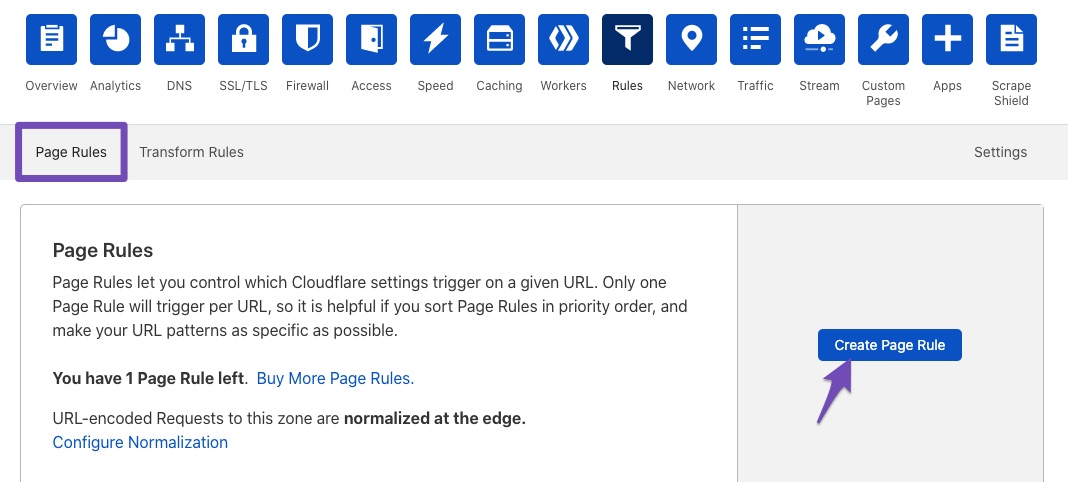
2. Clear Cache
Make sure to clear any caching plugins you might be using, as well as your browser cache. Sometimes, cached data can prevent new changes from being displayed.
3. Recheck Import Settings
Since you migrated from Yoast, ensure that all settings were correctly imported. If there were any errors during the import process, it might affect how Rank Math operates.
If these steps do not resolve the issue, please reply to this ticket, and a human agent from the Rank Math Support team will take over and assist you further. We appreciate your patience as we work to resolve this issue together!
Hello,
In this case, please check if you are using a Firewall as it may prevent saving the changes.
If you are using a Firewall, please whitelist this route:
/wp-json/rankmath/v1/updateMeta
/wp-json/rankmath/v1/saveModule
You can check this link for more information:
https://rankmath.com/kb/meta-data-not-saving/
If the issue persists, we might need to take a closer look at the settings. Please edit the first post on this ticket and include your WordPress & FTP logins in the designated Sensitive Data section.
Please do take a complete backup of your website before sharing the information with us.

It is completely secure and only our support staff has access to that section. If you want, you can use the below plugin to generate a temporary login URL to your website and share that with us instead:
https://wordpress.org/plugins/temporary-login-without-password/
You can use the above plugin in conjunction with the WP Security Audit Log to monitor what changes our staff might make on your website (if any):
https://wordpress.org/plugins/wp-security-audit-log/
We really look forward to helping you.
Hello,
I have updated the sensitive data as requested. Can you please check further?
Thank you.
Hello,
We tried changing the meta information and it seems to have been saved without any issues as you can see from the video screencast we inserted in the sensitive data section.
If this issue is happening to a different page/post, please share the URL here.
Also, as you can see from the video screencast, the title and description correspond to the entered information in the SEO settings so Rank Math is displaying the correct meta. If Google is still showing a different title and description, then Google must not seen the changes yet or it decided to show a different information form the page content to insure it aligns with the search intent.
Please note that it is a pretty common thing with Google these days. It happens with 70% of the results that even if everything’s fine, Google decides to show a different meta information for your search keyword, there is nothing you can do as Google sometimes ignores the custom meta info altogether and show something from the page’s content that matches the search intent better.
To understand more about this, please check this article: https://rankmath.com/kb/different-meta-title-and-description/
Looking forward to helping you.
Hello,
Since we did not hear back from you for 15 days, we are assuming that you found the solution. We are closing this support ticket.
If you still need assistance or any other help, please feel free to open a new support ticket, and we will be more than happy to assist.
Thank you.




