
-
Rank math does not see SEO title in snippet and gives error

-
Hello, we apologize for the issue you are facing with Rank Math not recognizing the SEO title in the snippet. This can happen for a few reasons, and we recommend checking the following:
-
Ensure Keywords are Present: Make sure that relevant keywords are included in your page title and description. You can add these by navigating to Rank Math > Titles & Meta > Homepage or directly from the Rank Math Metabox of the specific page if your homepage is set to a static page.
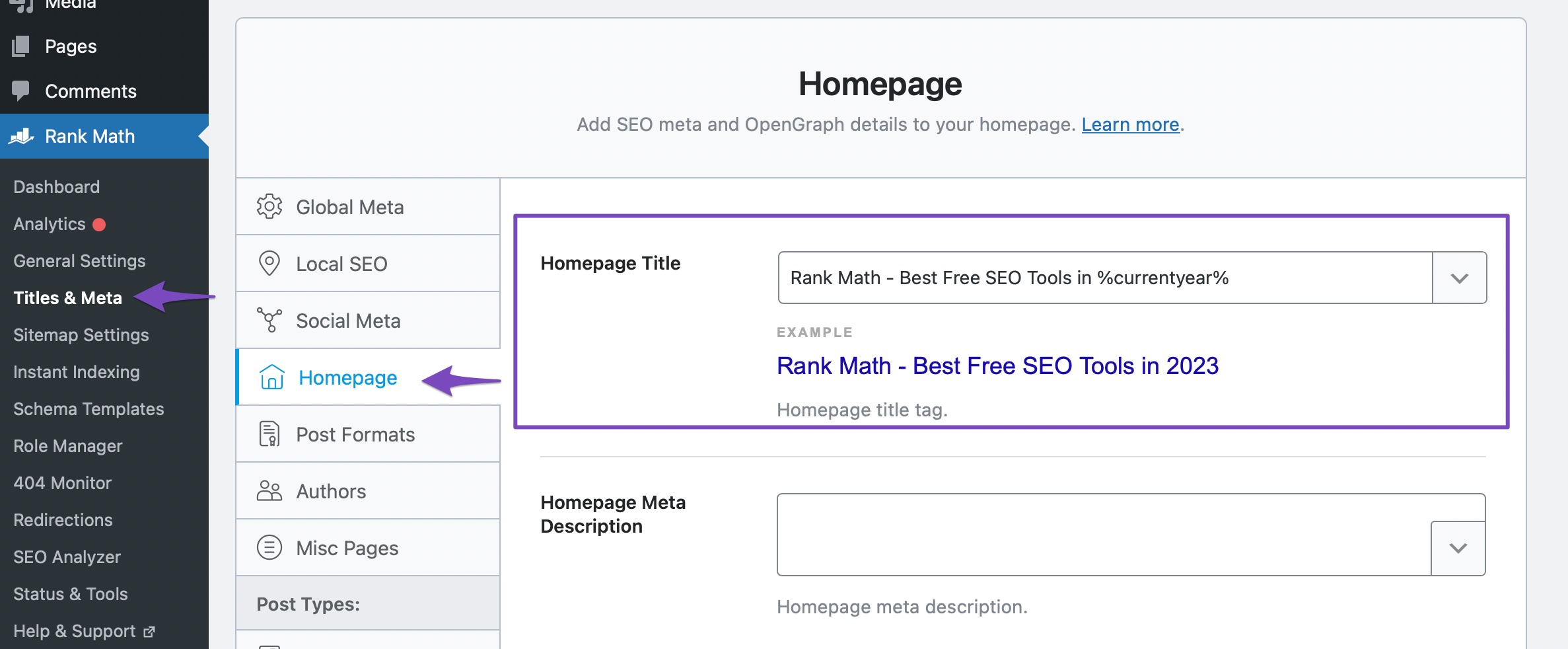
-
Check for Static Page Settings: If your homepage is set to a static page, you might see a notice indicating this. In such cases, you can edit the SEO Title and Description directly from the Rank Math Metabox of that page.
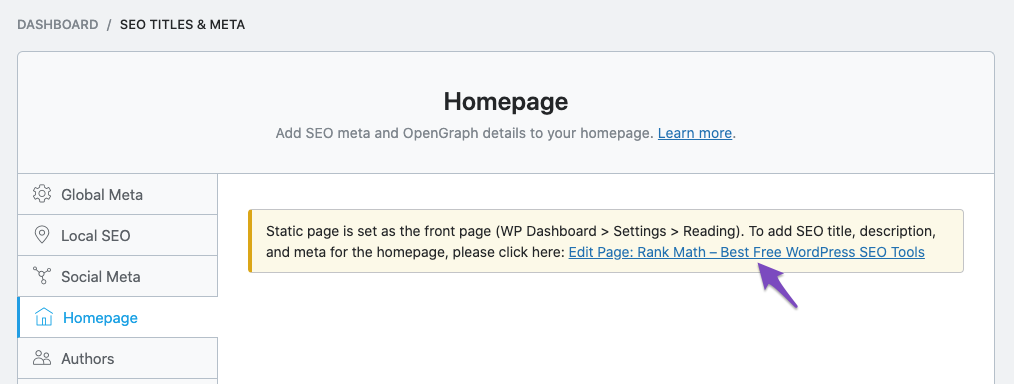
-
Review Your Theme Compatibility: Sometimes, themes may not support title tags properly. If your theme does not support title tags, you may need to enable the "Rewrite Titles" option in Rank Math settings.
If you’ve checked these settings and the issue persists, please reply to this ticket, and a human agent from the Rank Math Support team will assist you further. Thank you for raising this concern!
Sources:
How to Fix the "No Keywords Found in the Page Title" Test in Rank Math » Rank MathI have tried the above and the issue is not resolved
Hello,
Can you please share the error with us so that we can check the issue further for you? You can also use a tool like https://imgur.com/upload to share a screenshot with us.
Meanwhile, please confirm if you are using any page builders on your site. If so, please let us know which page builder you are using.
Looking forward to helping you.
Thank you.
I use Elementor
It is the RankMath error: Focus Keyword does not appear in the SEO title
Thank you
Hello,
We might need to take a closer look at the settings. Please edit the first post on this ticket and include your WordPress & FTP logins in the designated Sensitive Data section.
Please do take a complete backup of your website before sharing the information with us.
It is completely secure and only our support staff has access to that section. If you want, you can use the below plugin to generate a temporary login URL to your website and share that with us instead:
https://wordpress.org/plugins/temporary-login-without-password/
You can use the above plugin in conjunction with the WP Security Audit Log to monitor what changes our staff might make on your website (if any):
https://wordpress.org/plugins/wp-security-audit-log/
Looking forward to helping you.
Thank you.
The temporary login without password plugin requests an email. Can you give it to me please?
Hello,
You can use
s******@r***********email address and put any First & Lastname.Once done, please add the login details in the sensitive data section of this ticket.
Looking forward to helping you.
Hello,
I have updated the sensitive data as requested. Can you please check further?
Thank you.
Hello,
We’ve checked your site, and the title indeed does not match your focus keyword.
To pass this test, the post title should be the same as the whole keywords you have set. Please refer to the screenshot in the sensitive data section.
Please note that Rank Math looks for the exact match of the focus keywords you have in your title or your content.
Looking forward to helping you.
Oh my Gods, I feel so stupid now. Haha. So sorry to waste your time. And Thank You Very Much.
Hello,
No worries! We are glad that we could address your concern.
If you have another question in the future, please feel free to create a new forum topic, and it will be our pleasure to assist you again.
Thank you.
I changed the title as in the screenshot, which I unfortunately didn’t save and can’t see now, but the error still occurred. I also cleared the cache, but the error remains. I tried different things, cleared cache, etcetera, and it doesn’t resolve the issue.
Hello,
It looks like the logins from the sensitive data section are removed. Could you please share the logins again so that we can check the issue further for you?
We are looking forward to helping you.
Thank you.
Hello,
I have updated the sensitive data as requested. Can you please check further?
Thank you.
Thank you
Hello,
Since we did not hear back from you for 15 days, we are assuming that you found the solution. We are closing this support ticket.
If you still need assistance or any other help, please feel free to open a new support ticket, and we will be more than happy to assist.
Thank you.
-



The ticket ‘Rank math does not see SEO title in snippet and gives error’ is closed to new replies.