Hello,
We apologize for the issue you are facing with the Schema on your pages. To remove Schema from all pages and start fresh, you can follow these steps:
-
Disable the Schema Module: If you haven’t already, go to WordPress dashboard → Rank Math SEO → Dashboard and disable the Schema module. This will remove all Schema data from your site.
-
Remove Existing Schema: To ensure that any remaining Schema is deleted:
- Open each post or page where you see the unwanted Schema.
- Click on the Schema tab in the Rank Math SEO meta box.
- Delete all types shown under Schema in Use by clicking the delete icon next to each Schema type and confirming the deletion.
- Update the post/page after making these changes.
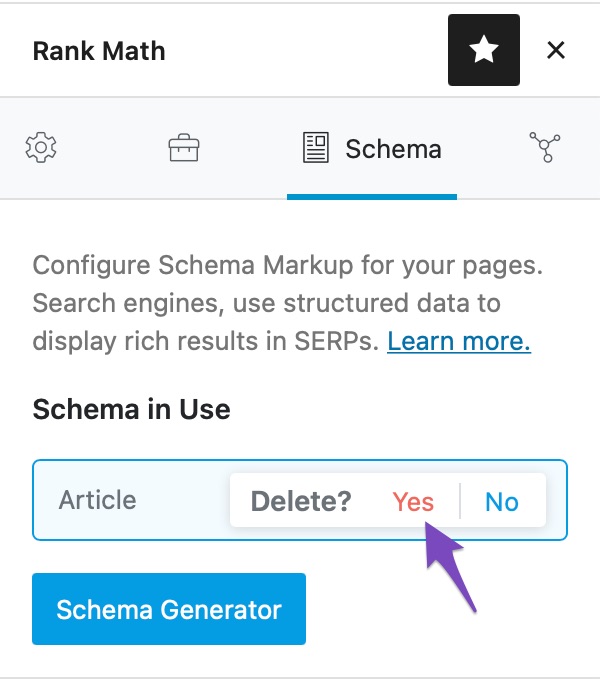
-
Add Unique Schema: Once you have removed all existing Schema, you can add unique Schema for each page as needed. You can do this by editing each post/page and using the Schema tab to select the appropriate Schema type for that specific content.
-
Verify Changes: After updating your posts/pages, you can verify that the Schema has been removed using the Schema Testing Tool.
If you still see any unwanted Schema after following these steps, please reply to this ticket, and a human agent from the Rank Math Support team will assist you further.
Thank you for raising this concern, and we hope this helps you achieve your desired setup!
Sources:
Removing Schema From Your Posts & Pages » Rank Math
I don’t think that screenshot worked! anyway the address (Well one of them, is: https://www.thewhitevanwedding.com/wedding-car-hire-crayford
I want to remove the Organisation schemas
Yes the schemas still there, lingering, annoying little thing!
Hello,
The two local business schemas on the page you shared do not come from Rank Math.
Assuming you are using the latest version of all the plugins and the themes (please update if not yet), they could be coming from one of your plugins or active theme.
To determine that, please follow this troubleshooting guide:
https://rankmath.com/kb/check-plugin-conflicts/
Here is a video you can follow as well: https://www.youtube.com/watch?v=FcIWRhcUP2c
Only the site admin would know and your users won’t be affected by this troubleshooting.
Looking forward to helping you.
Hi Reinelle,.
Thank you for your help. I have now tried this, but I can’t tell if the schema disappears in troubleshooting mode, as I can’t test it on google. I have deleted all the plug ins I no longer use, and can’t find where these schemas could be coming from.
I am the only admin of this site, in the past I had an seo agency (who ripped me off massively but thats another story)
Is there any way I can delete these Organisation schemas manually?
Hello,
Thank you for your patience.
Unfortunately, Rank Math cannot remove schemas that are coming from a different plugin/theme.
However, we checked again the URL and there’s only 1 local business schema with the warnings

Judging the code where it is placed, you may check if it is coming from Jetpack since the script is inside their code script data-jetpack-boost.
Looking forward to helping you.
Hello,
Since we did not hear back from you for 15 days, we are assuming that you found the solution. We are closing this support ticket.
If you still need assistance or any other help, please feel free to open a new support ticket, and we will be more than happy to assist.
Thank you.




