
-
Hello,
I need help with two things, the first thing is that my SEO Title, Description & Focus Keyword aren’t being saved.
The second issue is that I want to set up my Analytics so that I can see them on RankMath, I’m not sure if I have done it the right way.
Below are my WordPress logins, please assist me with this issue:

-
Hello,
We apologize for the issues you are facing with your SEO Title, Description, and Focus Keyword not being saved. Here are some common causes and solutions:
1. Plugin Conflicts
There may be conflicts with other plugins that prevent saving the SEO metadata. You can check for plugin conflicts by following our guide on plugin conflict.
2. JavaScript-Related Errors
JavaScript errors can also cause this issue. You can diagnose these errors by checking the JavaScript Console in your browser. Here’s how to do it in Chrome:
- Open Developer Tools by navigating to More Tools → Developer Tools or using the shortcut Ctrl + Shift + J (Windows) or Cmd + Option + J (Mac).

- Click on the Console tab to see if there are any errors.
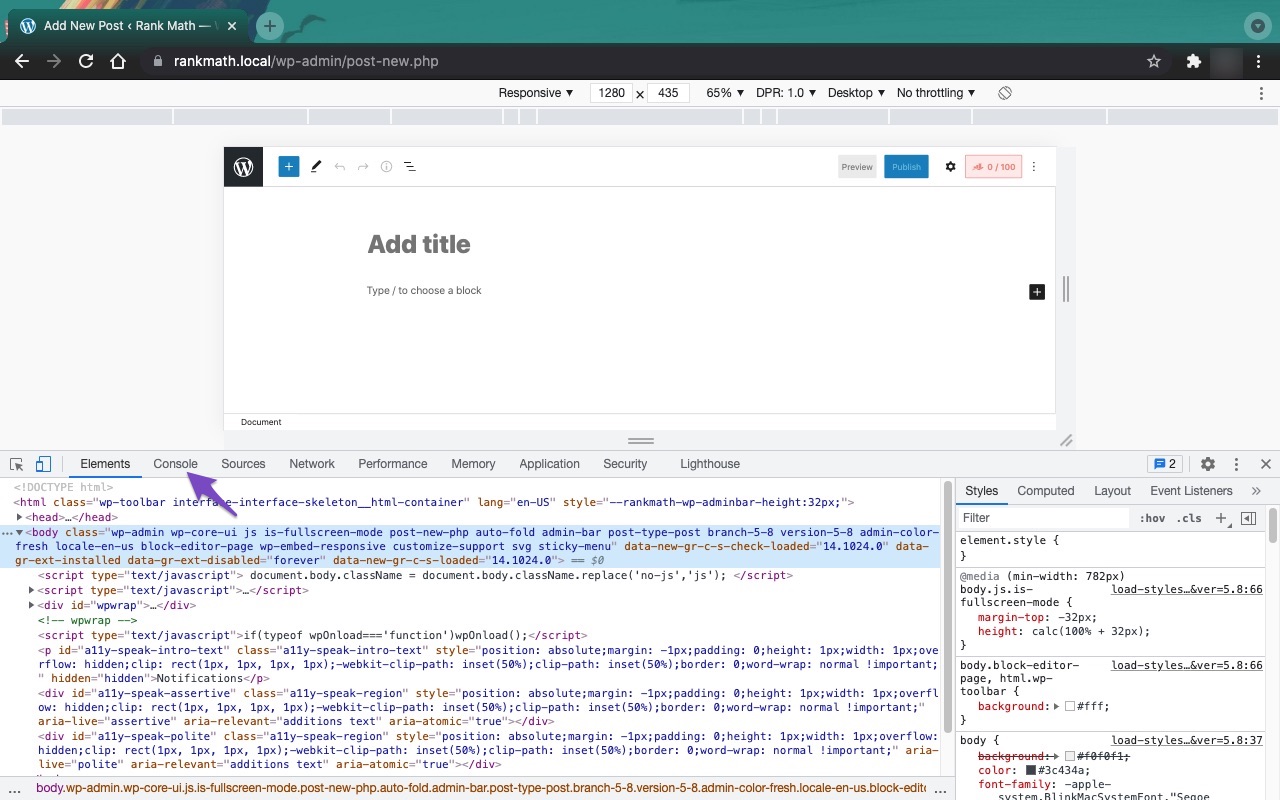
If you find any errors, please note them down and reach out to the respective support forum for assistance.
3. Firewall Blocked Access to the File
If you are using a firewall, it might be blocking access to Rank Math files. Ensure that Rank Math is whitelisted in your firewall settings. You can refer to our guide on how to whitelist Rank Math files.
4. Analytics Setup
For setting up Analytics in Rank Math, please ensure that you have followed the correct steps outlined in our documentation. If you need specific guidance, please reply to this ticket with details about what you’ve done so far, and we can assist you further.
If the issues persist after trying these solutions, please reply to this ticket, and a human agent from the Rank Math Support team will take over and assist you further.
Thank you for raising your concerns!
Hello,
I need help with two things, the first thing is that my SEO Title, Description & Focus Keyword aren’t being saved.
The second issue is that I want to set up my Analytics so that I can see them on RankMath, I’m not sure if I have done it the right way.
I have attached my WordPress logins under “Sensitive Data,” please resolve the issue on my behalf.
Hello,
Thank you for contacting us and sorry for any inconvenience that might have been caused due to that.
Please include your website login URL in the sensitive data section so we can check these issues.
In the meantime please follow the guide below to see if that helps.
I need help with two things, the first thing is that my SEO Title, Description & Focus Keyword aren’t being saved.
This issue is usually caused by some sort of blockage on the route to save the metadata on the website, a conflict with plugins, a javascript error, or a firewall-related issue.
Here is how you can fix it:
- Firstly, ensure that you have the latest version of Rank Math installed on your site.
- Check if your firewall or security plugin is blocking access to Rank Math’s files. You can do this by looking at your firewall logs and seeing if there are any blocked requests to these files:
/wp-json/rankmath/v1/updateMeta
/wp-json/rankmath/v1/updateSchemas
/wp-json/rankmath/v1/updateRedirection
/wp-json/rankmath/v1/getFeaturedImageId
/wp-json/rankmath/v1/getHead
If you see any blocked requests, you need to whitelist Rank Math and its files in your firewall or security plugin settings.
Learn more about troubleshooting this issue here: https://rankmath.com/kb/meta-data-not-saving/
The second issue is that I want to set up my Analytics so that I can see them on RankMath, I’m not sure if I have done it the right way.
Follow the instructions to sign in with your Google account and allow Rank Math to access your data. https://rankmath.com/kb/connect-your-google-account/
We hope these steps help you solve the problem. Let us know if the issues persist. We’re always happy to help.
Thank you for choosing Rank Math.
Hi Adetayo,
Thank you for getting back to me, here is the login URL: https://www.lawayala.com/aldev/wp-admin/
If you could do all the above that you mentioned on my behalf, that would be great, as this has taken up a lot of my time.
Just to add onto our conversation, this is what our web developer/admin said, he managed to save the titles, meta descriptions, etc on his end, but I can’t, I also tried clearing my cache:
“Hi Farai,
I updated the focus keywords and meta descriptions on the posts that you sent me (I didn’t see any meta titles instructions). You can check the posts in the dashboard on your end. And below are screenshots of the source code of the published posts showing that the SEO has been updated.
I updated the plugin to the latest version (after I made the changes, so the plugin version was not an issue for me). And as far as I can tell, there’s no firewall plugin on the website. So RankMath’s solutions do not seem to apply in this case.
For what it’s worth, I’m making the changes in incognito mode in Chrome. I would suggest that you try to make the edits on your end in that configuration, and if it still doesn’t work for you, you should contact RankMath and ask them why one admin user is able to make the changes but the other one isn’t. That seems very strange to me.”
Hello,
We checked your site and found that GoDaddy’s firewall is blocking Rank Math REST Routes that we use to update the data.
Please check the screenshot below for your reference:

To resolve this issue, please try whitelisting the following Rank Math REST Routes that are being blocked on your firewall.
/wp-json/rankmath/v1/updateMeta
/wp-json/rankmath/v1/updateSchemas
/wp-json/rankmath/v1/updateRedirection
/wp-json/rankmath/v1/getFeaturedImageId
/wp-json/rankmath/v1/getHead
You may try following this link to learn how you can whitelist Rank Math REST Routes in GoDaddy Website Firewall: https://in.godaddy.com/help/allow-access-to-a-file-or-folder-that-shows-an-access-denied-security-warning-32305
Alternatively, you can share the image with your hosting company (GoDaddy) and ask them to whitelist the above Rank Math routes.
We hope these steps help you solve the problem and please do not hesitate to let us know if you need our assistance with anything else.
Thank you for choosing Rank Math.
Thank you Adetayo, I’ll try this and get back to you.
Please also let me know about the Analytics, I’d like to resolve this as soon as possible.
Hello,
We checked your website and we can see that Rank Math Analytics is properly connected with your Google account.
Also, the data is showing on your Analytics Dashboard.
However, if you face any issue with the Rank Math Analytics, you can share a screenshot with us by using a tool like https://imgur.com/upload so that we can check the issue further for you.
Looking forward to helping you.
Thank you.
Thank you Rakibuzzaman Siam, are these analytics accurate though? For example, when it says we have keywords in the top 3, when we Google them, they don’t appear on the first page. If I Google “lis pendens” we are not in the top 3 search results for instance, we are number 16 in the middle of the 2nd page of search results.
Hello,
You can check the position of the keywords in the Performance section of your GSC account. The data is fetched from your GSC account and shouldn’t be compared with the actual rankings. The actual rankings are influenced by a lot of factors, like your location, language, etc. Also, the rankings you see in the GSC account or Rank Tracker are average positions for the timeframe you have selected. https://rankmath.com/kb/rank-tracker/
Hope that helps. Let us know if you need any other assistance.
Hello,
Since we did not hear back from you for 15 days, we are assuming that you found the solution. We are closing this support ticket.
If you still need assistance or any other help, please feel free to open a new support ticket, and we will be more than happy to assist.
Thank you.



The ticket ‘Need Urgent Assistance’ is closed to new replies.