Hello, we apologize for the confusion regarding the use of keywords in your WordPress site.
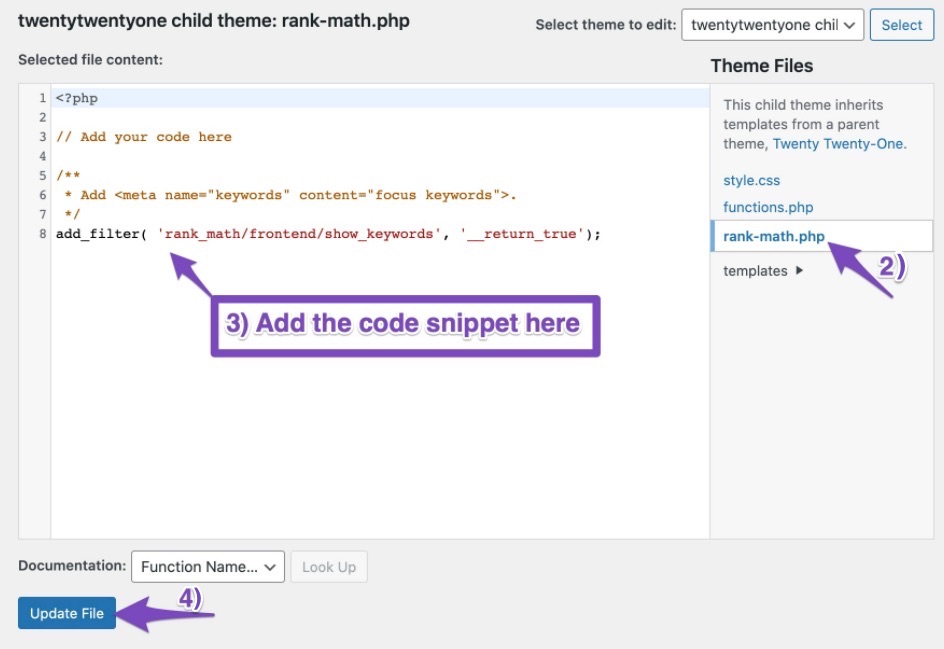
If you want to add the ` tag using Rank Math, you will need to add a filter in your theme'sfunctions.phpor create arank-math.php` file in your theme directory. This is necessary because Rank Math does not include the keywords meta tag by default, as search engines like Google no longer use it as a ranking signal. However, if you still wish to include it for any reason, you can follow these steps:
- Create a
rank-math.php file in the path /wp-content/themes/theme-name/rank-math.php using FTP or cPanel File Manager.
- Add the following code snippet to your
rank-math.php file:
/**
* Add .
*/
add_filter( 'rank_math/frontend/show_keywords', '__return_true');
- Save the changes to your file.
By doing this, Rank Math will display the keywords meta tag on your website.
Please note that while you can add keywords, they are not used by search engines for ranking purposes anymore. If you have further questions or need assistance, feel free to ask!
in this code where i add keywords?
Hello,
Please disregard the reply from our bot.
Could you please share the theme editor you’re referring to so we can check and advise accordingly?
If you want to share screenshots, you can upload them using this tool and add the link here.
Meanwhile, here’s a guide you can follow on how to add keywords to your posts and pages using Rank Math:
https://rankmath.com/kb/what-is-a-focus-keyword/
Looking forward to helping you.
Hello,
Since we did not hear back from you for 15 days, we are assuming that you found the solution. We are closing this support ticket.
If you still need assistance or any other help, please feel free to open a new support ticket, and we will be more than happy to assist.
Thank you.



