Hello,
We apologize for the issue you are facing with the Rank Math plugin not being visible in the page editor when used alongside Oxygen Builder and Fluent Forms. Thank you for raising this concern and for your troubleshooting efforts.
To confirm if this is indeed a conflict, we recommend performing a conflict check using the Health Check plugin. This allows you to enable and disable plugins without affecting your website visitors. Here’s how you can do it:
-
Install the Health Check Plugin:
- Log into your WordPress Administrator account and navigate to the dashboard.
- Go to Plugins > Add New.
- Search for ‘Health Check’ and click Install Now on the Health Check & Troubleshooting plugin.
- Activate the plugin.
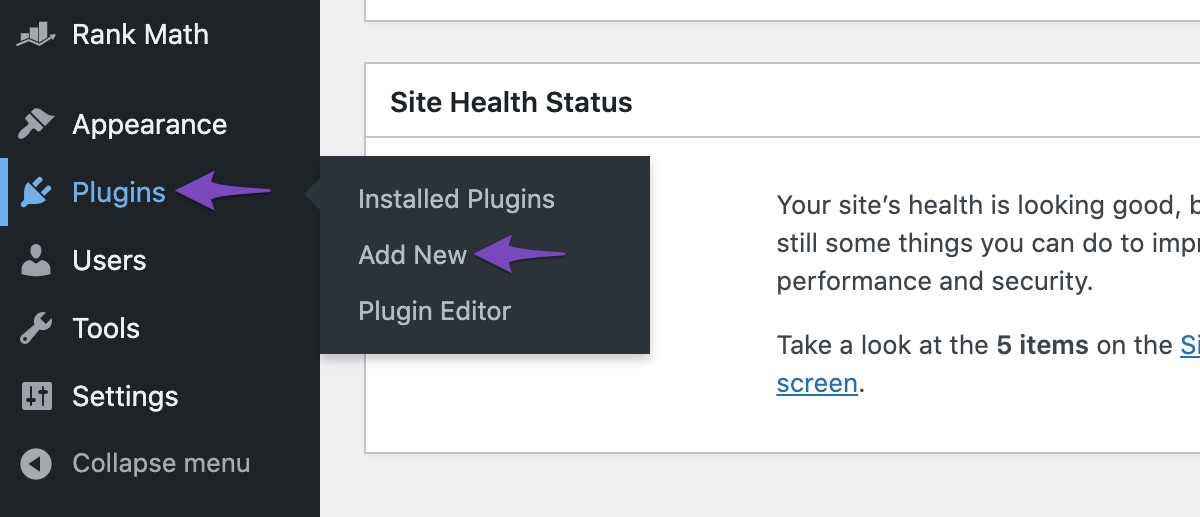
-
Use Troubleshooting Mode:
- Once activated, navigate to the Tools section in your WordPress menu and select Site Health.
- Enable Troubleshooting Mode from the top bar.
- You can then enable Oxygen Builder and Fluent Forms one at a time to see if the issue persists with Rank Math.
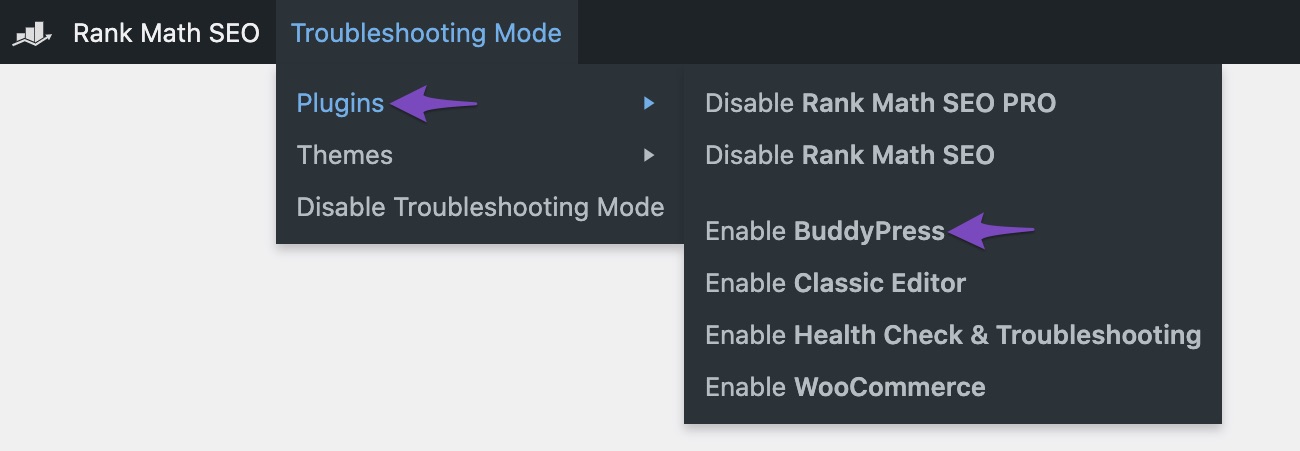
If you find that the issue occurs with either of these plugins enabled, then it confirms a conflict. Please let us know which plugin is causing the issue, and we will do our best to resolve it from our end.
If the problem persists even when only Rank Math and the default WordPress theme are active, please reply to this ticket, and a human agent from our support team will assist you further.
Thank you for your patience, and we look forward to resolving this issue for you!
I have done the troubleshoot and confirmed that the combination of RankMath, Oxygen Builder and Fluent Form leads to conflict.
Hello,
Thank you for contacting Rank Math support, and sorry for the inconvenience this may have caused.
To investigate this issue further, we might need to take a closer look at your website and settings. Please follow these steps:
- Edit the first post on this ticket and include your WordPress and FTP logins in the Sensitive Data section. This is a secure section that only our support staff can access.

- Make sure you take a complete backup of your website before sharing the information with us.
- If you prefer, you can use this plugin to generate a temporary login URL to your website and share that with us instead: https://wordpress.org/plugins/temporary-login-without-password/
- You can also use this plugin to monitor what changes our staff might make on your website (if any): https://wordpress.org/plugins/wp-security-audit-log/
We appreciate your cooperation and patience.
Thank you for choosing Rank Math.
Hi Adetayo, thanks for the quick response.
I tried out the combination of those 3 plugins on a different blank WordPress and they worked fine, which means the conflict is way more complicated than I anticipated. I don’t wanna bother you guys if it’s on the build of my WP and not because of your plugin. Do you have any recommendations for me that I can proceed on my own?
Thanks a lot.
Hello,
You may follow the conflict guide we previously shared to determine the root cause of this issue:
https://rankmath.com/kb/check-plugin-conflicts/
Also, you can replicate the page with the issue and use the same forms or buttons to determine which element is generating the issue.
Looking forward to helping you.
Hello,
Since we did not hear back from you for 15 days, we are assuming that you found the solution. We are closing this support ticket.
If you still need assistance or any other help, please feel free to open a new support ticket, and we will be more than happy to assist.
Thank you.




