Hello,
We apologize for the issue you are facing with the Dokan plugin and Rank Math. It seems that there is a conflict between the two plugins, which is causing the vendor registration button to be unclickable.
To confirm if it’s a bug or just a theme/plugin conflict, we recommend performing a quick conflict check using the Health Check plugin. This allows you to troubleshoot without affecting your website visitors. Here are the steps:
-
Install the Health Check Plugin:
- Log into your WordPress Administrator account and navigate to the dashboard.
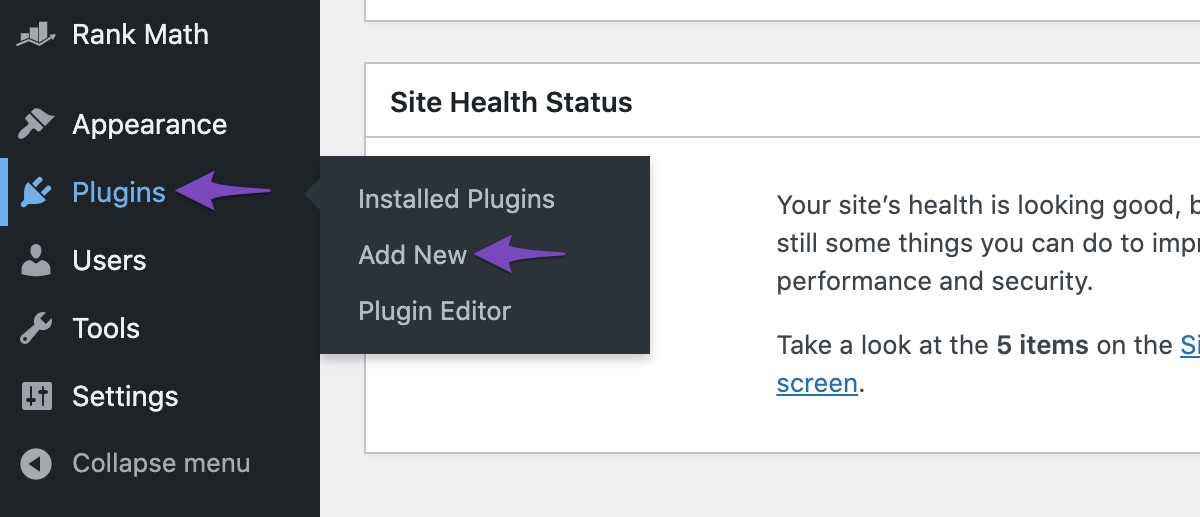
- Go to Plugins in the WordPress menu, then click on Add New.
- Search for ‘Health Check’ and click Install Now on the Health Check & Troubleshooting plugin.
- Activate the plugin.
-
Use Troubleshooting Mode:
- Once activated, navigate to Tools > Site Health in your WordPress menu.
- Enable Troubleshooting Mode from the top bar.
- This will deactivate all plugins except for Health Check and your active theme.
-
Enable Dokan Plugin:
- Hover over the plugins section and enable the Dokan plugin.
- Try reproducing the issue with the vendor registration button.
-
Identify Conflicts:
- If the issue persists, it indicates that Dokan is conflicting with another plugin or theme. You can enable other plugins one by one to identify which one is causing the conflict.
If you find that Dokan is indeed conflicting with Rank Math, please let us know which specific functionality is affected, and we will do our best to assist you further.
Thank you for raising this concern!
i checked not found anything
Hello,
Thank you for contacting us and sorry for any inconvenience that might have been caused due to that.
This issue could be caused by a conflicting plugin or theme on your website. Kindly make sure you are using the latest version of all the plugins and themes, please update if not yet.
Here’s a guide for troubleshooting further if the issue persists:
https://rankmath.com/kb/check-plugin-conflicts/
You can also follow the steps in this video:
https://www.youtube.com/watch?v=FcIWRhcUP2c
Only the site admin would know and your users won’t be affected by this troubleshooting.
Let us know how it goes. Looking forward to helping you.
Thank you.
all plugins and theme updated and latest version and i check all thing after diactivating rankmath issue is fixed but when i activate rankmath i face this issue, but i need both plugin dokan and rankmath , is there any solution also i check difrent them isssue not fixed, is there any code which can i snipped to fix this
Hello,
Please check the PHP values of your site by going to WordPress dashboard > Tools > Site Health > Info tab > Server. These values affect the performance of your site and they should be set atleast to the following recommendations:
PHP Memory Limit: 512M
Max input time: 150
PHP time limit: 120
PHP max input variables: 1000
If any of these values are lower than the recommended ones, please contact your hosting provider and ask them to increase them for you.
Let us know how that goes.
Thanks.
Hello,
Since we did not hear back from you for 15 days, we are assuming that you found the solution. We are closing this support ticket.
If you still need assistance or any other help, please feel free to open a new support ticket, and we will be more than happy to assist.
Thank you.




