Hello,
We apologize for the issue you are facing with the attachment redirects not working as expected. It seems that you have already enabled the Redirect Attachments option, which is a good first step. However, the error message you are encountering, ERR_TOO_MANY_REDIRECTS, indicates that there might be a conflict or misconfiguration causing an infinite redirect loop.
Here are a few steps you can take to troubleshoot this issue:
-
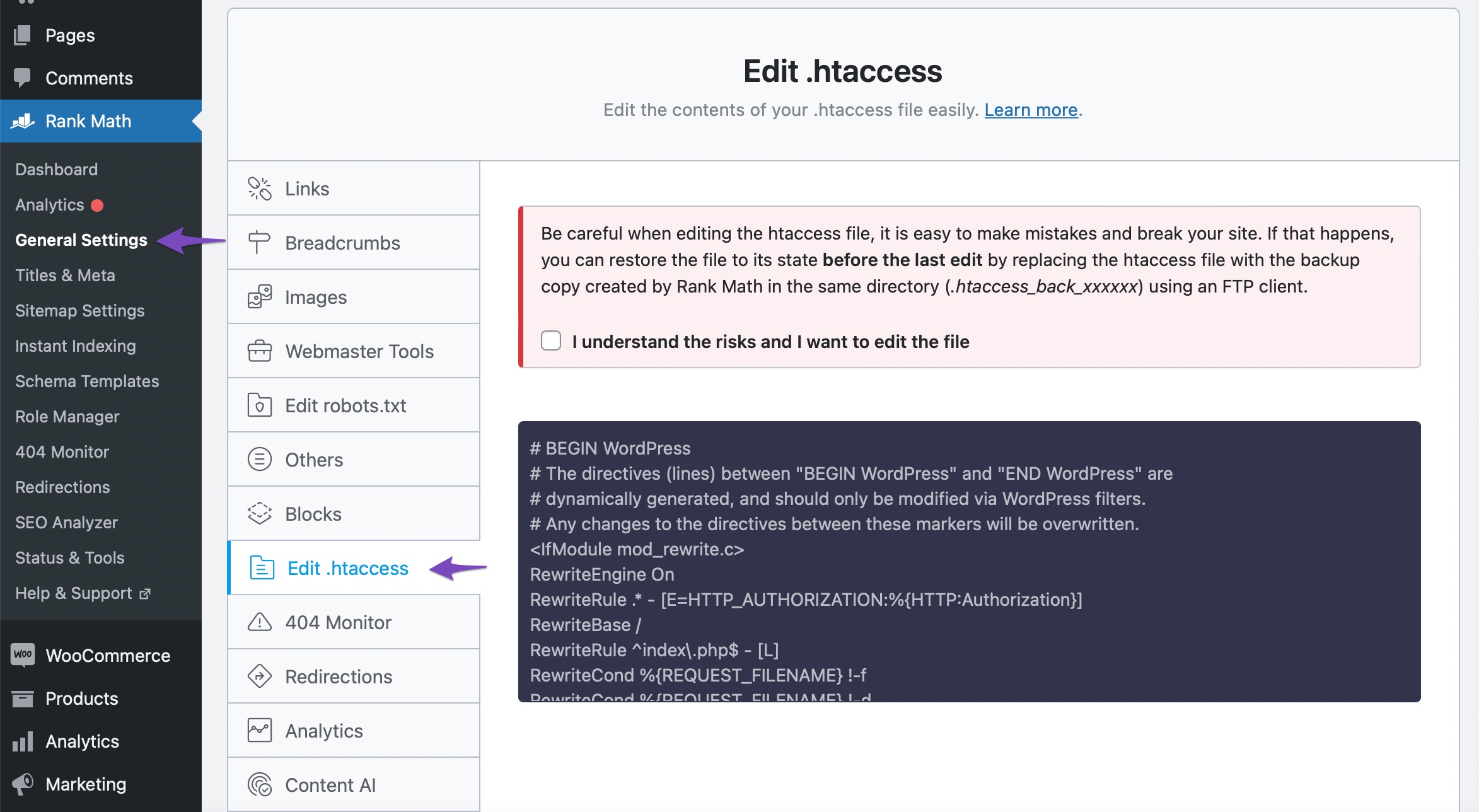
Check .htaccess File: Sometimes, additional redirect rules in your .htaccess file can cause conflicts. You can check your .htaccess file by navigating to WordPress Dashboard → Rank Math SEO → General Settings → Edit .htaccess. Look for any unnecessary redirect rules and remove them if found.
-
Clear Cache: If you are using any caching plugins, clear the cache to ensure that the changes take effect.
-
Disable Other Redirects: If you have other redirection plugins or settings enabled, they might conflict with Rank Math’s redirection feature. Try disabling them temporarily to see if that resolves the issue.
-
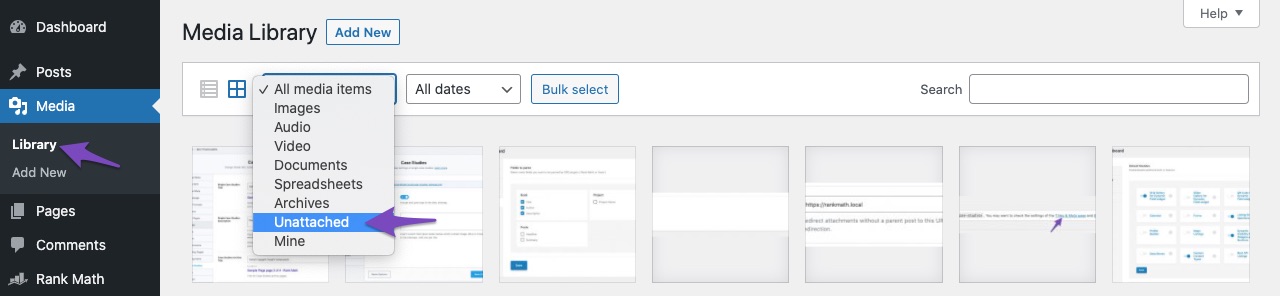
Check for Orphan Attachments: Ensure that the images are attached to their respective posts or pages. If they are orphan attachments (not attached to any post), they may not redirect as expected. You can check this in your WordPress Media Library by filtering for unattached media items.
-
Update Rank Math: Ensure that you are using the latest version of Rank Math, as updates often include bug fixes and improvements.
If after trying these steps the issue persists, please reply to this ticket, and a human agent from the Rank Math Support team will assist you further.
Thank you for raising this concern, and we hope to resolve it quickly for you!
Hi Rank Math Support Team,
I have followed the steps you previously suggested, but the redirect loop issue is still unresolved:
Checked for plugin conflicts: I deactivated all plugins and tested the site, but the issue persists.
Checked the theme: I switched to a default WordPress theme (like Twenty Twenty-One) and tested again, but the problem continues.
Cleared cache and disabled CDN: I cleared all cache on my site and disabled the CDN, but this did not solve the issue either.
I reviewed my htaccess file and did not find any manual redirection errors or conflicts. I’m unable to share the file at the moment, but I believe the redirections are properly configured.
Do you have any additional suggestions to resolve this? If there are any specific settings or adjustments I should make in Rank Math, please let me know.
Thank you,
SAYYAD ALIZADEH
Hello,
Thank you for contacting us. We apologize for any inconvenience this issue may have caused.
The URL uses the plain permalink structure with the attachment ID as the query parameter. Our Redirections module appends the query string to the destination URL, and that is causing the issue with the Redirect Attachments option.
Unfortunately, redirection for parameterized/query URL is only available in the PRO version and the default behavior of appending the query string has to be disabled using a filter:
https://rankmath.com/kb/setting-up-redirections/#parameterized-url
Hope that helps, and please do not hesitate to let us know if you need our assistance with anything else.
Hello
I am saying this because I have worked with the Pro version before.
The method you mentioned works for redirecting a single page. I think it will not work to solve this problem. If you explain how to do it in more detail, I would be happy.
But I think this problem can be solved with another method. In the Rank Math SEO → General Settings → Redirections tab, the problem is eliminated by activating Debug Redirections.
I would like to hear your opinion about this method.
Thank you with my respects.
hello again
Can it be from the settings of this section that why redirect is not done correctly?

thanks
Hello,
Those settings shouldn’t conflict with the redirect attachment option.
Can you please share the actual attachment page URL with us so we can check what is triggering the redirection loop that you are seeing?
Looking forward to hearing back from you.
Hello,
Please use the following filter on your website and see if that works for you:
add_filter( 'rank_math/redirection/add_query_string', '__return_false' );
Here’s how you can add filter/hook to your WordPress site: https://rankmath.com/kb/wordpress-hooks-actions-filters/
Let us know how it goes. Looking forward to helping you.
Thank you.
Hello
thank you very much Your solution solved the redirect problem well.
Thank you very much
Hello,
We are super happy that this resolved your issue. If you have any other questions in the future, know that we are here to help you.
If you don’t mind me asking, could you please leave us a review (if you haven’t already) on https://wordpress.org/support/plugin/seo-by-rank-math/reviews/#new-post about your overall experience with Rank Math? We appreciate your time and patience.
If you do have another question in the future, please feel free to create a new forum topic, and it will be our pleasure to assist you again.
Thank you.




