Hello,
If you are having issues with the data inside your Analytics module, this guide might help you.
A.Pre-check List
#1. You should not be using any other Google Analytics plugin.
#2. Update to the latest versions of Rank Math Free & PRO
#3. Ensure that you are logged in to your account:
https://rankmath.com/my-account/

#4. Disconnect and reconnect your account from WordPress dashboard > Rank Math > Dashboard > Help

B.
#1. Please delete RankMath’s app from here:
https://myaccount.google.com/permissions

#2. Re-create tables by clicking WordPress Dashboard > Rank Math > Status & Tools > Database Tools and click the Re-create database Table button.

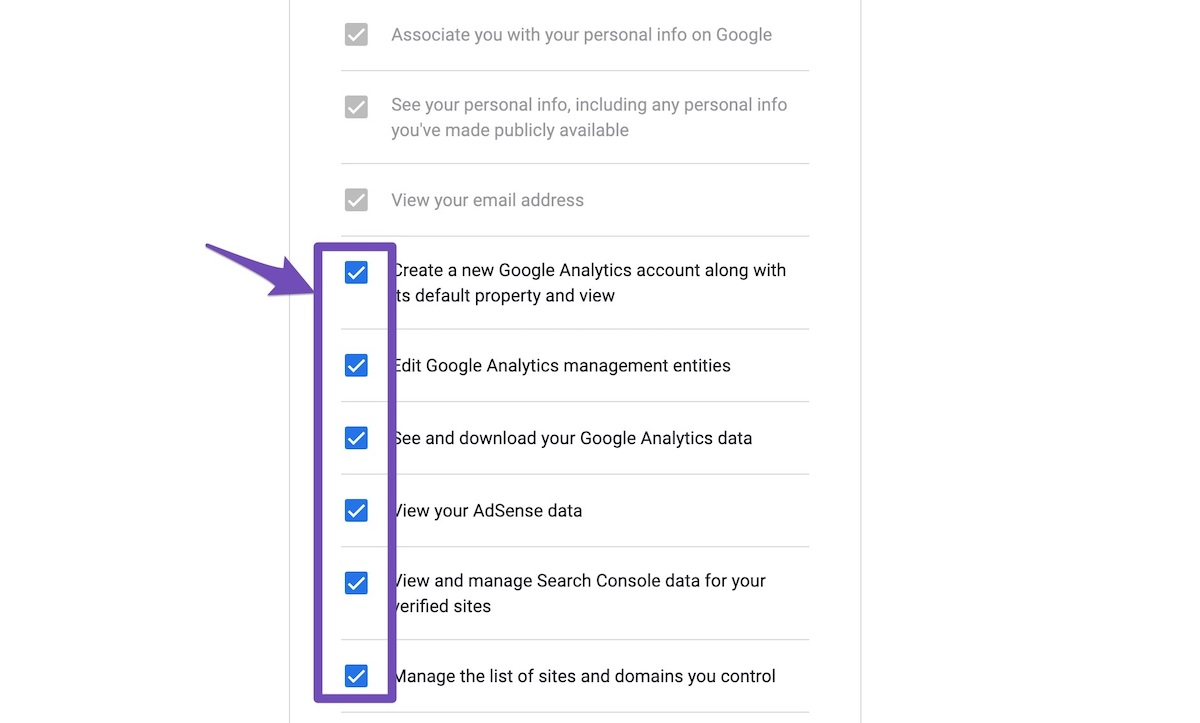
#3. Reconnect the account inside Rank Math by clicking here and ensure that you approve all the permission notices that show up:
WP Dashboard >> Rank Math >> General Settings >> Analytics tab, and click the Reconnect link

Allow all the permissions on the next screen.
https://rankmath.com/wp-content/uploads/2021/01/Allow-Permissions-to-Google-App-1.jpg
#4. Let the process complete, which might take around 30 minutes.
#5. Now head over to WordPress Dashboard > Rank Math > Status & Tools > Database Tools and click the Rebuild Index for Analytics button.

#6. Please check if the data shows up here:
https://yourwebsite.com/wp-admin/admin.php?page=rank-math-analytics#/

If that does not help, please paste the data from here:
WP Dashboard > Rank Math > Status & Tools > System Status and click the Copy System Info to Clipboard button

Regarding the Email reports issues, to test if the emails are working properly, try to send a test email report by simply adding the suffix &send=1 part to the email report preview link.
You can also use this link to send a test email report manually: https://domain.com/?rank_math_analytics_report_preview=1&send=1
Change domain.com with your actual domain name.
Then check your email to see the report.
However, if you did not get the email, there might be some issues with your website’s email-sending capability. Can you please check if your website can send emails normally? If not, you can use a plugin like WP Mail SMTP to configure your email settings.
We hope this helps, and please do not hesitate to let us know if you need our assistance with anything else.