Hello,
We apologize for the issue you are facing with Rank Math crashing your website. It sounds frustrating, and we appreciate you bringing this to our attention.
Here are a few steps you can take to troubleshoot the problem:
-
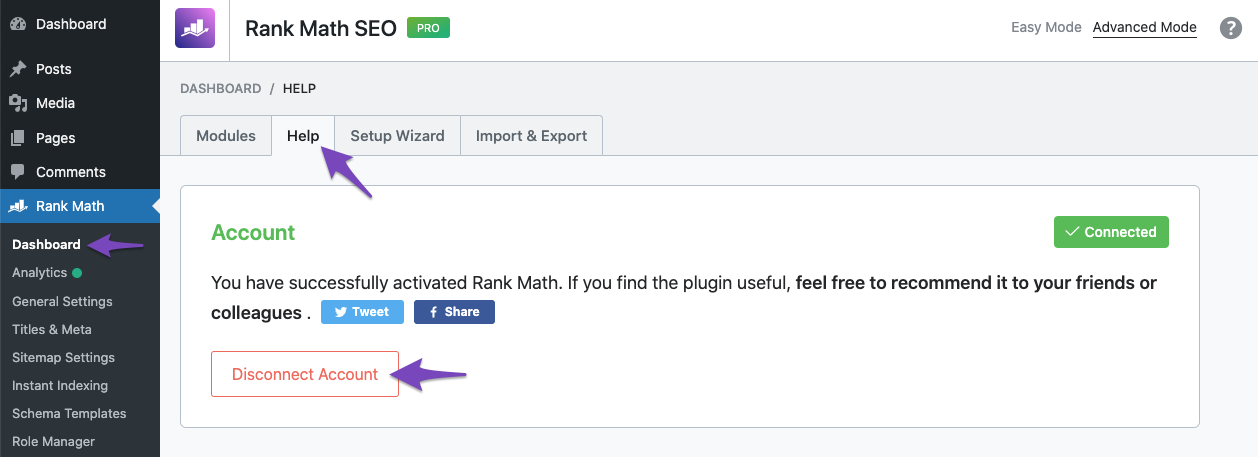
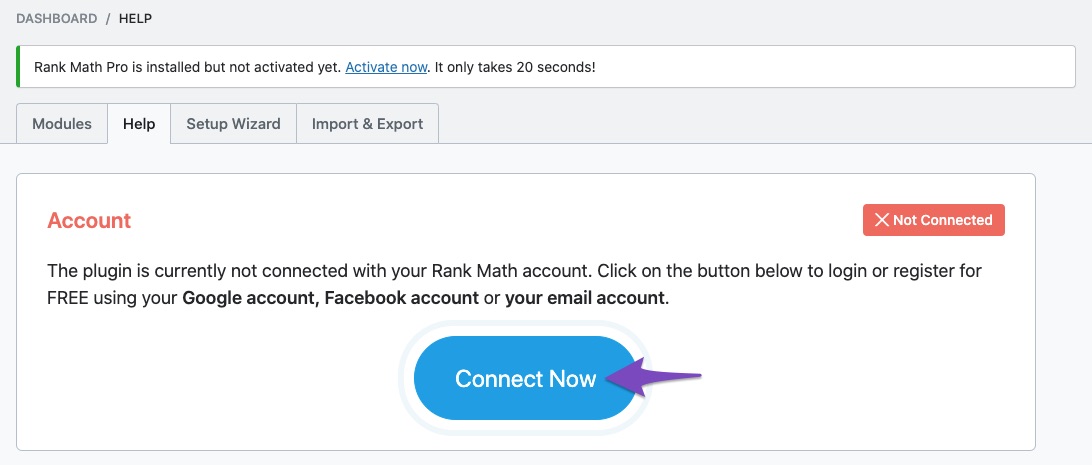
Reconnect Your Website with Rank Math: Sometimes, simply reconnecting your website can resolve issues. You can do this by going to WordPress Dashboard → Rank Math SEO → Dashboard → Help, and then click on Disconnect Account. After that, click on Connect Now to reconnect your account.
-
Check for Plugin Conflicts: There may be a conflict with another plugin or your theme. You can check for conflicts by following our guide on Plugin/ Theme Conflict With Rank Math.
-
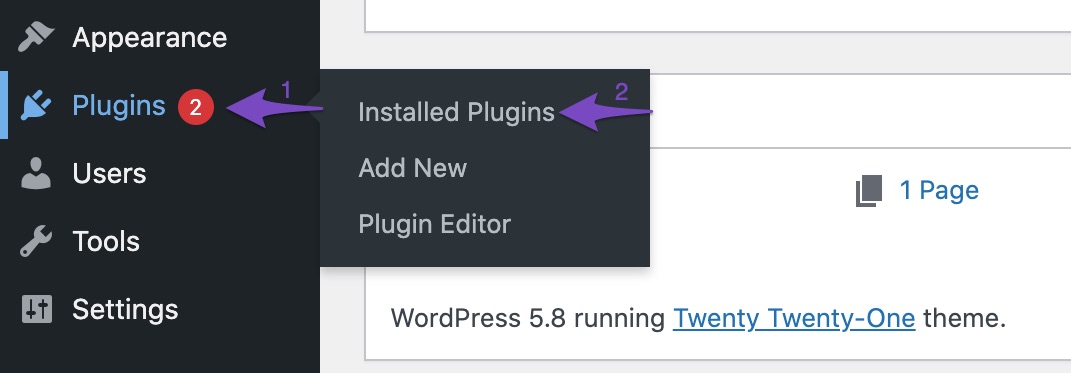
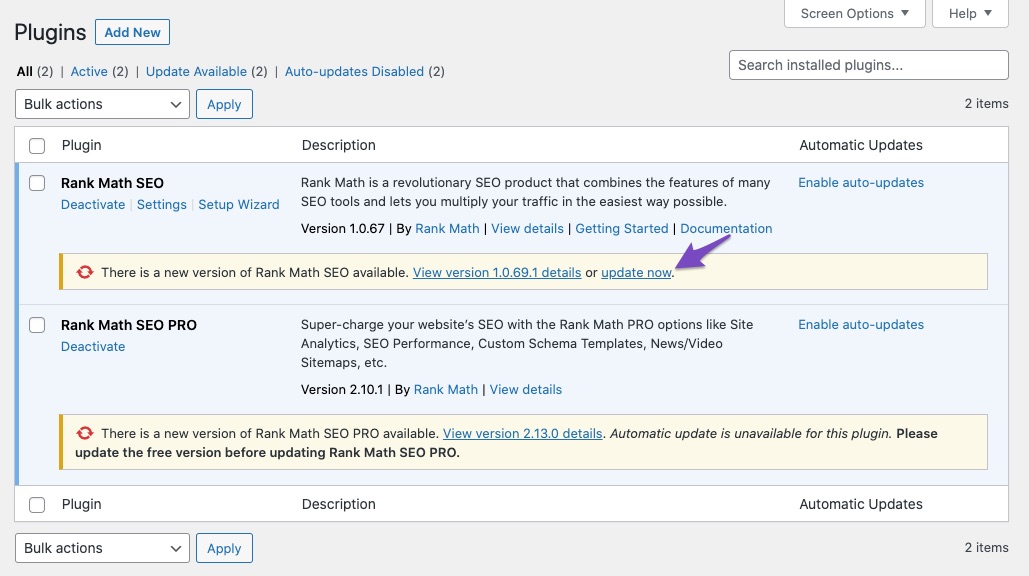
Update to the Latest Version: Ensure that you are using the latest version of Rank Math. You can check this by navigating to Plugins → Installed Plugins in your WordPress dashboard. If an update is available, click the update now link below the plugin.
-
Clear Cache: If you are using any caching plugins, try clearing the cache as it might be causing issues with the updates.
-
Check Server Resources: Sometimes, server resource limitations can cause plugins to behave unexpectedly. Ensure that your hosting environment meets the requirements for running Rank Math.
If these steps do not resolve the issue, please reply to this ticket, and a human agent from the Rank Math Support team will assist you further. We understand your concerns about SEO and will do our best to help you get everything back to normal.
Thank you for your patience!
The problem was not fixed with the method provided. I sent a video showing the process of the problem.
Hello,
Thank you for contacting us and sorry for any inconvenience that this issue might have caused.
In this case, we might need to take a closer look at the settings. Please edit the first post on this ticket and include your WordPress & FTP logins in the designated Sensitive Data section.
Please do take a complete backup of your website before sharing the information with us.

It is completely secure and only our support staff has access to that section. If you want, you can use the below plugin to generate a temporary login URL to your website and share that with us instead:
https://wordpress.org/plugins/temporary-login-without-password/
You can use the above plugin in conjunction with the WP Security Audit Log to monitor what changes our staff might make on your website (if any):
https://wordpress.org/plugins/wp-security-audit-log/
We really look forward to helping you.
Hello,
I have updated the sensitive data as requested. Can you please check further?
Thank you.
Hello,
Thank you for reaching out to Rank Math support.
When we tested this issue on your website, everything was working fine. We tested it on the same post as your video using both the block editor and the classic editor, and both were working fine.
Could you please confirm if you are still experiencing this issue? If so, could you provide details on how we can replicate the issue?
Thank you for your patience and cooperation.
Video
Hello, how are you?
So, I tested it and the post updates as I show in the video above, but it doesn’t change the post’s keyword. Also, the SEO cleaning and recalculation is giving an error. I show it in the video as well.
Hello,
There is some issue on your site with REST API:

That’s why our plugin is not able to save the metadata, and the database tools are not working. Please check with your host and ask them to make sure that REST API is working fine on your site to fix the issue.
Let us know how that goes. Looking forward to your update.
Hello, how are you?
So, Hostgator can’t help me with this.
I’m going to stop using the plugin for a while, unfortunately, and then I’ll try again to see if the problem is solved.
Thanks for trying to help.
Hello, I did some more research and found a plugin called: Action Scheduler and after activating it, everything started working normally again now. Just install it and it will configure itself. And again, thank you very much for your attention.
Hello,
Glad that helped.
If you have any other concerns, please don’t hesitate to contact us anytime so we can assist you further.
Looking forward to helping you.





