
-
I have Instant Indexing plugin but i get error 403 Permission denied. Failed to verify the URL ownership..
I have taken all the steps in the manual and also all the steps listed in the error list
and when i click on the button send to api i get the error 403 Permission denied. Failed to verify the URL ownership.
In google the service account is owner of the site

-
Hello,
We apologize for the issue you are facing with the Instant Indexing plugin and the 403 Permission Denied error. This can be a common issue, but there are a few steps you can take to resolve it.
Possible Causes and Solutions:
-
API Key Issue: The most likely explanation for the 403 Forbidden error is that the text file containing the API key has not been created automatically. You can try changing the API key from within the Rank Math plugin:
- Navigate to Rank Math SEO → Instant Indexing → IndexNow API Settings → API Key.
- Click on the Change Key button to generate a new API key.
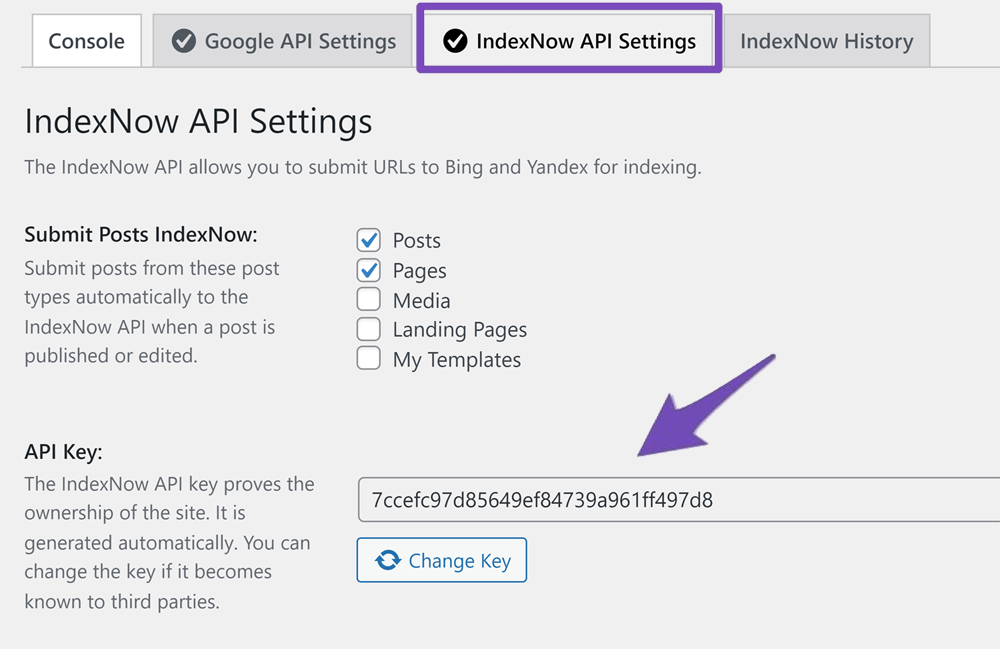
-
File Permissions: Ensure that the file permissions for your website are set correctly. Incorrect permissions can lead to access issues.
-
Firewall Settings: Check your firewall settings to ensure that they allow Googlebot access to your site.
-
IP Address Blocking: Make sure that Googlebot’s IP addresses are not blocked by your server or security plugins.
-
.htaccess File: Inspect your
.htaccessfile for any rules that might be blocking access to the necessary resources.
If you have already tried these steps and are still encountering issues, we recommend replying to this ticket so a human agent from the Rank Math Support team can assist you further.
Thank you for raising this concern, and we hope to help you resolve it soon!
I think a have a another problem.
your screenshot have 4 tabs and i have only 2 tabs
i have console and google api settingsHello,
Thank you for contacting us and sorry for any inconvenience that might have been caused due to that.
To fix the issue, please make sure the service account is listed as the Owner of the site in the Search Console.
You can follow the steps illustrated here to solve the issue:
https://rankmath.com/blog/google-indexing-api/#403-permission-deniedOnce done, clear your website’s cache and check again.
Please note that some options are only available when you enable the Advanced Mode in Rank Math. If it’s not showing, you must have chosen to use Easy Mode.
You can follow the steps in this link to switch to Advanced Mode: https://rankmath.com/kb/advanced-mode/
Let us know how it goes. Looking forward to helping you.
Thank you.
my service account is is listed as owner
and i can’t switch between modes
again all the settings in google are correct.
again i can’t switch between modesHello,
Kindly confirm you are using the latest version of the Rank Math FREE plugin on your site: https://rankmath.com/changelog/free/
If the issue persists, we might need to take a closer look at the settings. Please edit the first post on this ticket and include your WordPress logins in the designated Sensitive Data section.
Please do take a complete backup of your website before sharing the information with us.
It is completely secure and only our support staff has access to that section. If you want, you can use the below plugin to generate a temporary login URL to your website and share that with us instead:
https://wordpress.org/plugins/temporary-login-without-password/
You can use the above plugin in conjunction with the WP Security Audit Log to monitor what changes our staff might make on your website (if any):
https://wordpress.org/plugins/wp-security-audit-log/
We really look forward to helping you.
i have the latest version of the plugin and i have put in the login in the Sensitive Data section.
Hello,
Please share your website login URL with us so that we can check this further for you.
Looking forward to helping you.
Thank you.
Hello,
I have updated the sensitive data as requested. Can you please check further?
Thank you.
Hello,
Thank you for reaching out to Rank Math support.
Please be aware that the Rank Math Instant Indexing addon-plugin is specifically designed to work in conjunction with the Rank Math plugin. Although possible, still using the Instant Index plugin without the Rank Math plugin may lead to unanticipated issues. This is also the reason why you only see 2 tabs instead of 4 – the other two are for the Bing/Yahoo Instant Indexing feature, which is integrated and exclusively available in the Rank Math plugin.
As for the 403 issue, it is most likely due to either not having added your service account as the owner of your Search Console property, or your property URL not matching
http://sportivo.infinityfreeapp.com/. Please ensure that neither of these is the case.If you have verified all of the above and are still experiencing issues, please add the following users to your Google Search Console property and let us know here
m*******@r***********
g******@r***********
Thank you for your patience and cooperation. We look forward to hearing back from you.
The service account is the owner and i have added the user and i still get 403
is it possible to send a screenshot?Hello,
Your service account is not an owner on this property.
Your service account email would look like this:
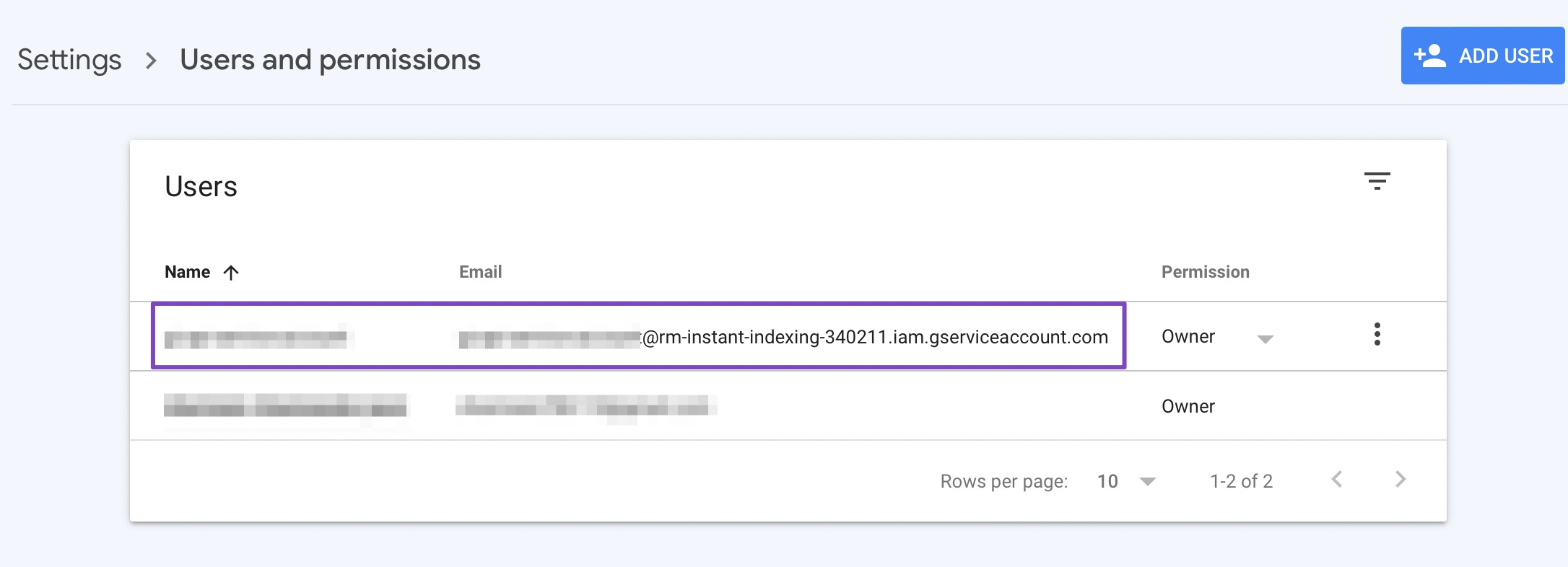
You can get the service email from here.
Don’t hesitate to let us know if you need help with anything else.
thanks for the assistance
Hello,
We are glad to know that this issue has been resolved. Thank you for letting us know.
This ticket will be closed now, but you can always open a new one if you have any other questions or concerns. We are here to help you with anything related to Rank Math.
We appreciate your patience and cooperation throughout this process.
Thank you for choosing Rank Math.
-



The ticket ‘Instant Indexing not working’ is closed to new replies.