
-
We are getting incorrect reports of
– Use the Focus Keyword at the beginning of your content.
it’s in the first line,– Use the Focus Keyword in the content
it’s used in multiple places,– The content should be 600-2500 words long
content is over 700 words longI have tried steps here:
https://rankmath.com/kb/no-keywords-found-in-the-page-title/and also the Health Check plugin – which did not work

-
Hello,
We apologize for the issue you are facing with Rank Math not recognizing the focus keyword in your content. It sounds frustrating when the reports do not align with your actual content.
Here are a few things to consider:
-
Focus Keyword at the Beginning of Content: Ensure that the primary focus keyword is indeed present in the first 10% of your post. If your post is over 300 words, Rank Math checks only the first 10%. If it’s under 300 words, it checks the entire content. You can refer to this guide on scoring 100 in tests for more details.

-
Use of Focus Keyword in Content: Make sure that the focus keyword is used naturally and not just as a repetition. Sometimes, if the keyword is used too frequently or unnaturally, it may not be recognized correctly.
-
Content Length: Double-check that the content is indeed over 600 words. Sometimes, formatting issues or hidden characters can affect the word count detected by Rank Math.
If you have already tried the steps mentioned in the article you linked and used the Health Check plugin without success, we recommend replying to this ticket. A human agent from the Rank Math Support team will be able to assist you further with this issue.
Thank you for raising this concern, and we hope to resolve it for you soon!
We still need some help to resolve this issue.
Hello,
Thanks for contacting us and sorry for any inconvenience that might have been caused due to that.
Can you please confirm if you are using any page builders on your site? If so please let us know which page builder you are using.
However, please note that if you are using a page builder not supported by Rank Math yet, then you would need to contact the developer of that page builder by showing them the following link: https://rankmath.com/kb/content-analysis-api/
This will allow Rank Math to read the contents from your page properly.
Looking forward to helping you.
Thank you.
The site is running Bricks builder, but the content is only edited from the usual WP Gutenberg editor — we do not allow users other than admins to access the Bricks functionality.
So I think it should work as normal?
Hello,
If you’re using a custom block, then it’ll require you to apply our API as currently, we are not able to access the content generated by custom blocks: https://rankmath.com/kb/content-analysis-api/
If that is not the case, then we might need to take a closer look at your site. Please edit the first post on this ticket and include your WordPress logins in the designated Sensitive Data section.
Please do take a complete backup of your website before sharing the information with us.
It is completely secure and only our support staff has access to that section. If you want, you can use the below plugin to generate a temporary login URL to your website and share that with us instead:
https://wordpress.org/plugins/temporary-login-without-password/
You can use the above plugin in conjunction with the WP Security Audit Log to monitor what changes our staff might make on your website (if any):
https://wordpress.org/plugins/wp-security-audit-log/
We really look forward to helping you.
Hello,
I have updated the sensitive data as requested. Can you please check further?
Thank you.
Hello,
We noticed that you are using the Bricks Builder and our plugin doesn’t support that page builder in the Content Analysis API. The Bricks Builder team would need to add support for it in their page builder following the steps here: https://rankmath.com/kb/content-analysis-api/
The results can be calculated properly only if you use the database tools to update the scores because they look at the content in the database.
However, the live page editor is based on JavaScript and we need the page builder to be compatible with the Content Analysis API so that our JavaScript can read the content entirely.
Don’t hesitate to get in touch if you have any other questions.
But we aren’t using the Bricks builder at all for content editing – that is the mechanism by which we have built the template. Editors login and edit content from the standard WP edit page, with Gutenberg blocks etc?
What is weird is that some posts/pages work fine – but some do not – so it’s not even consistent.
Hello,
Since you have enabled the Bricks builder for the Pages post type, our plugin won’t be able to detect the content. You must ask the Bricks Builder team to integrate our Content Analysis API into their builder to fix the issue.
Please do not hesitate to let us know if you need our assistance with anything else.
But it works for some posts/pages?
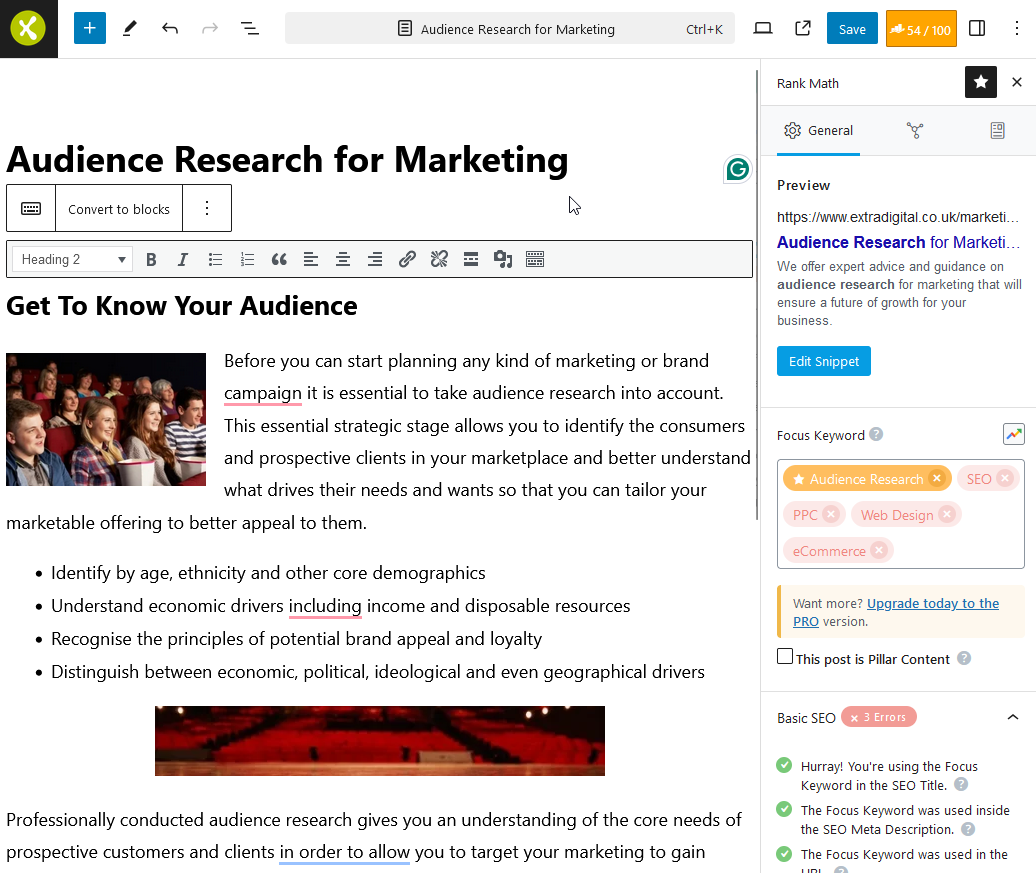
Again – we are not using the Bricks builder or interface to work on the content. We are using the WP editor and Gutenberg blocks. Bricks is not enabled for the Editor role, or the page post type
We’ve just been lobbying our boss to buy the pro version – but she is very reluctant to use it for clients as it looks bad if we cannot get good scores. I’ve switched your login to Editor Role – perhaps you can look again?
Hello,
The screenshot you shared is from a page that passes the same exact tests as the one you shared in the sensitive data section.
The plugin correctly sees the metadata and passes the tests relative to those but the keyword in the content cannot be identified for the reasons we mentioned before.
Don’t hesitate to get in touch if you have any other questions.
Hello,
Since we did not hear back from you for 15 days, we are assuming that you found the solution. We are closing this support ticket.
If you still need assistance or any other help, please feel free to open a new support ticket, and we will be more than happy to assist.
Thank you.
-



The ticket ‘RankMath can’t see the focus keyword in content, incorrect word count’ is closed to new replies.