Hello,
We apologize for the issue you are facing with the sitemap update in your multisite setup using Rank Math and WP Rocket. It sounds like you’ve already taken some steps to address the problem by adding rules in the Advanced Rules menu, but it seems that the sitemap is still not updating automatically for your multisite configuration.
Here are a few suggestions that might help resolve the issue:
-
Check Nginx Configuration (if applicable): If you are using an Nginx server, ensure that you have added the necessary rewrite rules in your Nginx config file as mentioned in our documentation. Here’s a reminder of the rules:
# START Nginx Rewrites for Rank Math Sitemaps
rewrite ^/sitemap_index.xml$ /index.php?sitemap=1 last;
rewrite ^/([^/]+?)-sitemap([0-9]+)?.xml$ /index.php?sitemap=$1&sitemap_n=$2 last;
rewrite ^/([a-z]+)?-sitemap.xsl$ /index.php?xsl=$1 last;
# END Nginx Rewrites for Rank Math Sitemaps
-
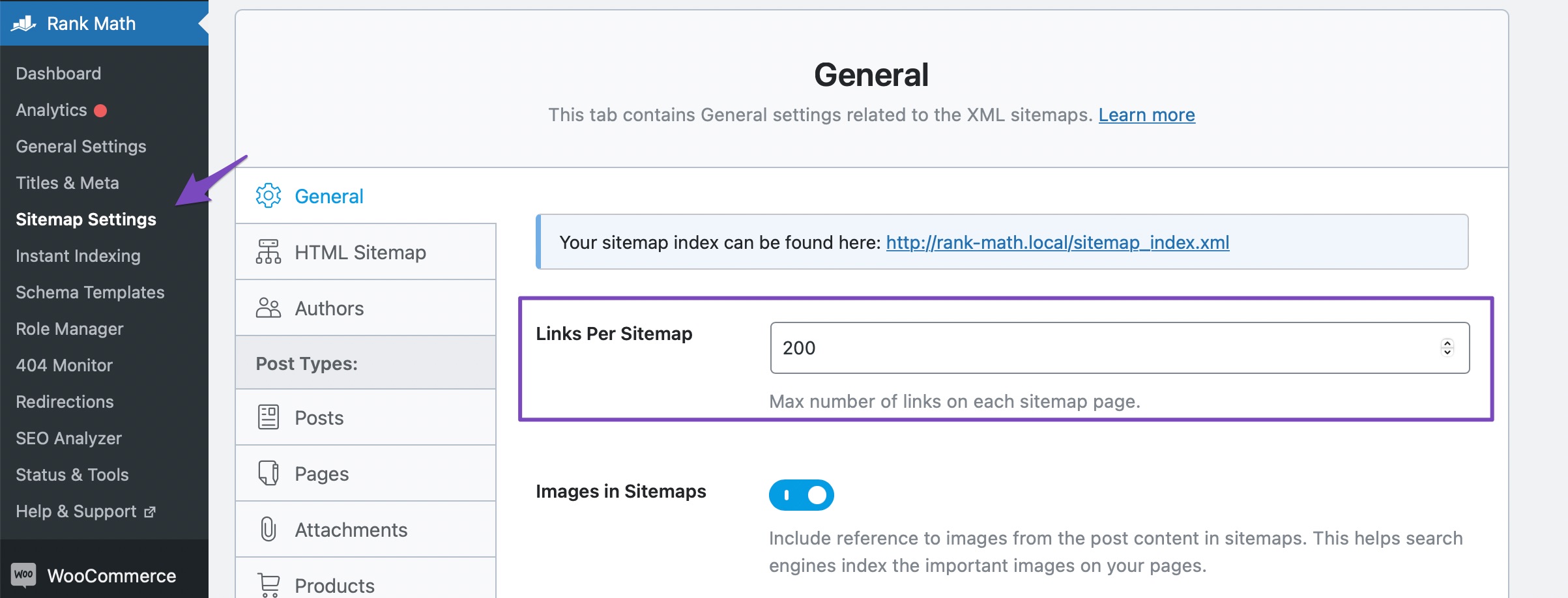
Flush Sitemap Settings: After making changes to your configuration, it’s important to flush your sitemap settings. You can do this by going to Rank Math SEO → Sitemap Settings in your WordPress admin area and making a minor change to the Links Per Sitemap count, then clicking Save Changes.
-
Caching Plugin Settings: Ensure that WP Rocket is configured correctly to exclude the sitemap from caching. You can do this by navigating to Settings → WP Rocket → Advanced Rules → Never Cache URL(s) and ensuring that you have the following entries:
/(.*)sitemap(.*).xml
/(.*)sitemap.xsl
-
Check for Plugin Conflicts: Sometimes, other plugins can conflict with Rank Math or WP Rocket. You can use the Health Check plugin to identify any potential conflicts.
-
Manual Updates: If all else fails, you may need to manually trigger updates for each site until a more permanent solution is found. This can be cumbersome but may be necessary as a temporary measure.
If these steps do not resolve the issue, please reply to this ticket, and a human agent from the Rank Math Support team will take over and assist you further. Thank you for raising this concern, and we appreciate your patience as we work to resolve it!
Sources:
How To Exclude Rank Math Sitemaps from Caching » Rank Math
Rank Math XML Sitemaps on NGINX Servers » Rank Math
Hello,
Thank you for your query and we are so sorry about the trouble this must have caused.
Please note that the correct way to use our plugin on a multisite setup is to install it on the network but only activate it on specific subsites so make sure to deactivate it on the network and then activate it on the subsites.
If you checked that already, please follow the steps below:
1. Flush the Sitemap cache by following this video screencast:
https://i.rankmath.com/pipRDp
2. Exclude the Sitemap files of the Rank Math plugin in your caching plugin. The cache could be via a plugin or from the server. For plugins or Cloudflare, please follow this article:
https://rankmath.com/kb/exclude-sitemaps-from-caching/
3. Apply the following filter code to your site.
add_filter( 'rank_math/sitemap/enable_caching', '__return_false');
Here’s how you can add filter to your WordPress site:https://rankmath.com/kb/wordpress-hooks-actions-filters/
Let us know how that goes.
Hello,
Since we did not hear back from you for 15 days, we are assuming that you found the solution. We are closing this support ticket.
If you still need assistance or any other help, please feel free to open a new support ticket, and we will be more than happy to assist.
Thank you.



