Hello,
We apologize for the issue you are facing with the ALT attributes on your homepage images. To ensure that your images are properly indexed and displayed, you can enable the Image SEO module in Rank Math. Here’s how to do it:
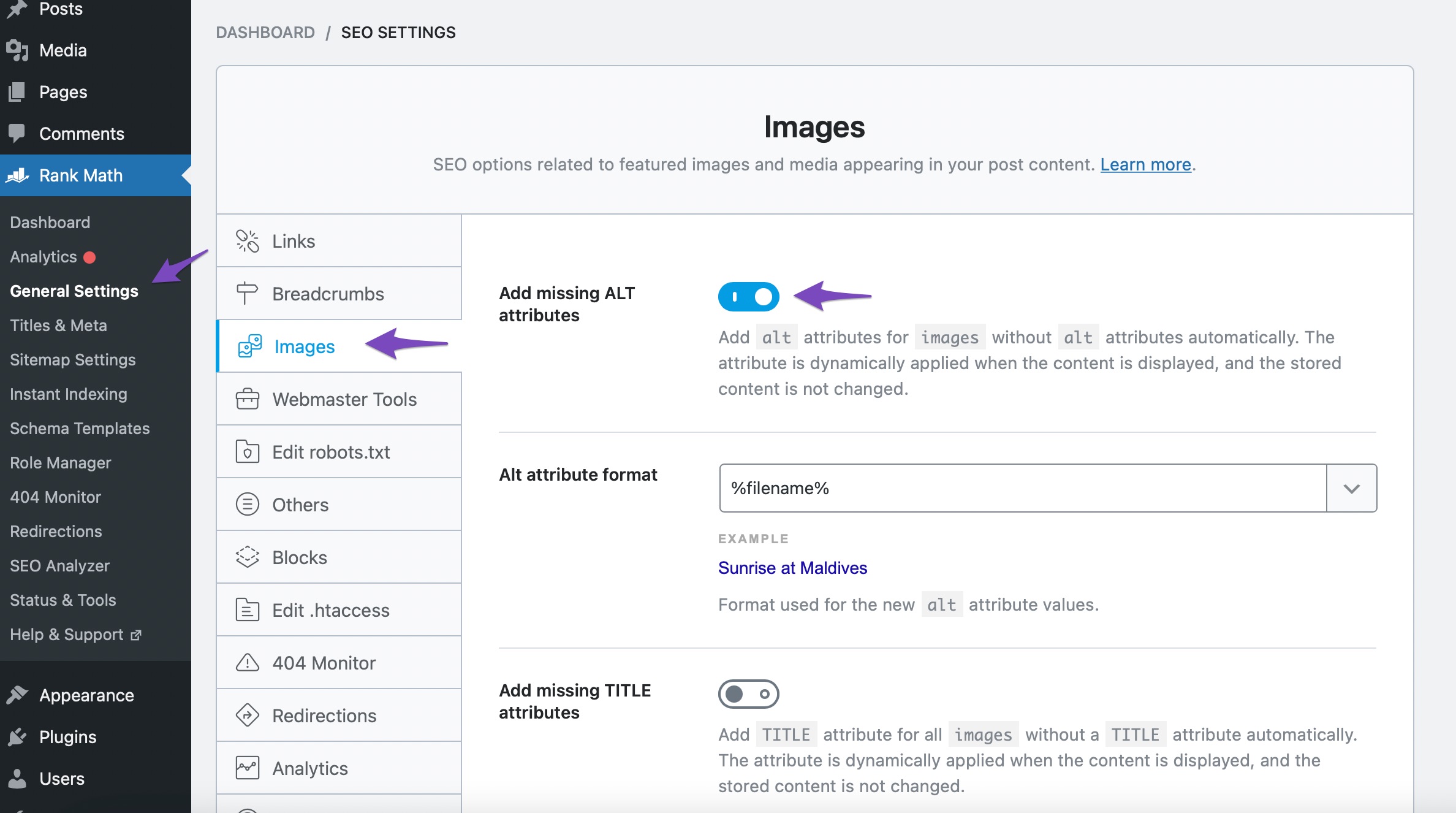
- Navigate to Rank Math SEO from your WordPress dashboard.
- Go to General Settings → Images.
- Toggle the Add missing ALT attributes option to automatically add ALT text to images that don’t have it.
You can also set the format for the ALT text under the same settings. The default value is %filename%, which uses the name of the file as the ALT text.
Regarding the image link you mentioned (https://rankmath.com/wp-content/uploads/2022/12/keywords-title-description-test.jpg), if it is not in your media database, it may be hardcoded into your theme or a plugin. You can check your theme settings or any custom code that might be referencing this image. If you want to remove it, you will need to locate where it is being used and delete or replace it accordingly.
If you need further assistance, please reply to this ticket, and a human agent from the Rank Math Support team will take over and help you out.
Thank you for raising this concern!
Sources:
How to Show Images in the Search Results » Rank Math
Analyzing Your Site’s SEO with Rank Math’s SEO Analysis Tool
Image SEO Options in Rank Math
Hello,
We checked your homepage with our external SEO Analyzer tool but were not able to find the image URL you’ve shared:

However, after checking the images we can see they are coming from the sidebar and icons:

Please note that Rank Math adds missing ALT attributes only for images added in post or page content, it will not do so for images added by your WordPress theme or page builder to various sections like your sliders, thumbnails, icons, headers, sidebars, footers, etc. as they only apply to images added directly on your content, and added on the fly.
In order to fix this issue, you’ll have to manually add the ALT text in these images.
Hope that helps and please don’t hesitate to let us know if you have any other questions.
Thank you.
Hello,
Since we did not hear back from you for 15 days, we are assuming that you found the solution. We are closing this support ticket.
If you still need assistance or any other help, please feel free to open a new support ticket, and we will be more than happy to assist.
Thank you.




