
-
I appreciate the welcome.i wonder if you could assist me with an issue i’m stuck at search console to connect with google.

-
Hello,
We apologize for the issue you are facing with connecting to Google Search Console. To connect Rank Math to the Search Console, please follow these steps:
- Go to Rank Math SEO → General Settings → Analytics.
- If you haven’t already created and verified your website property in the Google Search Console, Rank Math will do this automatically for you.
- You should see your website listed under the Site drop-down list in the Search Console section.
- Select your Site and Country from the drop-down lists.
- Click on the Save Changes button once you have made the changes.
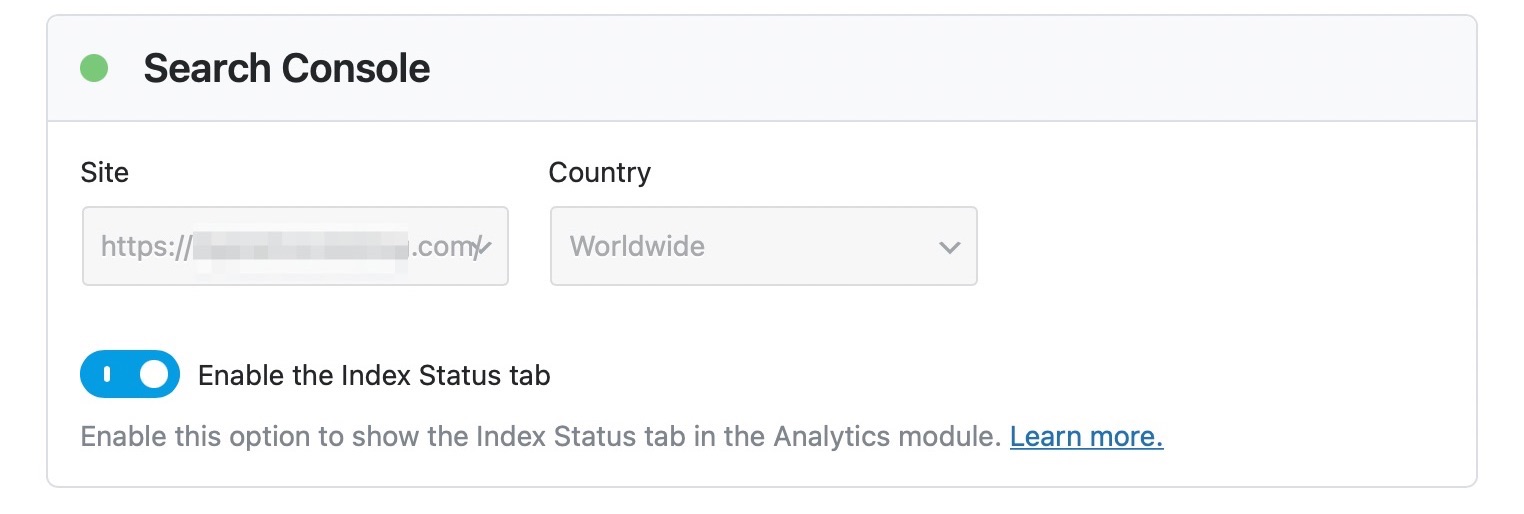
If you encounter any issues during this process, please let us know, and we can assist you further! Thank you for raising this concern.
Sources:
How to Connect Your Google Account With Rank Math SEO » Rank MathHello team RankMath wonder if you could assist me with an issue i’m stuck at search console to connect with google.
Hello,
Thank you for contacting us and sorry for any inconvenience that might have been caused due to that.
Please try to follow the steps below and see if that works for you:
1. Make sure that you have verified your website on Google Search Console, if not, follow this guide: https://rankmath.com/kb/google-site-verification/
2. Please make sure that you are not connecting to Google Search Console via a domain property but rather a URL prefix and that you have verified the correct version of your website on the Google Search Console (HTTP or HTTPS, www or non-www).
3. Please remove RankMath’s app from your Google apps permissions: https://myaccount.google.com/permissions
4. Once done, reconnect the Google account again from WordPress Dashboard > Rank Math > General Settings > Analytics and configure the Search Console and Analytics settings again.
Kindly check all necessary checkboxes to allow Rank Math to access some of the Google Services.
If the issue persists, please share a screenshot with us by using a tool like https://imgur.com/upload so that we can check the issue further for you.
Let us know how it goes. Looking forward to helping you.
Thank you.
I dont know what else to do i try the steps and its not working
Hello,
In this case, we might need to take a closer look at the settings. Please edit the first post on this ticket and include your WordPress logins in the designated Sensitive Data section.
Please do take a complete backup of your website before sharing the information with us.
It is completely secure and only our support staff has access to that section. If you want, you can use the below plugin to generate a temporary login URL to your website and share that with us instead:
https://wordpress.org/plugins/temporary-login-without-password/
You can use the above plugin in conjunction with the WP Security Audit Log to monitor what changes our staff might make on your website (if any):
https://wordpress.org/plugins/wp-security-audit-log/
We really look forward to helping you.
Hello,
I have updated the sensitive data as requested. Can you please check further?
Thank you.
Hello,
We would like to check the issue in your website but the login information you share is not working. Can you please verify that so we can proceed with debugging the issue?
Looking forward to helping you.
Hello,
I have updated the sensitive data as requested. Can you please check further?
Thank you.
Information update
Hello,
Please follow these steps to reconnect Rank Math with your Google account and grant all the necessary permissions:
First of all, check to make sure that you have a verified Google Search Console and Google Analytics properties, if not follow the attached link to create one.
If you already have verified properties and you’re still unable to connect them – then follow these steps
1) Remove Rank Math’s access from Google Please remove RankMath’s app from your Google apps permissions: https://myaccount.google.com/permissions
2) Re-connect to regenerate the auth token from Google
After that, reconnect the Google account again to regenerate the auth token from Google, by going to WordPress Dashboard > Rank Math > General Settings > Analytics and configure the Search Console and Analytics settings again:
3) Grant all necessary permissions
Kindly check all necessary checkboxes to allow Rank Math to access some of the Google Services. Please check my screenshot below for reference:
4) Follow the instructions to sign in with your Google account and allow Rank Math to access your data. https://rankmath.com/kb/connect-your-google-account/
You can also refer to this guide for more details: https://rankmath.com/kb/analytics-issues/#expired-google-oauth-token
We hope this resolves the issue for you.
If you still face any problems or have any questions, please let us know.
We’re always here to help.
Thank you very much for your assistant i followed the steps and i think i did it correct,can you please check to see if everything is up to date thank you
Hello,
We’ve checked your site, and your GSC and Analytics are already configured.
The frequency of data updates in the free version is 7 days, so you should see the data fetches from your Search Console after that.
Looking forward to helping you.
thank you very much.
Hello,
We are super happy that this resolved your issue. If you have any other questions in the future, know that we are here to help you.
If you don’t mind us asking, could you please leave us a review (if you haven’t already) on
https://wordpress.org/support/plugin/seo-by-rank-math/reviews/#new-postabout your overall experience with Rank Math? We appreciate your time and patience.
If you do have another question in the future, please feel free to create a new forum topic, and it will be our pleasure to assist you again.
Thank you.



The ticket ‘connect with google’ is closed to new replies.