
-
Hi RankMath Team, I’m having a problem with my site when trying to save changes to your plugin.
I tried all the solutions I found on the internet, including yours, but nothing worked for me.The error I get in debug is:
”
WordPress database error:
[Table ‘fsrvuncutd.blKyyHUhq_rank_math_analytics_gsc’ doesn’t exist]
SELECT COUNT(id) FROM blKyyHUhq_rank_math_analytics_gsc LIMIT 0, 1
”
Of course I did try the solution you offer “Re-create Missing Database Tables” but nothing changed.I would appreciate a solution,
Thanks in advance!

-
Hello,
We apologize for the issue you are facing with saving changes in Rank Math. Thank you for raising this concern.
The error message you are encountering indicates that a specific database table related to Rank Math is missing. Since you’ve already tried the solution to "Re-create Missing Database Tables" without success, we recommend the following steps:
-
Update Rank Math: Ensure that both the free and PRO versions of Rank Math are updated to their latest versions. This can sometimes resolve underlying issues.
-
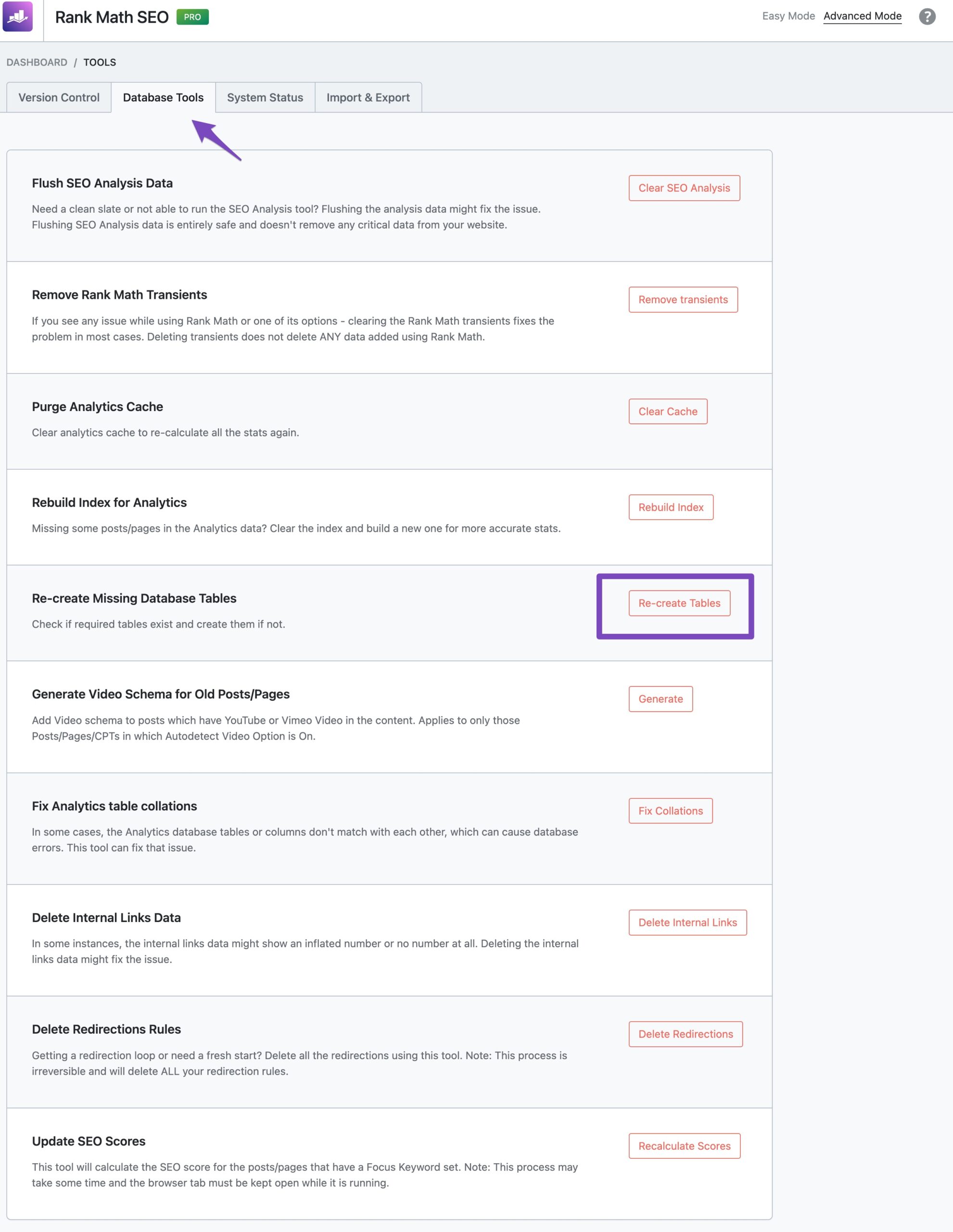
Check Database Status: After updating, navigate to Rank Math SEO → Status & Tools → Database Tools and try the "Re-create Tables" option again. This should help in recreating any missing tables.
-
Backup Your Database: Before making any changes, it’s always a good idea to back up your database to prevent any data loss.
-
Manual Table Creation: If the above steps do not work, you may need to manually create the missing table in your database using a tool like phpMyAdmin. The SQL command to create the
rank_math_analytics_gsctable can be found in the Rank Math documentation or by contacting our support team for assistance.
If you continue to experience issues after trying these steps, please reply to this ticket, and a human agent from the Rank Math Support team will assist you further.
Thank you for your patience, and we hope to resolve this issue for you soon!
Sources:
Why Rank Math Settings Are Not Getting Saved? » Rank MathStill not working.
Hello,
Please check if you are using a Firewall as it may prevent saving the changes.
If you are using a Firewall, please whitelist this route:
/wp-json/rankmath/v1/updateMeta
/wp-json/rankmath/v1/saveModule
You can check this link for more information:
https://rankmath.com/kb/meta-data-not-saving/If the issue persists, we might need to take a closer look at the settings. Please edit the first post on this ticket and include your WordPress & FTP logins in the designated Sensitive Data section.
Please do take a complete backup of your website before sharing the information with us.
It is completely secure and only our support staff has access to that section. If you want, you can use the below plugin to generate a temporary login URL to your website and share that with us instead:
https://wordpress.org/plugins/temporary-login-without-password/
You can use the above plugin in conjunction with the WP Security Audit Log to monitor what changes our staff might make on your website (if any):
https://wordpress.org/plugins/wp-security-audit-log/
We really look forward to helping you.
Hello,
I have updated the sensitive data as requested. Can you please check further?
Thank you.
I tried all the options on the internet and in your guides, nothing works.
I have attached all the details to you in Sensitive Data, I would be happy for a solutionHello,
We’ve checked your website and found that Rank Math REST Routes that we use to update the data are being redirected to your homepage and most likely this is why you’re facing the issue. Please check the screenshot in the sensitive data section for your reference.
It looks like the redirection is coming from the
.htaccessfile. In this case, please try to use the default.htaccessfile from here and see if that works for you: https://wordpress.org/support/article/htaccess/Please do take a complete backup of your website before modifying your .htaccess as it is a sensitive file.
Let us know how it goes. Looking forward to helping you.
Thank you.
Thanks for your reply but that is not the problem.
I restored the original htaccess file earlier, but it didn’t solve the problem
Even now, the file is as you sent and the problem still existsI would appreciate a solution
Hello,
You cannot use the plugin you are currently using to force the lowercase URLs on the website because the REST API route needs to have some uppercase letters.
What is happening is that the plugin expects
updateMetawith uppercaseMand that plugin is forcing a lower case which results in a redirection and subsequent failure of the route.Don’t hesitate to get in touch if you have any other questions.
Ahh I see.. Thank you very much for your reply!
The problem is that after I used your feature to change all the urls, and because I use an uncoded language,
I found that all the links that contain uppercase letters lead to an error page for some reason, and those pages with lowercase letters lead to a normal page.
The plug-in that changes to lowercase letters is the only solution I found..I dug the internet for days, there is no other solution,
Will I have to turn off the referral plugin every time, change meta tags in your plugin, and activate the referral plugin again?EXAMPLE when the Force Lowercase Plugin is off:
https://sapirasayag.co.il/%d7%9e%d7%90%d7%a8%d7%96%d7%99%d7%9d/ (all lower-case, page will work)
https://sapirasayag.co.il/%d7%9e%d7%90%d7%a8%d7%96%d7%99%d7%9D/ (1 uppercase at the end, page 404)Hello,
Yes, unless the creator of that plugin can make changes to it to disable the forcing of lowercase URLs in the REST API routes that plugin needs to be disabled when making changes to the pages so the route work as expected.
Don’t hesitate to get in touch if you have any other questions.
I find it hard to believe he could change that.
Look – this problem with the URLS only started after using your plugin, and I think exactly as soon as I used your features to shorten the site’s addresses.
My question is whether now restoring the site backwards will solve the problem, because of course it will restore the old links and make it a bit difficult for me in front of Google, but I don’t see any other choice,
Or maybe we can find out why it happened with the links? Why don’t the links encoded to uppercase letters work? Because on my other sites that don’t use Rankmath it doesn’t happen..
Have you encountered such a problem before?Hello,
1. If the issue with uppercase links started when you enabled any of the Rank Math Strip Base options, then you can disable those options and use alternative methods to achieve URL stripping.
2. The plugin you’re using to force lowercase URLs has not been updated for six years, so you might want to find alternative plugins that can achieve the same objectives.
3. It is possible and standard best practice to exclude all WP Rest API URLs from forced URL modifications of this kind. You can contact the developer of the affected plugin or prospective plugin to request that
/wp-json/be excluded from the forced change.We hope this clarifies the issue. Please let us know if you have any other questions or concerns.
Thank you very much for the help!
Just updating that I changed the plugin and it really solved the problem.
Thank you very much for your patience and support. Appreciate itHello,
We are glad that everything has been sorted out.
Do you still need our assistance with anything else or we can go ahead to close the ticket?
We really look forward to helping you.
Everything is ok. Thanks again:)
Hello,
Since we did not hear back from you for 15 days, we are assuming that you found the solution. We are closing this support ticket.
If you still need assistance or any other help, please feel free to open a new support ticket, and we will be more than happy to assist.
Thank you.
-



The ticket ‘Rank Math changes are not saved on my site’ is closed to new replies.