Hello,
We apologize for the issue you are facing with inserting the Table of Contents plugin in your post. To add the Table of Contents block using Rank Math, please follow these steps:
- Edit Your Post/Page: Navigate to the post or page where you want to add the Table of Contents.
- Add Block: Click on the ‘+’ icon to add a new block.
- Search for Table of Contents: In the block search, type Table of Contents by Rank Math and select it from the list.
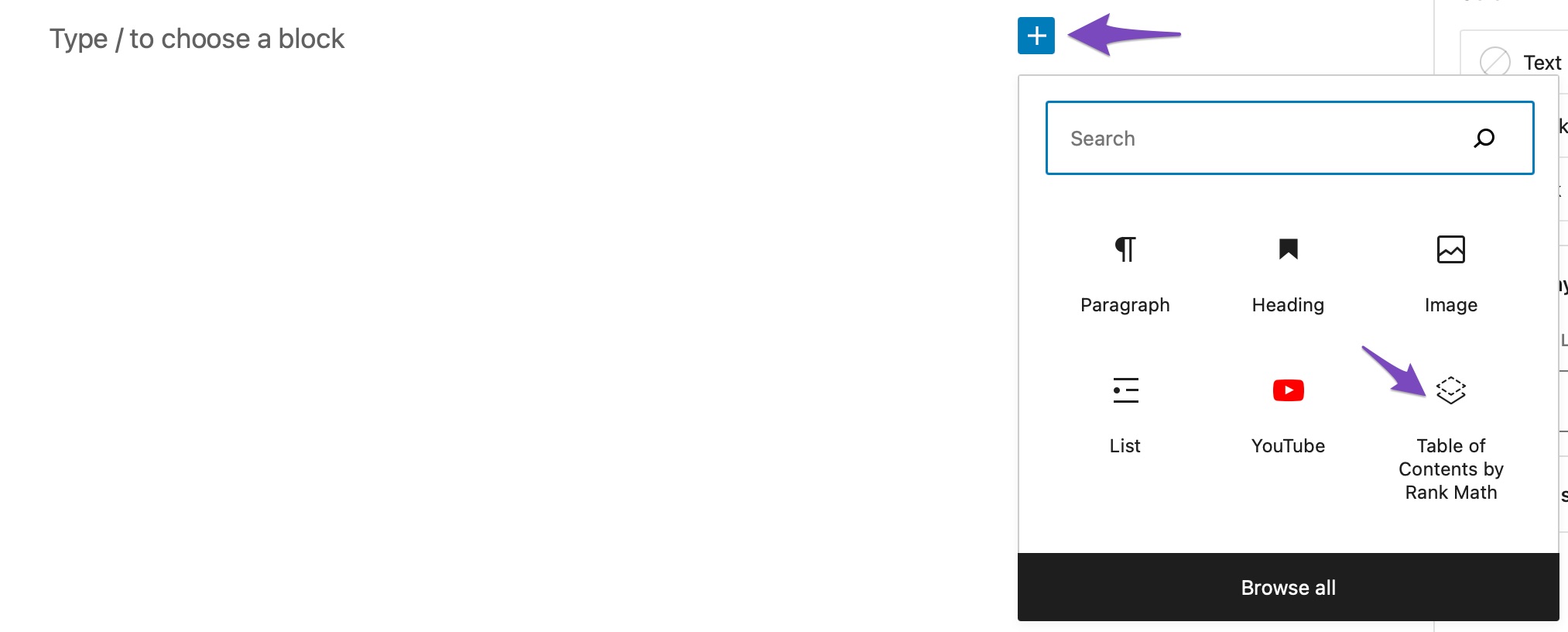
- Configure the Block: Once added, you can customize the settings of the Table of Contents block as per your requirements.
If you are using a different editor or if the block is not appearing, please ensure that you have the Rank Math plugin activated and that you are using the Block Editor (Gutenberg). If you are using a Classic Editor or another page builder, you may need to check for compatibility with Rank Math.
For more detailed instructions, you can refer to our guide on how to add a Table of Contents block by Rank Math.
If you continue to experience issues, please reply to this ticket, and a human agent from the Rank Math Support team will assist you further.
Sources:
How to Add Rank Math’s Table of Contents Block » Rank Math
How to Use a Table of Contents to Improve Content Readability » Rank Math
Hello,
Thank you for your query and we are so sorry about the trouble this must have caused.
Rank Math’s Table of Contents Block is available only for the Block Editor. If you’re using Classic Editor or other page builders like Elementor, Divi, we recommend checking other compatible TOC plugins listed here. https://rankmath.com/kb/table-of-contents/
Hope that helps. Let us know if you need any other assistance.
Hello,
Since we did not hear back from you for 15 days, we are assuming that you found the solution. We are closing this support ticket.
If you still need assistance or any other help, please feel free to open a new support ticket, and we will be more than happy to assist.
Thank you.



