Hello,
We apologize for the issue you are facing with the 403 error when trying to remove the category base in Rank Math. This error can occur due to a few reasons, such as a plugin conflict or permission issues related to the API key.
To resolve this, you can try the following steps:
-
Change the API Key in Rank Math: Navigate to Rank Math SEO → Instant Indexing → IndexNow API Settings → API Key and click on the Change Key button. This may help in resolving the 403 error.
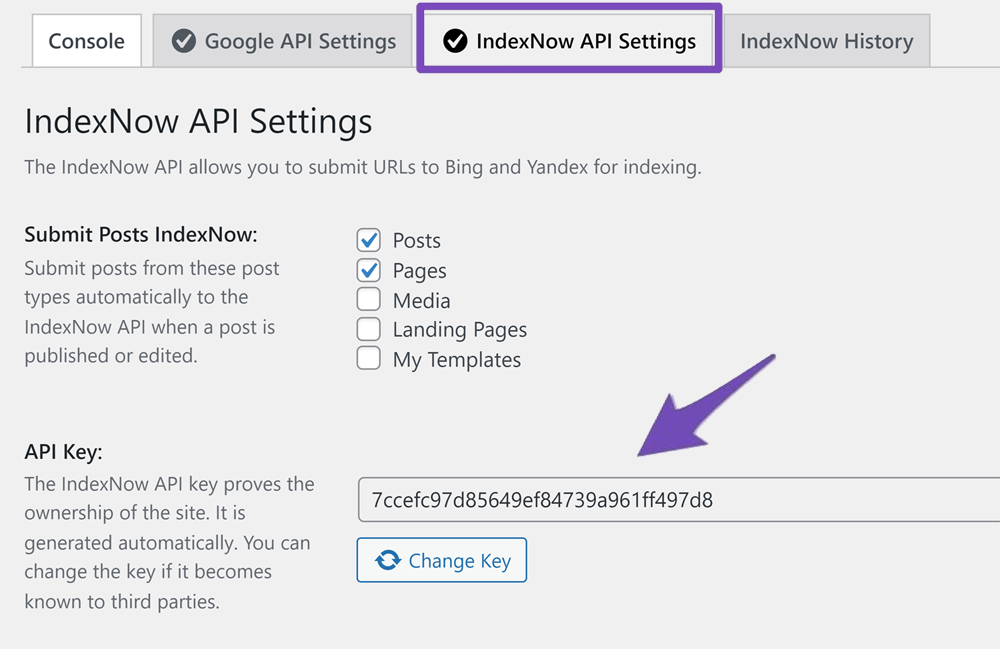
If the issue persists after trying this, we recommend replying to this ticket, and a human agent from the Rank Math Support team will assist you further.
Thank you for raising this concern!
Sources:
How to Fix 403 Forbidden Error with IndexNow » Rank Math
Hi, the issue still persists after changing the key…
I also checked .htaccess, should be no problem, and I also deactivated all other plugins and tried again… does not work.
I have many Websites running RankMath with the same hosting and configuration – the other websites work fine.
Hello,
Thank you for contacting us and sorry for any inconvenience that might have been caused due to that.
Please get in touch with your web host and ensure that the ModSecurity is disabled or they are not blocking any process of the plugin.
However, it looks like you’re currently using the Rank Math PRO plugin on your website, but the account you have used to open this ticket is the Rank Math free version.
Please search and forward a receipt from FastSpring.com so we can locate your account and verify it.
Let us know how it goes. Looking forward to helping you.
Thank you.
Hi, I will check with my web host about ModSecurity and will get back to you.
I am not using RankMath PRO – just the Free Version.
Hello,
Sure, let us know how this goes.
Meanwhile, if you have any other concerns, please don’t hesitate to contact us anytime so we can assist you further.
Looking forward to helping you.
Hello,
That is fine.
Checking the page source of your website shows that the Rank Math PRO is active on your website

In the meantime, please flush your permalinks by navigating to Settings → Permalinks in your WordPress dashboard. You don’t need to make any changes there; just click the Save Changes button.
After this, enable this option and check again.
Let us know how it goes. Looking forward to helping you.
Thank you.
None of the suggested solutions worked.
The problem was in the configuration of the firewall. I had to deactivate the firewall for my hostings, then I was able to make settings again. Maybe this will help someone in the future.
Hello,
We’re glad that you have already resolved this issue.
If you have any other concerns, please don’t hesitate to contact us anytime so we can assist you further.
Looking forward to helping you.





