
-
Dear Rank Math Support Team,
I’m having trouble with Google not being able to fetch my website’s sitemap. I’ve followed all the steps mentioned in this guide: https://rankmath.com/kb/couldnt-fetch-error-google-search-console/.
It’s been a week, and the issue still persists. Can you please assist?
Best Regards,
Taha Awaida
ATCOM

-
Hello,
We apologize for the issue you are facing with Google not being able to fetch your sitemap. Thank you for following the steps in the guide and for raising this concern.
If you have already tried the troubleshooting steps mentioned, here are a few additional things you can check:
-
Validate Your Sitemap: Ensure your sitemap is correctly configured by using a validation tool. You can use the Validate XML Sitemap tool to check for any issues.

-
Ensure the Sitemap is Located in the Root Folder: Make sure your sitemap is in the root folder of your WordPress installation. The URL should look like this:
https://yourdomainname.com/sitemap_index.xml. -
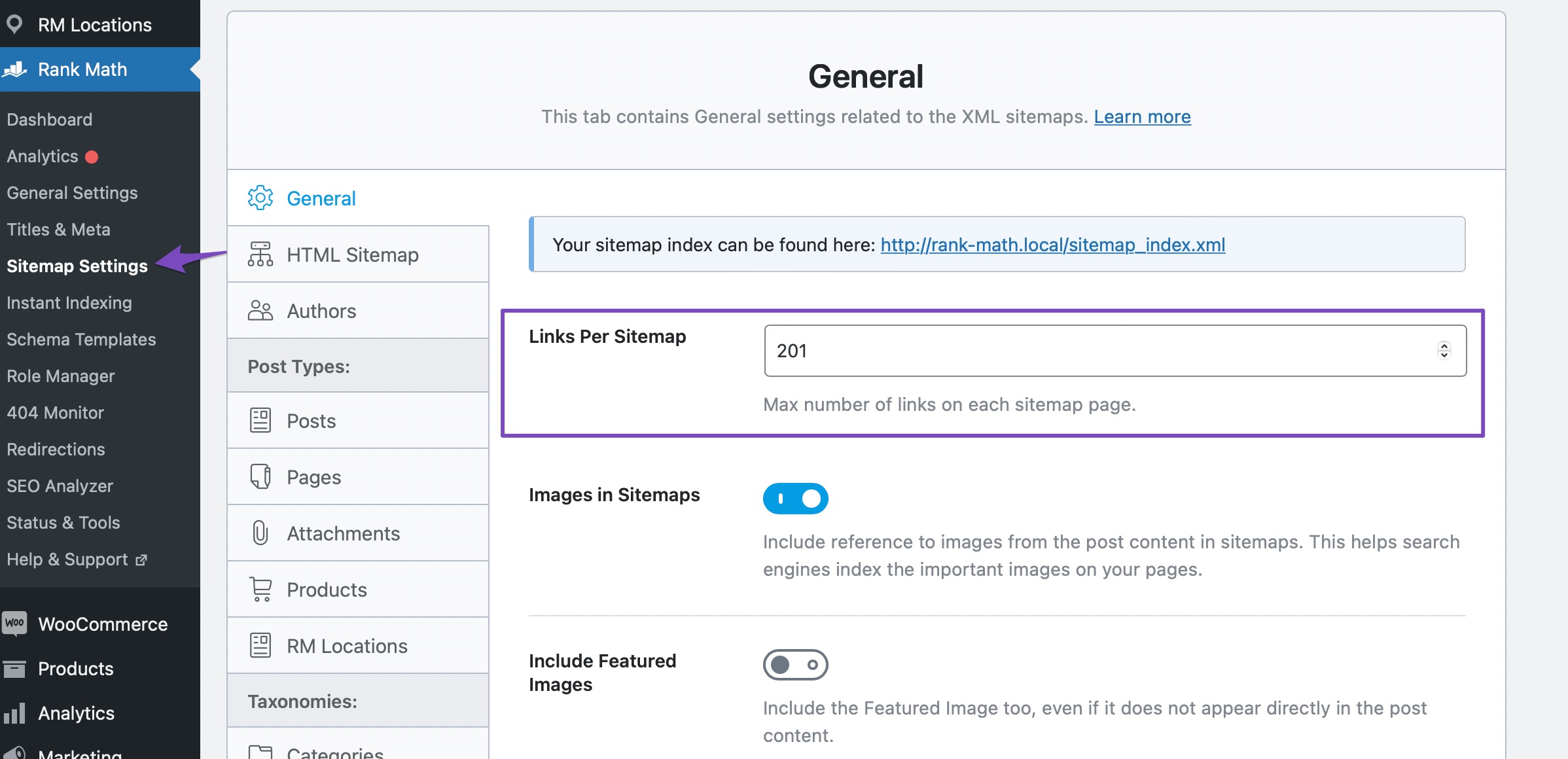
Flush the Cache: If your sitemap appears outdated, try flushing the sitemap cache by increasing the value of the Links Per Sitemap in Rank Math SEO → Sitemap Settings and then saving your changes. After that, go to Settings → Permalinks and click Save Changes.

-
Check for Unsupported File Format: If you see an error regarding unsupported file format, ensure your sitemap file has the correct header:
If you’ve checked all these and the issue still persists, please reply to this ticket, and a human agent from the Rank Math Support team will take over and assist you further.
We’re here to help!
Sources:
Troubleshooting the “Couldn’t Fetch” Error in Google Search Console » Rank Math
Rank Math Sitemap Issues and Their Fixes » Rank MathDear Rank Math Support Team,
I’ve carefully followed all the instructions provided in your guide, but the problem persists. Google is still unable to fetch my sitemap, and it’s been a week without any progress.
Could you please help me resolve this?
Best Regards,
Hello,
That tool is for XML files so it will return that error. Here’s a tool you can use to validate the sitemap:
https://www.xml-sitemaps.com/validate-xml-sitemap.htmlHowever, your sitemap is already validating fine. In this case, please follow these steps to flush your sitemap cache:
1. Flush the Sitemap cache by following this video screencast:
https://i.rankmath.com/pipRDp2. Exclude the Sitemap files of the Rank Math plugin in your caching plugin. The cache could be via a plugin or from the server. For plugins or Cloudflare, please follow this article:
https://rankmath.com/kb/exclude-sitemaps-from-caching/3. Disable the transient cache for the sitemap by applying this filter. This will make sure that your XML sitemap always reflects the latest changes on your site:
/**
 * Filter if XML sitemap transient cache is enabled.
 *
 * @param boolean $unsigned Enable cache or not, defaults to true
 */
add_filter( 'rank_math/sitemap/enable_caching', '__return_false');
If you’re not sure how to add this code, you can follow this guide:
https://rankmath.com/kb/wordpress-hooks-actions-filters/Once done, remove all your submitted sitemaps and resubmit your main sitemap only /sitemap_index.xml.
After that, give Google some time to recrawl your sitemaps and the “Last Read” column date will be updated as well.
Looking forward to helping you.
Hello Reinelle,
Thank you for your guidance. I have followed all the steps provided:
1. I validated the sitemap using the tool you recommended, and it is validating correctly.
2. I flushed the Sitemap cache as per the video instructions.However, I did not take any action on excluding Sitemap files from caching, as I do not have a caching plugin installed on either my WordPress site or in my WHM setup.
Despite these steps, the issue with the sitemap is still persisting. Could you please advise on any additional steps I should take or if there might be another underlying issue?
Thank you for your assistance.
Best regards,
Hello,
We visited the sitemap while simulating as a Googlebot and the sitemap gave the
200status, which shows that everything is fine.Please give Google some time to crawl and read your sitemap then check again.
If everything is fine on your end, and Google may still return the error, please note that not all sitemaps are processed by Google. Not necessarily because there is something wrong with the sitemap.
Even a perfect sitemap may not be processed by Google.
Most of the time, it’s still sitting in the queue waiting for processing. Remember, Google is processing millions of sitemap daily, sometimes it takes time to get to yours. But for whatever reason, Google never gets around to some sitemaps. It just doesn’t think it is worth it.
And Search Console sometimes shows ‘Pending’ as ‘couldn’t fetch’ incorrectly. You can check the replies of Google experts for the Couldn’t Fetch(especially for the TLDs except for .com) issues on the following threads:
https://support.google.com/webmasters/thread/29055233/missing-xml-sitemap-data-in-google-search-console-for-tld-domain?hl=en
https://support.google.com/webmasters/thread/31835653/sitemap-couldn-t-fetch-sitemap-couldn-t-be-read-by-google-search-console?hl=enYou can try using a different sitemap plugin like https://wordpress.org/plugins/xml-sitemap-generator-for-google/ to generate the sitemap and see if Google can read them. Please make sure to disable the Sitemap module of our plugin in WP Dashboard > Rank Math > Dashboard.
Let us know how that goes. Looking forward to helping you.
Hello Adetayo,
Thank you for the suggestion. I have added the new sitemap plugin XML Sitemap Generator for Google as recommended and disabled the Sitemap module in Rank Math via the dashboard.
Unfortunately, the situation remains the same—nothing has changed. The issue is still persisting.
i will wait
Hello,
Don’t worry, currently it seems that it shows that error until Google has had time to process the sitemap. Give it some time and things should look fine.
Until your sitemap is processed it can display
Couldn't fetchor the longerSitemap could not be readmessage, in reality, it just means Google hasn’t fetched or processed it yet. There may be nothing wrong with the sitemap. When fetching/processing occurs, and there IS an issue, you will typically get a more specific message.In the meantime, you can follow this guide on Google to debug the issue: https://support.google.com/webmasters/answer/7451001?hl=en#fetch_errors&zippy=%2Csitemap-fetch-errors
We hope that helps.
Thank you.
Hello,
Since we did not hear back from you for 15 days, we are assuming that you found the solution. We are closing this support ticket.
If you still need assistance or any other help, please feel free to open a new support ticket, and we will be more than happy to assist.
Thank you.
-



The ticket ‘Google Can’t Fetch Sitemap Despite Following Steps’ is closed to new replies.