Hello,
We apologize for the issue you are facing with the category still showing in your URLs despite your settings. To resolve this, please ensure that you have enabled the Strip Category Base option in Rank Math. Here’s how you can do it:
- Install Rank Math: If you haven’t already, make sure Rank Math is installed and set up.
- Enable the Strip Category Base Setting: Navigate to Rank Math SEO → General Settings → Links and locate the Strip Category Base option. If you don’t see this option, ensure you are using the Advanced mode of Rank Math.
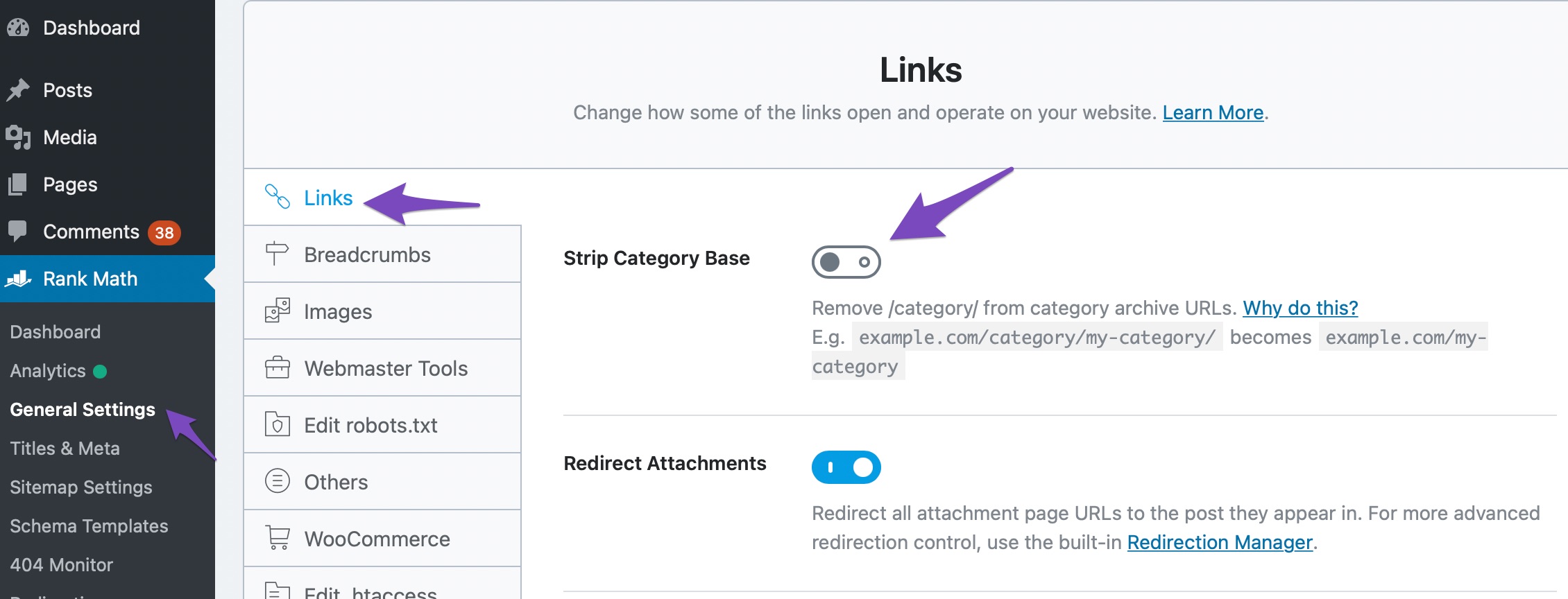
Enabling this option will remove the category names from your category archive URLs, resulting in cleaner URLs. For example, a URL like:
https://yourwebsite.com/category/SEO/
will change to:
https://yourwebsite.com/SEO/
Please note that if your categories have the same slug as your posts/pages/products, it might cause unexpected results. After enabling the setting, all existing category URLs will be automatically redirected to the new links.
If you continue to experience issues after following these steps, please reply to this ticket, and a human agent from the Rank Math Support team will assist you further. Thank you for raising this concern!
Sources:
How to Remove the Category Base From WordPress » Rank Math
Does Enabling this option will affect my website Or are there any recommended settings that I need to doa gain?
Hello,
Thank you for contacting Rank Math support.
Please share an example of how the URL structure should be and how it currently is. This would help us understand the issue properly.
>> Does Enabling this option will affect my website
No, the ‘Strip Category Base’ option will not affect your SEO in any way.
Don’t hesitate to let us know if you need help with anything else.
Thanks for the Help I turned on the option and removed the extra Plugin.
Hello,
We’re glad that you have already managed to resolve this issue.
If you have any other concerns, please don’t hesitate to contact us anytime so we can assist you further.
Looking forward to helping you.
Hello,
Since we did not hear back from you for 15 days, we are assuming that you found the solution. We are closing this support ticket.
If you still need assistance or any other help, please feel free to open a new support ticket, and we will be more than happy to assist.
Thank you.




