
-
Hi im using your plugin rankmath and i have heard good things about it. With that said i would likte to buy the premium version, but i need to get it to work first. Their is problems with the sitemap and the page indexing. Also my favicon isn’t showing up in google. The url is Mydesweden.se i can send login information if necessary. Here is some images https://imgur.com/a/cRt8076

-
Hello,
We apologize for the issues you are facing with the sitemap and page indexing. Thank you for raising your concerns.
To address the sitemap issues, please check the following:
- Sitemap URL: Ensure that you are submitting the correct XML sitemap to Google, which should be available at `https://rankmath.com/wp-content/uploads/2023/04/Site-Health-Info.png.
- Server Configuration: If your sitemap is not loading properly, it may be due to server configuration issues. For Apache servers, you may need to add specific rewrite rules to your
.htaccessfile. For Nginx servers, similar rules should be added to your Nginx config file. You can find the necessary rewrite rules in our Sitemap Issues and Their Fixes article. - Robots.txt: Check if your sitemap URL is blocked by any rules in your
robots.txtfile. You can manage this in the Rank Math settings under Rank Math SEO → General Settings → robots.txt. - Custom Canonicals: If you have set custom canonical URLs for your posts, they may not appear in the sitemap. Consider removing these custom canonicals if you want all posts to be included in the sitemap.
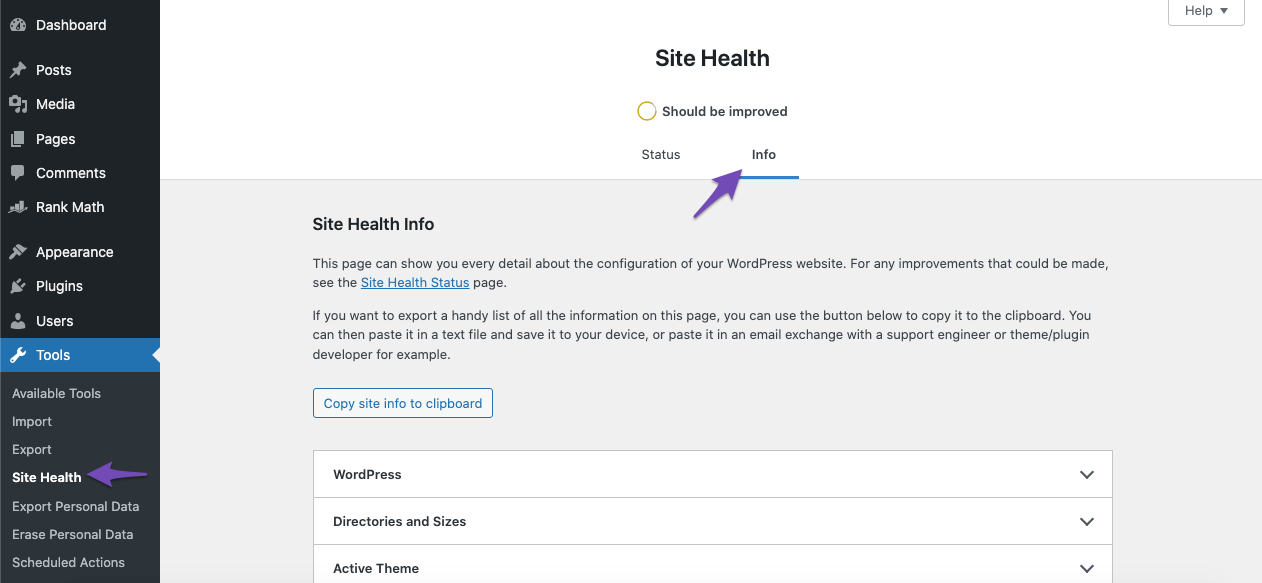
- Slow Loading Sitemap: If your sitemap loads slowly, it could be due to insufficient server resources. You can check your server configurations under Tools → Site Health → Info in your WordPress dashboard.
Regarding the favicon not showing up in Google, ensure that it is correctly set in your website’s settings and that it is accessible publicly. Sometimes, it may take time for Google to index changes made to favicons.
If you continue to experience issues after checking these points, please reply to this ticket, and a human agent from the Rank Math Support team will assist you further.
Thank you for your patience!
Sources:
Rank Math Sitemap Issues and Their Fixes » Rank Math
Why Did My Website Disappear From Google Search? » Rank MathHey there,
Thanks for reaching out to Rank Math support.
We’ve gone through all your sitemaps and they seem to be working just fine. So, it’s okay to ignore the ‘Couldn’t fetch’ status on your category sitemap. Sometimes, Google may show this incorrectly.
As for the favicon issue, we checked the version of your site that’s currently indexed on Google cache and it looks like Google knows about your logo and favicon but isn’t displaying it for some reason. This can happen if your website is relatively new to Google. Eventually, the logo should start to appear.
We hope this clears things up. Let us know if you have any other questions or concerns.
Hi,
Thanks for replying, it still think their is something wrong. Look at the indexed pages for example I have over 50 pages on my site and it’s only showing 7 in total. I’m also using a nginx server and I’ve been in contact with my hosting provider to adjust my website for rankmath. I don’t know if something went wrong there maybe? Is it possible to check? And regarding the favicon, I’ve had the site for a long time it should be showing by now.Hello,
1. Please submit the affected posts/pages that aren’t indexed on the SERP to your Google Search Console’s URL inspection tool and share a screenshot of the report here.
2. For your sitemap, try applying this configuration to your server and see if this helps: https://rankmath.com/kb/xml-sitemaps-nginx/
Also, try flushing the Sitemap cache by following this video screencast:
https://i.rankmath.com/pipRDpThen, exclude the Sitemap files of the Rank Math plugin in your caching plugin. The cache could be via a plugin or from the server. For plugins or Cloudflare, please follow this article:
https://rankmath.com/kb/exclude-sitemaps-from-caching/You can also apply the following filter code to your site.
add_filter( 'rank_math/sitemap/enable_caching', '__return_false');Here’s how you can add filter to your WordPress site:https://rankmath.com/kb/wordpress-hooks-actions-filters/
After doing all that, remove all your sitemaps from your GSC and submit only the primary sitemap (
https://yourdomain.com/sitemap_index.xml).3. Please note that our plugin doesn’t control the favicon, it is usually your theme that is generating the favicon so you need to make sure that your favicon is properly configured. You may check with your theme author for that or you may refer to this guide: https://rankmath.com/kb/wordpress-favicon/.
Even so, it is up to Google to decide if they wish to insert the icon on the SERP, it will depend on several factors, and website authority is one of those factors.https://developers.google.com/search/docs/appearance/favicon-in-search
Looking forward to helping you.
Ive done all those steps but its still not working. My about us page is not getting indexed and none of my products are getting indexed. I have over 50 pages on my website and google search console can only view 7.
https://imgur.com/a/NrnLRtLHello,
Your sitemap is working fine and Google is able to read it without any issues. For the category sitemap, please confirm whether the issue is still present even after resubmitting it.
Please use the Request Indexing option of the URL inspection tool for the About Us page and wait for Google to crawl it. It can take some time for Google to discover and crawl all the URLs from the sitemap based on the crawl budget they have assigned to your site.
Let us know how that goes. Looking forward to helping you.
still not working, smy about us page wont get indexed for example
Hello,
Sometimes, Google may not index a page if it deems the content to be low-quality, duplicate, or not unique enough. Ensure that your About Us page has valuable, unique content that clearly communicates your brand’s message.
Also, ensure that your About Us page and other key pages are linked from other high-authority pages within your site. This can help Google discover and prioritize these pages for indexing.
We hope this helps.
Thanks.
Hello,
Since we did not hear back from you for 15 days, we are assuming that you found the solution. We are closing this support ticket.
If you still need assistance or any other help, please feel free to open a new support ticket, and we will be more than happy to assist.
Thank you.



The ticket ‘Sitemap not working properly.’ is closed to new replies.