Hello,
We apologize for the issue you are facing with the formatting on your website after moving it to the main domain. It seems that the warning from Rank Math regarding the URL change may have caused some conflicts with your site’s formatting.
To resolve this issue, we recommend the following steps:
-
Ensure you are using the latest version of Rank Math. You can check for updates in your WordPress dashboard.
-
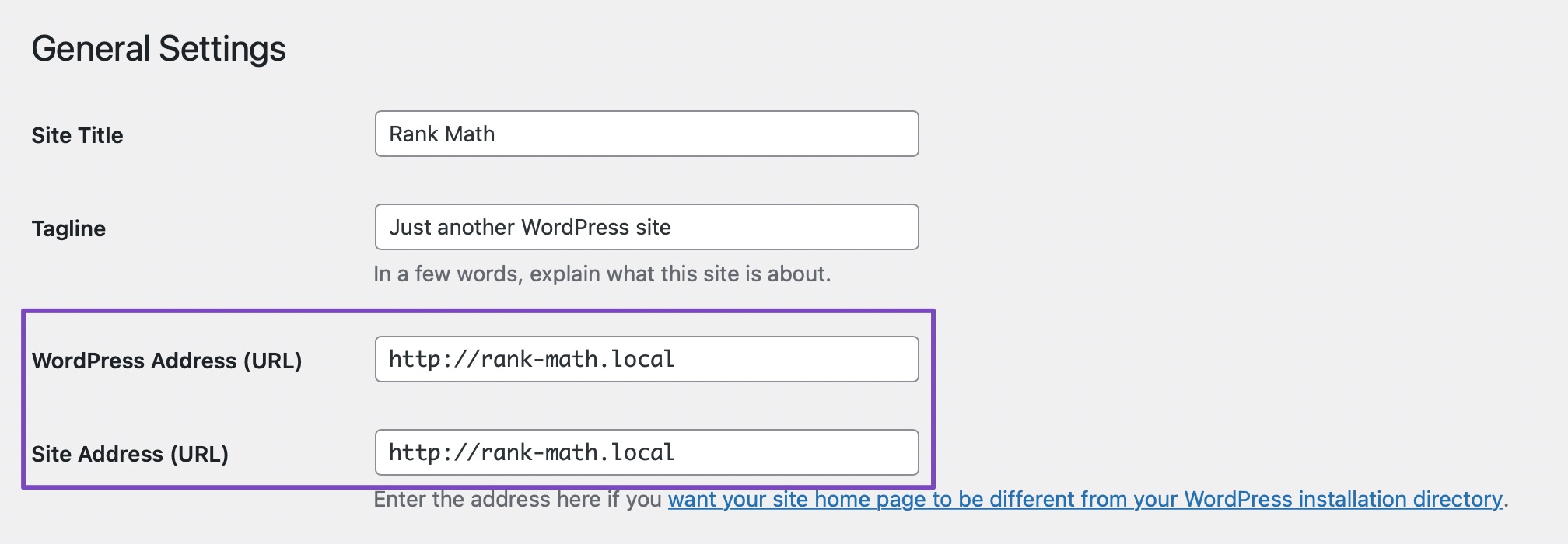
Verify that the WordPress URL and Site URL are the same. Navigate to WordPress Dashboard → Settings → General and ensure both URLs match. This is crucial for a proper connection.
-
Disconnect and reconnect your Rank Math account. This can sometimes resolve issues related to URL changes. You can find instructions on how to do this here.
-
Clear your browser, website, and site-level cache. Sometimes cached data can cause formatting issues after making changes.
-
If the problem persists, you can add a filter to your website to bypass the URL check temporarily:
/**
* Filter whether we need to check for URL mismatch or not.
*/
add_filter( 'rank_math/registration/do_url_check', '__return_false' );
You can refer to our guide on how to add the filter to your site.
If you follow these steps and still encounter issues, please reply to this ticket, and a human agent from the Rank Math Support team will assist you further.
Thank you for raising this concern, and we hope to help you get Rank Math working smoothly again!
Sources:
How to Fix Problems While Connecting Account Using Rank Math » Rank Math
I am facing the same issue on the website of my client which is thepicsartsapk.com.
Please suggest a solution to me as well.
Thank you in advance.
Hello,
@picsart Please share the formatting issue you are referring to so we can check and advise accordingly.
You can share the screenshot with and without Rank Math activated on your site so we can see the difference.
You can upload screenshots using this tool and add the link here.
Looking forward to helping you.
I followed the steps above provided by the bot and that seemed to sort it, even though I didn’t do anything different to what I had done when it happened, no idea but all good now!
Thank you!
Hello,
We are super happy that you resolved the issue.
If you have another question in the future, please feel free to create a new forum topic, and it will be our pleasure to assist you again.
Thank you.
Hello,
Since we did not hear back from you for 15 days, we are assuming that you found the solution. We are closing this support ticket.
If you still need assistance or any other help, please feel free to open a new support ticket, and we will be more than happy to assist.
Thank you.





