
-
Hi ,
My problem is : when i set canonical link for my post it does not work on keywords of the post and the keywords have the canonical problem in search engine !
please let me know what should i do ?
Best Regards
Majid

-
Hello,
We apologize for the issue you are facing with the canonical settings in Rank Math. To resolve the problem with your canonical link not working correctly, you can try the following steps:
1. Choose a Different Canonical URL
You can set a different canonical URL for your post using the Rank Math meta box. Here’s how:
- Go to the post or page you want to edit.
- In the Rank Math meta box, navigate to the Advanced tab.
- In the Canonical URL field, enter the URL you want Google to index.
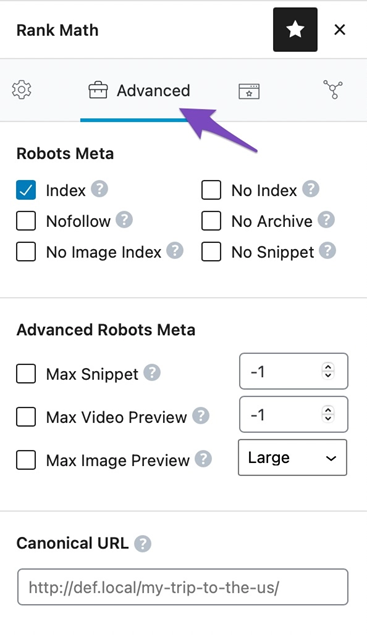
If you cannot find the Advanced tab, please enable the advanced mode from WordPress Dashboard > Rank Math > Dashboard.
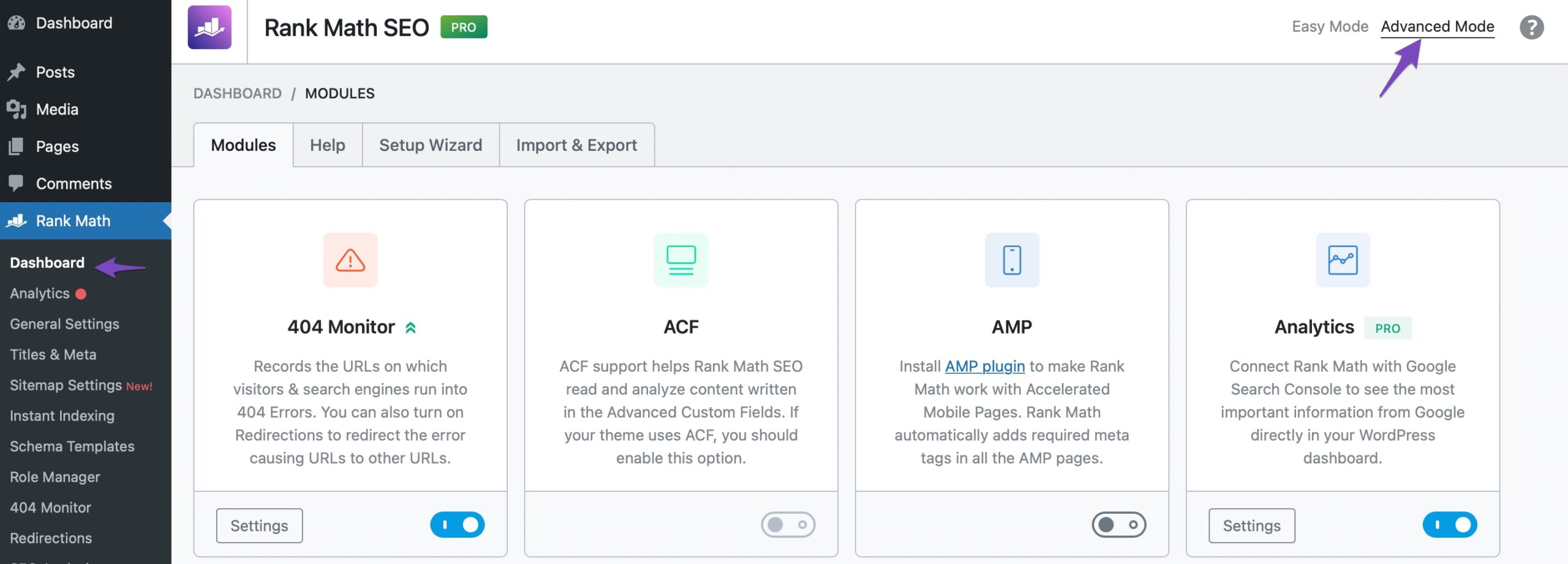
2. Add a 301 Redirect
If you want to ensure that traffic is directed to your canonical URL, consider adding a 301 redirect from the non-canonical URL to the canonical URL:
- Go to Rank Math > Redirections in your WordPress admin dashboard.
- Create a new 301 redirect by entering the non-canonical URL as the Source URL and the canonical URL as the Destination URL.
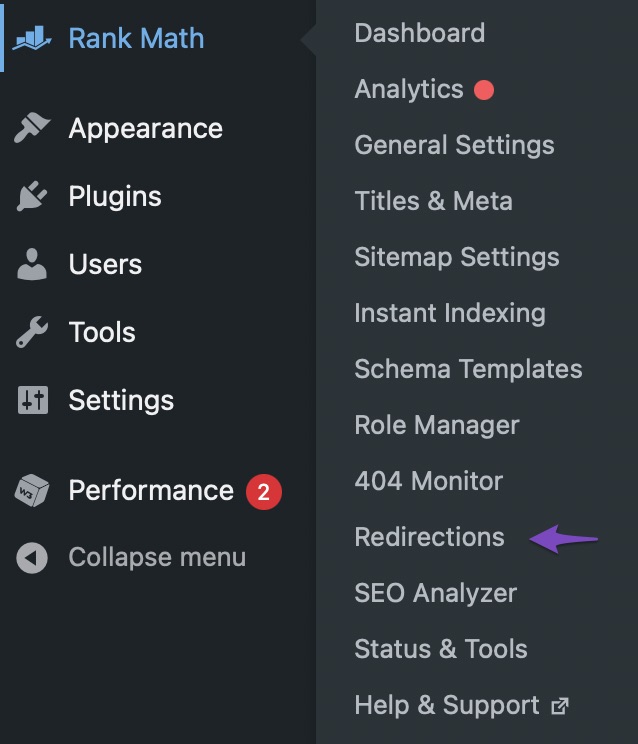
Once you’ve made these changes, save your settings and allow some time for Google to re-index your page with the new canonical URL.
If you continue to experience issues, please reply to this ticket, and a human agent from the Rank Math Support team will assist you further. Thank you for raising this concern!
Sources:
How to Fix “Duplicate, Google Chose Different Canonical than User” » Rank Mathi submited a ticket to have support from human to solve my problem ! before i submit the ticket i talked wit robot and real the articles! butthey are not for my my problem
Hello,
Thank you for your query and we are so sorry about the trouble this must have caused.
Can you please explain your concern with the canonical and keywords in detail? Please share some screenshots if you’re able to.
Please note that if you change the canonical URL of your post to point to a different URL, the post will not be indexed at all so keywords don’t matter now here. Please explain what you meant when you say “when i set canonical link for my post it does not work on keywords of the post”.
Looking forward to helping you.
Hi there ,
Thank you very much for your reply but I did not undrestand your explain. cause when we set canonical link for a post we say to robots the main page for ranking is the cononical link!So now my problem is :
I need to know why when i set canonical link for a post it does not set automatical to its keywords and I have problem with search consol on this issueanother problem is on the feeds
the feeds have canonical problem in search consol and there is no any option for setting of canonical and rss in the plugins.
So please help me what should i do to set canonical link automatical to the keywords of the a post when i set canonical link for a post !
and how can add canonical link to rss feed link
for example i can send you a link :
https://bhowco.de/tag/fakuma-show-2024/feed/at this link i have problem canonical error in search consol but i already set the canonical link to the post ! and the post got index now but for feed and keywords have problem of canonical !
Thank you so much in advance for your help
Best Regards
Majidmore explain :
I have a main page that serves as an overview/introduction to the international trade fairs in Germany.
Then I have numerous individual posts that dive deeper into each specific trade fair event.
I’ve applied canonical tags on these individual posts to point back to the main overview page.
This is a completely valid and recommended use of the canonical tag. The purpose is to signal to search engines that the main overview page is the “canonical” or preferred version, even though I have detailed posts on each event.The key points are:
The individual posts are not duplicate content, they are unique articles on each trade fair.
The canonical tag helps avoid any potential issues of the posts outranking the main overview page.
Based on your Google Search Console check, it seems the posts are being properly indexed despite the canonical tag.
So in your case, the use of the canonical tag is appropriate and should not prevent the individual posts from being indexed or ranked.For Example: the post link with canonical link : https://bhowco.de/fakuma-2024/
it is indexed as same as all posts with canonical link !and now my problem is for the keywords and the feeds of this post that have canonical error cause they have no any canonical link !
Hello,
By default, Rank Math uses the current post/page URL as the canonical URL, so you would only need to alter this setting if you wish to change it to something else. This is also known as a self-referencing canonical.
When you set a canonical tag for a post, it indicates to search engines that the primary or preferred version of the content is the canonical URL. Ideally, Search engines would not index pages having a different canonical URL (not self-referencing).
Also, the canonical tag does not automatically set keywords or change keyword associations. Keywords will be associated with the URL that search engines see as the canonical one. If you want specific keywords to be recognized under the canonical URL, ensure that those keywords are present and optimized on the canonical page itself.
2. RSS feeds typically don’t require canonical tags. Feed URLs are not created for humans but for RSS feed crawlers and readers. They are only basic code versions of your actual content pages.
Those are not meant to be indexed and hopefully, you won’t want these pages to be indexed as Google doesn’t like them on its SERPs and would most likely not show them to users anyway.
In this case, please add this rule to your
robots.txtto disallow them from being crawled:User-Agent: * Disallow: */feed/Here’s how you can edit the
robots.txtfile using Rank Math:
https://rankmath.com/kb/add-sitemaps-to-robots-txt/#num-2-2-navigate-to-edit-robots-txtThis should save your crawl budget and after the next few crawls, the warnings should be removed from GSC.
If the problem persists after these adjustments, please share more details or screenshots of the specific errors you’re seeing in Google Search Console. This will help us provide more targeted assistance.
We hope this helps.
Thanks.
Hi there ,
Thank you very much for your help. but still have problme cause i have no control to manage feed pages.The problem is now fro the results of search consol on my request in robots.txt
It is done but change the category of the problem in search consol not delet them !
And now search consol show all the problems in category of :
Blocked by robots.txt🙁
how can I manage to say never index feed anddelet the all feed linksin search consol. i need just no indexthem
thank you in advance for your attention and help
best regards
MajidHello,
As we stated previously, to prevent feeds from being indexed, adding the
Disallow: */feed/rule to your robots.txt file is the correct approach. However, if you still see issues in Google Search Console, those warnings should disappear after some time as Google re-crawls and updates its index.2. Handling Search Console Errors: The “Blocked by robots.txt” message indicates that Google has acknowledged your request to not crawl these URLs. You can use the URL inspection tool to discover where Google is discovering those URLs.
Please allow some time for these changes to take effect.
Hope that helps, and please do not hesitate to let us know if you need our assistance with anything else.
Hello,
Since we did not hear back from you for 15 days, we are assuming that you found the solution. We are closing this support ticket.
If you still need assistance or any other help, please feel free to open a new support ticket, and we will be more than happy to assist.
Thank you.



The ticket ‘problem with Rankmath on canonical setting’ is closed to new replies.