Hello,
We apologize for the issue you are facing. It sounds like you are looking for assistance with redirecting old blog posts to a new URL after rebranding.
Rank Math can help with setting up redirections for your client’s old posts to ensure that visitors are directed to the new URLs without losing traffic. You can easily set up these redirections using the Rank Math plugin, which is designed to manage SEO and redirection tasks effectively.
To enable automatic post redirection in Rank Math, you would need to activate the Redirections module in the WordPress dashboard. Here’s a brief overview of how to do it:
- Go to WordPress Dashboard → Rank Math SEO → Dashboard.
- Activate the Redirections module.
- Navigate to WordPress Dashboard → Rank Math SEO → General Settings → Redirections and enable the Auto Post Redirect option.
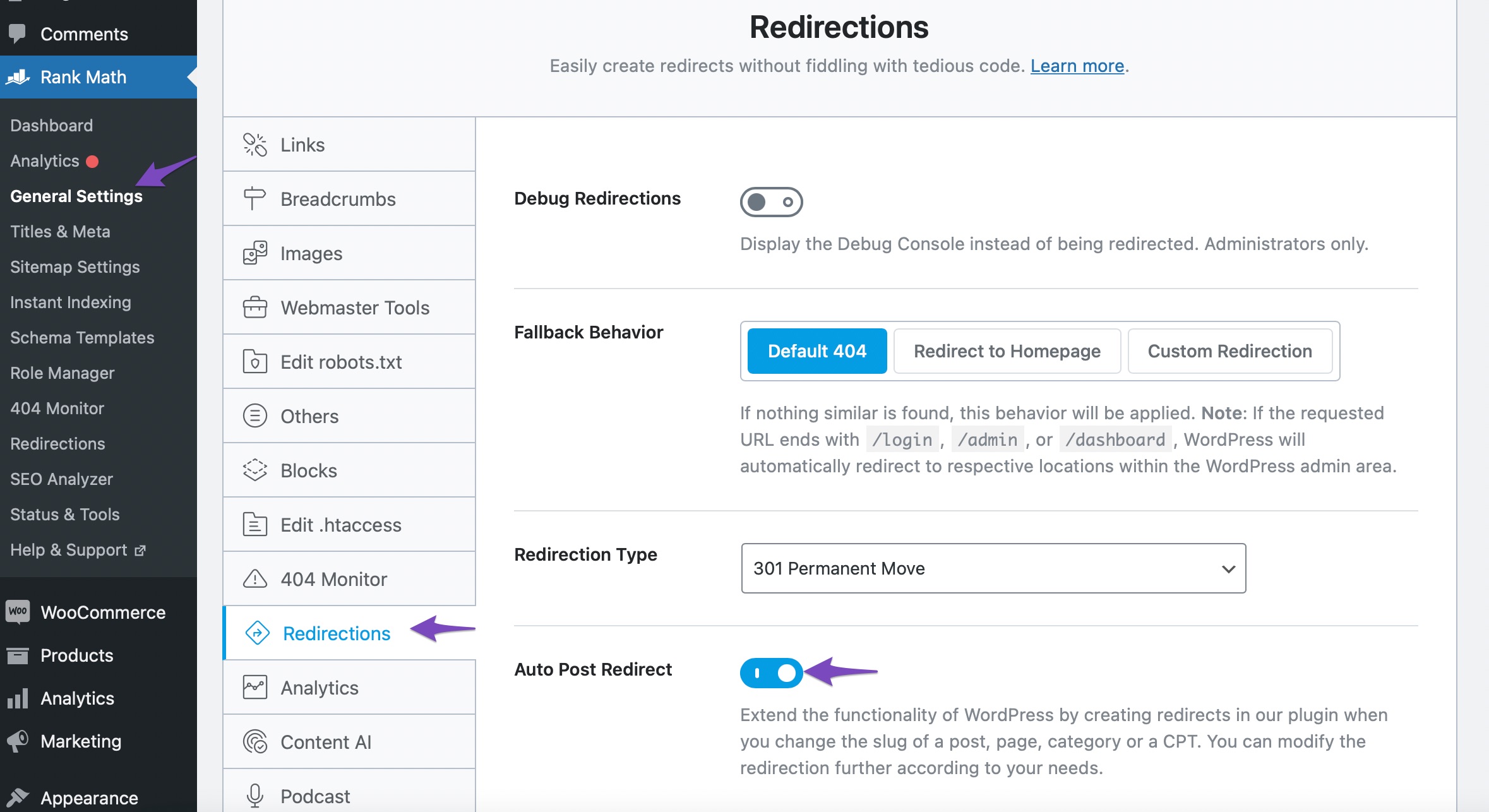
For detailed instructions, you can refer to our article on how to redirect posts after changing URLs.
Regarding pricing, you can find more information about Rank Math’s pricing plans on our website.
If you have further questions or need specific assistance, please reply to this ticket, and a human agent from the Rank Math Support team will take over and provide the help you need.
Thank you for raising this concern!
Sources:
How to Redirect Posts After Changing URLs » Rank Math
Hi, is there anyone at Rankmath who would be able to assist with this?
Hello,
Thank you for contacting Rank Math support.
I’m afraid we cannot cc’ another email on this ticket, if you need email support you can reach out to s******@r***********.
Yes, we can help you add the .htaccess code to your client’s website if you share the website access with us as well as the old and new URLs. Regarding pricing, the .htaccess editing feature is available on the free plan of the plugin but if you want to access more features by using the Rank Math PRO plan, the pricing is available here: https://rankmath.com/pricing/
Hope this helps.
Okay thanks for this info. I just want to make sure I’m understanding so I can pass this on to my client. So if she uses Rankmath, one of your reps can help her with the redirection process? And if so, should we wait to change her url until the redirections are done? Or do we change her url and then Rankmath can help? I just don’t want to mess anything up. Thanks in advance.
Also, for what she needs, would it be covered under your free plan? Again, she wants to have her old posts redirect to the new blog that will have a new domain url name. Thanks again.
Hello,
Yes, your client can contact us anytime for assistance with the redirects.
And if so, should we wait to change her url until the redirections are done?
The redirection should be done after changing the URLs, but the redirect can be created beforehand as you can deactivate/activate it in Rank Math.
Also, for what she needs, would it be covered under your free plan?
Yes, we can assist with the redirections even if the account is under the free plan.
Looking forward to helping you.
Hello,
Since we did not hear back from you for 15 days, we are assuming that you found the solution. We are closing this support ticket.
If you still need assistance or any other help, please feel free to open a new support ticket, and we will be more than happy to assist.
Thank you.




