Hello,
We apologize for the issue you are facing with the FAQ scripts crashing your site. Unfortunately, the context provided does not contain specific information regarding FAQ scripts or issues related to them.
For the SEO Analyzer issue, we also do not have details on that in the context. We recommend replying to this ticket with more specific information about the errors you are encountering, and a human agent from the Rank Math Support team will be able to assist you further.
Thank you for raising this concern, and we look forward to helping you resolve these issues!
Hello,
Thank you for contacting us and sorry for any inconvenience that might have been caused due to that.
Could you please share a screencast of the issue by using a tool like https://loom.com so that we can check this further for you? A visual representation of the issue will help us to understand it better.
In case, you’re facing any critical error, please share the error log with us.
Having the error log file will give a clear idea of why this might be happening.
You can follow this guide to enable debugging in WordPress https://wordpress.org/support/article/debugging-in-wordpress/ or you can get in touch with your web host, and they will help you locate the log file.
Looking forward to helping you.
Thank you.
Hello,
I have updated the sensitive data as requested. Can you please check further?
Thank you.
Hello,
The video you shared only showed the issue with the SEO Analyser and excluded that of the FAQ. Has this been resolved?
In the meantime, we checked your site using the Rank Math SEO External Analyser and the analysis was completed. You can try it here: https://rankmath.com/tools/seo-analyzer/
Please clear your browser cache and head over to WordPress Dashboard > Rank Math > Status & Tools > Database Tools and click on the Clear SEO Analyzer button to flush SEO Analyzer data.
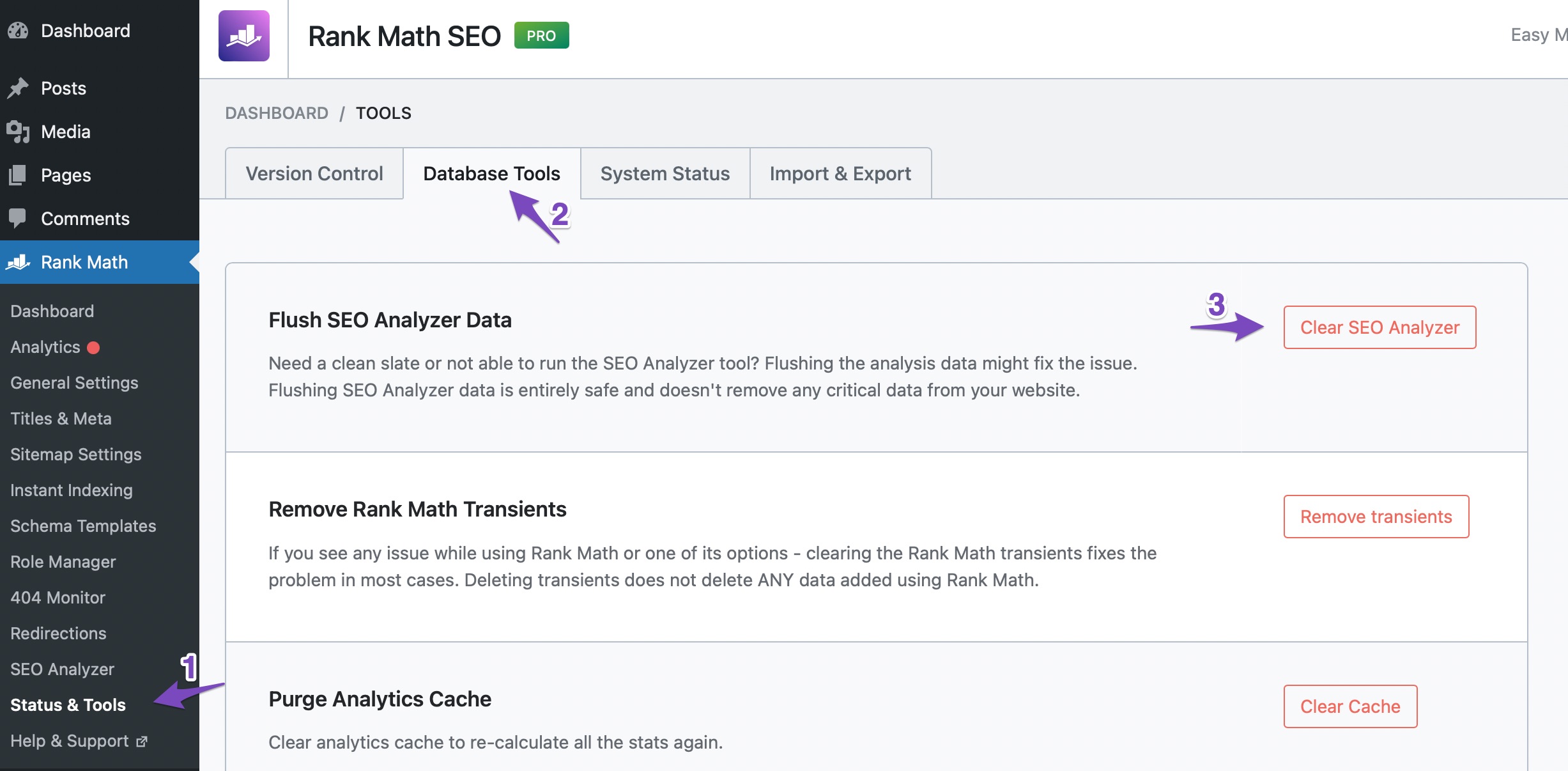
After this run a fresh SEO analysis. That should fix the issue.
Hope this helps. Let us know if you need any other assistance.
Dear Support,
For the FAQ I switched to another plugin.
For the SEO Analyzer, the error remains the same even after following the steps:
Please clear your browser cache and head over to WordPress Dashboard > Rank Math > Status & Tools > Database Tools and click on the Clear SEO Analyzer button to flush SEO Analyzer data.
Hello,
Thank you for contacting Rank Math support.
Please contact your host and request them to whitelist the IP address 46.30.211.100 and the following user-agent to see if that resolves the issue:
RankMathApi/2.0.2; https://rankmath.com
For more details on this matter, please visit the following URL: https://rankmath.com/kb/api-http-400-error/
If the problem persists, kindly share your website URL with us so that we can further investigate.
Let us know how it goes. We are eager to assist you.
Thank you.
Hello,
Since we did not hear back from you for 15 days, we are assuming that you found the solution. We are closing this support ticket.
If you still need assistance or any other help, please feel free to open a new support ticket, and we will be more than happy to assist.
Thank you.





