Hello,
We apologize for the issue you are facing with the 500 Server Error when trying to save a page in Elementor with the Rank Math plugin active. This error can be caused by various factors, and since you’ve already checked the PHP memory limit, here are a few other things you can investigate:
-
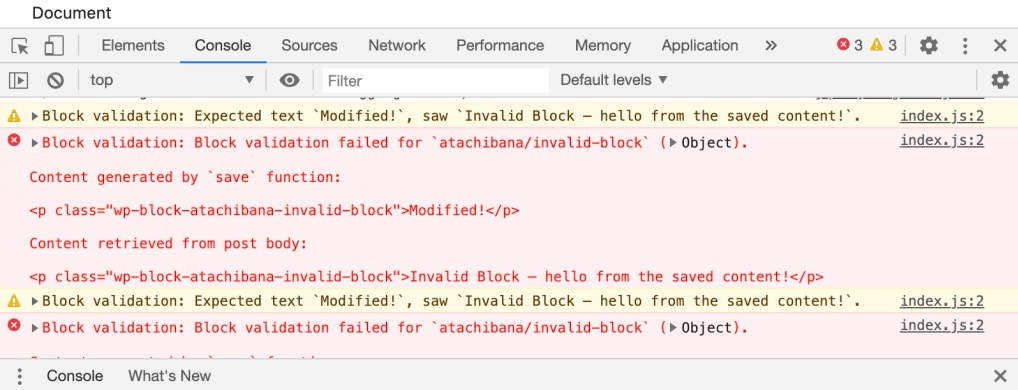
JavaScript Conflicts: Sometimes, JavaScript conflicts between plugins or themes can cause issues. You can check the browser’s console for any JavaScript errors that might provide more insight into the problem. If you find any errors, consider reaching out to the respective support forums for those plugins or themes.
-
Firewall Settings: If you are using a firewall, it might be blocking certain requests from Rank Math. Check if Rank Math is being blocked and whitelist it if necessary. Look for blocked access to files like:
/wp-json/rankmath/v1/updateMeta/wp-json/rankmath/v1/updateSchemas/wp-json/rankmath/v1/updateRedirection/wp-json/rankmath/v1/getFeaturedImageId/wp-json/rankmath/v1/getHead
-
ModSecurity: Sometimes, ModSecurity can block requests from plugins like Rank Math. You may want to contact your hosting provider to temporarily disable ModSecurity and see if that resolves the issue.
-
Plugin Conflicts: There could be a conflict with another plugin. Try deactivating other plugins one by one to see if the issue persists when Rank Math is active.
If these steps do not resolve the issue, please reply to this ticket, and a human agent from the Rank Math Support team will take over and assist you further.
Thank you for bringing this concern to our attention!
Sources:
Why Your SEO Title, Description & Focus Keyword Aren’t Being Saved » Rank Math
Why Rank Math Settings Are Not Getting Saved? » Rank Math
Hello,
Thank you for contacting us and we are sorry for any inconvenience that might have been caused due to that.
Can you please share the error log with us?
Having the error log file will give a clear idea of why this might be happening.
You can follow this guide to enable debugging in WordPress https://wordpress.org/support/article/debugging-in-wordpress/ or you can get in touch with your web host, and they will help you locate the log file.
Looking forward to helping you.
Thank you.
Hello,
Since we did not hear back from you for 15 days, we are assuming that you found the solution. We are closing this support ticket.
If you still need assistance or any other help, please feel free to open a new support ticket, and we will be more than happy to assist.
Thank you.



