Hello,
We apologize for the issues you are facing after switching to Rank Math. It’s understandable to be concerned about the alerts from Google Search Console regarding indexing and 404 errors.
Here are a few steps you can take to troubleshoot and resolve these issues:
-
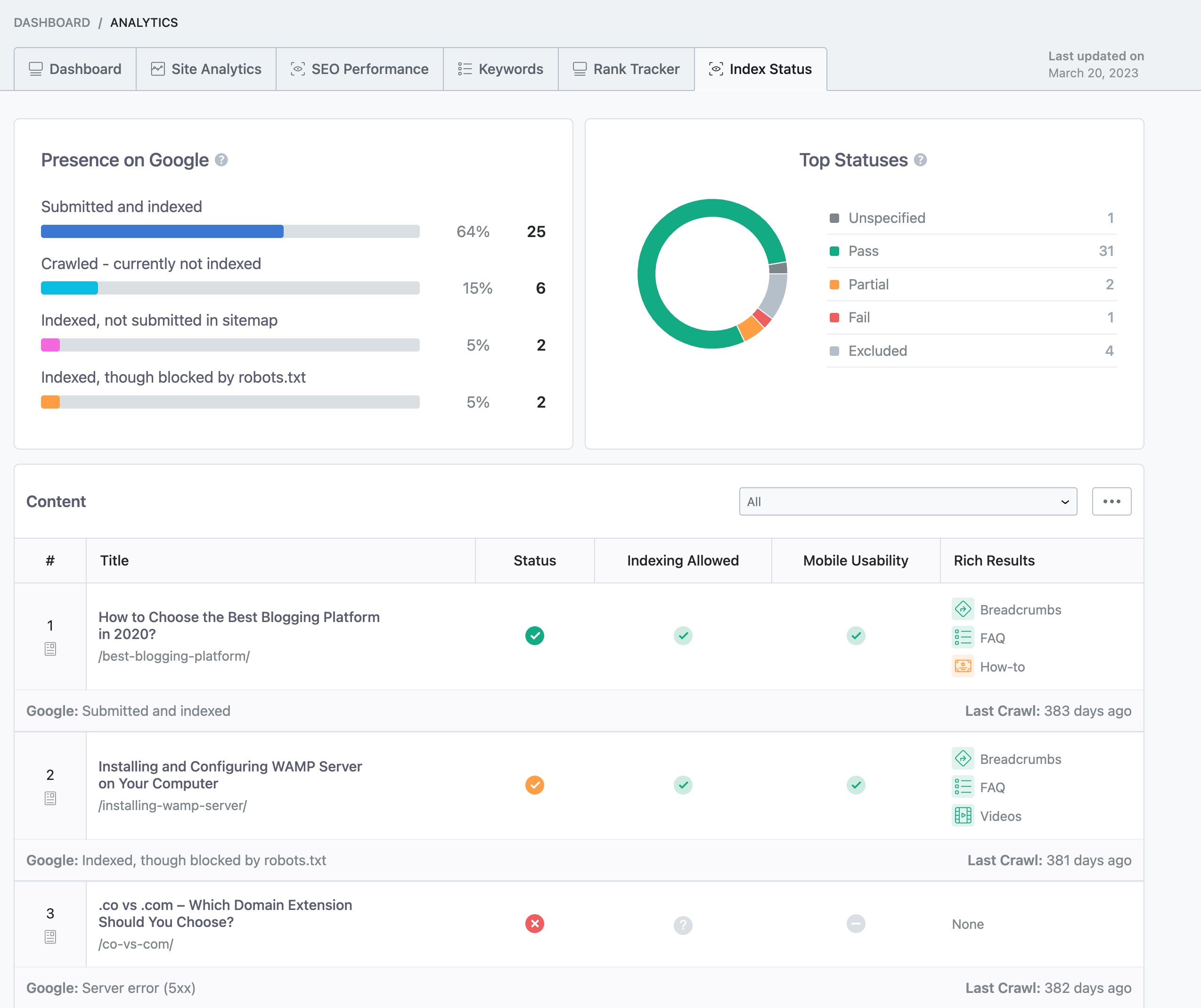
Check Indexation Status: Use Google Search Console to monitor your website’s indexation status. This tool will show you any errors that Google has encountered while trying to crawl and index your site. You can also check the Index Status report in Rank Math’s Analytics by navigating to Rank Math SEO → Analytics and clicking on the Index Status tab. This will provide you with real-time data about your pages’ presence on Google.
-
Review 404 Errors: If you are seeing 404 errors, it may be due to URLs that no longer exist or were not properly redirected during the import process. You can manage these errors in the Redirection Manager within Rank Math. If the errors are not affecting user experience, you may choose to delete them from the Redirection Manager.
-
Importing Redirects: If you had redirects set up in Yoast SEO, ensure that they were imported correctly. If you are having trouble importing redirects, it might be due to using an older version of Rank Math. Make sure you are using the latest version of Rank Math for the best experience.
-
Check for Plugin Conflicts: Sometimes, other plugins can conflict with Rank Math. You can run a plugin conflict test to see if any other plugins are causing issues with Rank Math.
-
Fix Errors Promptly: If you find any errors in Google Search Console or Rank Math, make sure to address them as soon as possible to improve your site’s indexation and overall SEO performance.
If you continue to experience issues after following these steps, please reply to this ticket, and a human agent from the Rank Math Support team will assist you further.
Thank you for raising this concern, and we hope to help you resolve it soon!
Sources:
Why Did My Website Disappear From Google Search? » Rank Math
Hello,
Thank you for contacting us and sorry for any inconvenience that might have been caused due to that.
The issues you’re facing are pretty common. We have published in detail guidelines for those errors which you can try to follow and see if that works for you:
Excluded by NoIndex Tag:
https://rankmath.com/kb/excluded-by-noindex-tag/
Page With Redirect:
https://rankmath.com/kb/page-with-redirect/
No found (404):
https://rankmath.com/kb/find-the-souce-of-404-errors/
Alternate Page with Proper Canonical Tag:
https://rankmath.com/kb/alternate-page-with-proper-canonical-tag/
Duplicate, Google Chose Different Canonical than User:
https://rankmath.com/kb/duplicate-google-chose-different-canonical-than-user/
If the issues persist, please try to share the affected URLs for the exact errors so that we can check them further for you.
Let us know how it goes. Looking forward to helping you.
Thank you.
Hello,
Since we did not hear back from you for 15 days, we are assuming that you found the solution. We are closing this support ticket.
If you still need assistance or any other help, please feel free to open a new support ticket, and we will be more than happy to assist.
Thank you.



