Hello,
We apologize for the issue you are facing with the persistent notification about the new post type. It can be frustrating when notifications keep reappearing despite attempts to dismiss them.
To resolve this, please try the following steps:
- Clear your browser cache to ensure that any cached data is not causing the notification to persist.
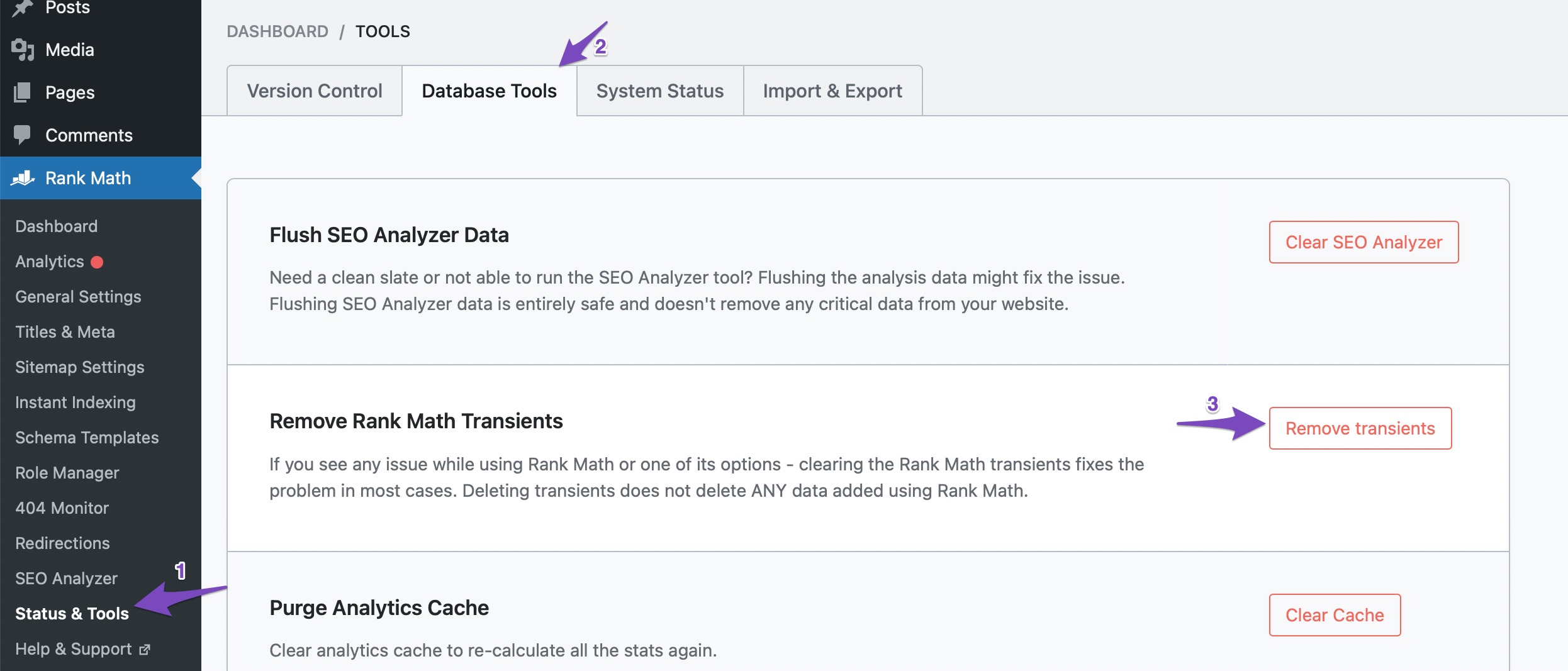
- Navigate to Rank Math SEO → Status & Tools → Database Tools in your WordPress dashboard.
- Click on Remove Transients. This action should help in clearing any temporary data that might be causing the notification to reappear.
If you have already tried these steps and the notification still appears, please reply to this ticket, and a human agent from the Rank Math Support team will take over and assist you further.
Thank you for raising this concern, and we appreciate your patience as we work to resolve it!
Sources:
We Detected New Post Type(s) » Rank Math
Thank you, I see this advice over and over again too. Talking to a human would be nice.
Hello,
Thank you for contacting us. We apologize for any inconvenience this issue may have caused.
Our plugin only shows the notification if a theme or plugin registers post types. Please navigate to WP Dashboard > Rank Math SEO > Status & Tools > Database Tools and use the Remove Rank Math Transients option. Once done, clear your site cache and dismiss the notification again.
If the issue persists, we might need to take a closer look at the settings. Please edit the first post on this ticket and include your WordPress logins in the designated Sensitive Data section.
Please do take a complete backup of your website before sharing the information with us.

It is completely secure and only our support staff has access to that section. If you want, you can use the below plugin to generate a temporary login URL to your website and share that with us instead:
https://wordpress.org/plugins/temporary-login-without-password/
You can use the above plugin in conjunction with the WP Security Audit Log to monitor what changes our staff might make on your website (if any):
https://wordpress.org/plugins/wp-security-audit-log/
We really look forward to helping you.
Hello, yes the problem persisted after your solution. However, I managed to close the notifications eventually. Unfortunately, I’m not exactly sure how. I deactivated several plugins that I suspected might be causing a conflict with Rank Math and then successfully closed the notification and it did not reappear. I then reactivated the plugins. So I won’t post the access details, or you wouldn’t see anything. However, these were WP Rocket, UiPress and ASE. Which one causes the notifications to show up again and again, though, I have no idea.
Hello,
If you start seeing the notice again, please let us know.
Regards,
@till6 Could you help me figure out how you did it? I am having the same issue and I also use WP-Rocket. Perhaps there are other plugins we share in common.
What steps did you do?
I have had the same issue and started a support topic a long time ago but with no results.
Hello @baniwafels,
If you have followed the steps we gave here and the notice still persists on your site, please open a new ticket, describe the situation and share access to your site.
this will enable us to investigate further.
Thanks.
I did all that and have opened a ticket in the past. I would just like to know from this guy what he did. Rank Math support could not help. There is a conflict somewhere but I can’t find it. I want to replicate what Till6 did
edit: or perhaps there is a Github post with a followup. WP-Rocket has everything visible so I supose you guys have that too
Hello @baniwafels,
If the CPTs that appear in the notification are not public, the plugin won’t be able to add them to the known post types so the notification will reappear each time the website is opened.
We don’t know what post types you are referring to since you don’t have any previous tickets opened with us using this account.
If you continue to experience this please open your own ticket and provide the details about the post types so we can verify if they are indeed public or not.
Thank you.





