Subject: Assistance Required: Breadcrumbs Integration Issue with Rank Math

#844245
  • Resolved mubeen khan
    Rank Math free

    Dear Rank Math Support Team,

    I hope this message finds you well.

    I am currently experiencing an issue with integrating Rank Math breadcrumbs on my WordPress site. I have followed the instructions for enabling and configuring breadcrumbs within Rank Math, but they are not displaying as expected on my site.

    Here are the details of the issue:

    Website URL: [https://techfitfusion.online/]
    Theme: Blocksy
    Issue Description: Although I have enabled breadcrumbs in Rank Math and added the necessary code to my theme’s functions.php file, the breadcrumbs are not appearing on my site. I have also verified that breadcrumbs are enabled in the theme settings and cleared all caches.
    I would appreciate your assistance in resolving this issue. Could you please provide guidance on how to correctly integrate and display breadcrumbs with Rank Math and the Blocksy theme? Additionally, if there are any theme-specific configurations or code adjustments needed, please let me know.

    Thank you for your support.

Viewing 2 replies - 1 through 2 (of 2 total)
  • Hello,

    We apologize for the issue you are facing with integrating Rank Math breadcrumbs on your WordPress site. Thank you for providing detailed information about your setup.

    To ensure that breadcrumbs display correctly with the Blocksy theme, please follow these steps:

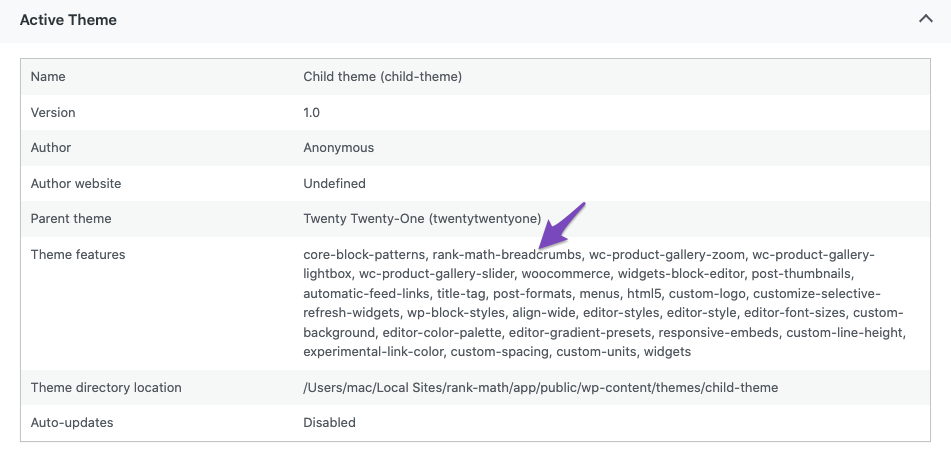
    1. Verify Theme Support: First, check if your theme has native support for Rank Math breadcrumbs. You can do this by navigating to Rank Math SEO → Status and Tools → System Info → Active Theme. Look for rank-math-breadcrumbs in the Theme features section.
      Rank Math Breadcrumbs theme features

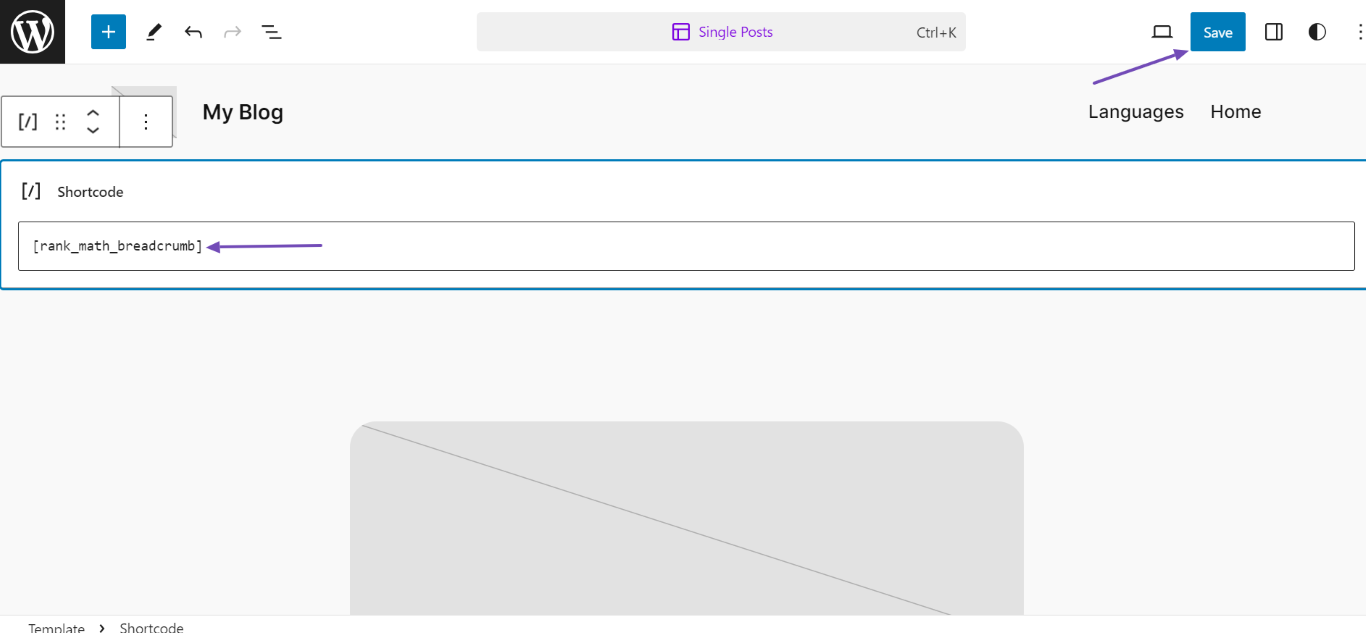
    2. Add Shortcode: If your theme supports it, you can also add the breadcrumbs using a shortcode. Edit the template where you want the breadcrumbs to appear and insert the following shortcode:

      [rank_math_breadcrumb]

      Rank Math Breadcrumbs shortcode

    3. Check Template Files: If you are comfortable editing your theme files, ensure that you have added the following code in the appropriate template file (like header.php or single.php):

      Make sure to use a child theme to avoid losing changes during updates.

    4. Clear Cache: Since you mentioned clearing caches, ensure that you clear any server-side caching as well as browser cache after making changes.

    If you have followed these steps and the breadcrumbs still do not appear, there may be a specific configuration or conflict with another plugin or theme setting. In that case, please reply to this ticket, and a human agent from our support team will assist you further.

    We appreciate your patience and look forward to helping you resolve this issue!

    Sources:
    How to Enable Breadcrumbs on Your Website With Rank Math SEO » Rank Math

    Hello,

    Thank you for contacting us and sorry for any inconvenience that might have been caused due to that.

    You should add the breadcrumbs code to your single.php/single-page.php or header.php file and make sure to add the PHP code on the body of the code, not in the <header> or <footer> tags.

    If the issue persists, then we might need to take a closer look at the settings. Please edit the first post on this ticket and include your WordPress & FTP logins in the designated Sensitive Data section.

    Please do take a complete backup of your website before sharing the information with us.

    Sensitive Data Section

    It is completely secure and only our support staff has access to that section. If you want, you can use the below plugin to generate a temporary login URL to your website and share that with us instead:

    https://wordpress.org/plugins/temporary-login-without-password/

    You can use the above plugin in conjunction with the WP Security Audit Log to monitor what changes our staff might make on your website (if any):

    https://wordpress.org/plugins/wp-security-audit-log/

    Let us know how it goes. Looking forward to helping you.

    Thank you.

    Hello,

    Since we did not hear back from you for 15 days, we are assuming that you found the solution. We are closing this support ticket.

    If you still need assistance or any other help, please feel free to open a new support ticket, and we will be more than happy to assist.

    Thank you.

Viewing 2 replies - 1 through 2 (of 2 total)

The ticket ‘Subject: Assistance Required: Breadcrumbs Integration Issue with Rank Math’ is closed to new replies.