
-
I have opened a ticket for this and tried all the solutions and I checked the firewall thing and it is not the problem please fix it yourself.

-
Hello,
We apologize for the issue you are facing with saving keywords in your WooCommerce product categories. Thank you for raising this concern and for trying the suggested solutions.
Since you’ve already checked the firewall and tried other solutions, it might be helpful to look for any JavaScript-related errors that could be causing this issue. You can do this by opening the Developer Tools Console in your browser and checking for any errors that appear when you try to save the keywords. Here’s how you can do that:
-
Open Chrome Developer Tools by navigating to More Tools → Developer Tools from the Chrome menu or using the keyboard shortcut Ctrl + Shift + J (Windows) or Cmd + Option + J (Mac).

-
Click on the Console tab to view any errors.
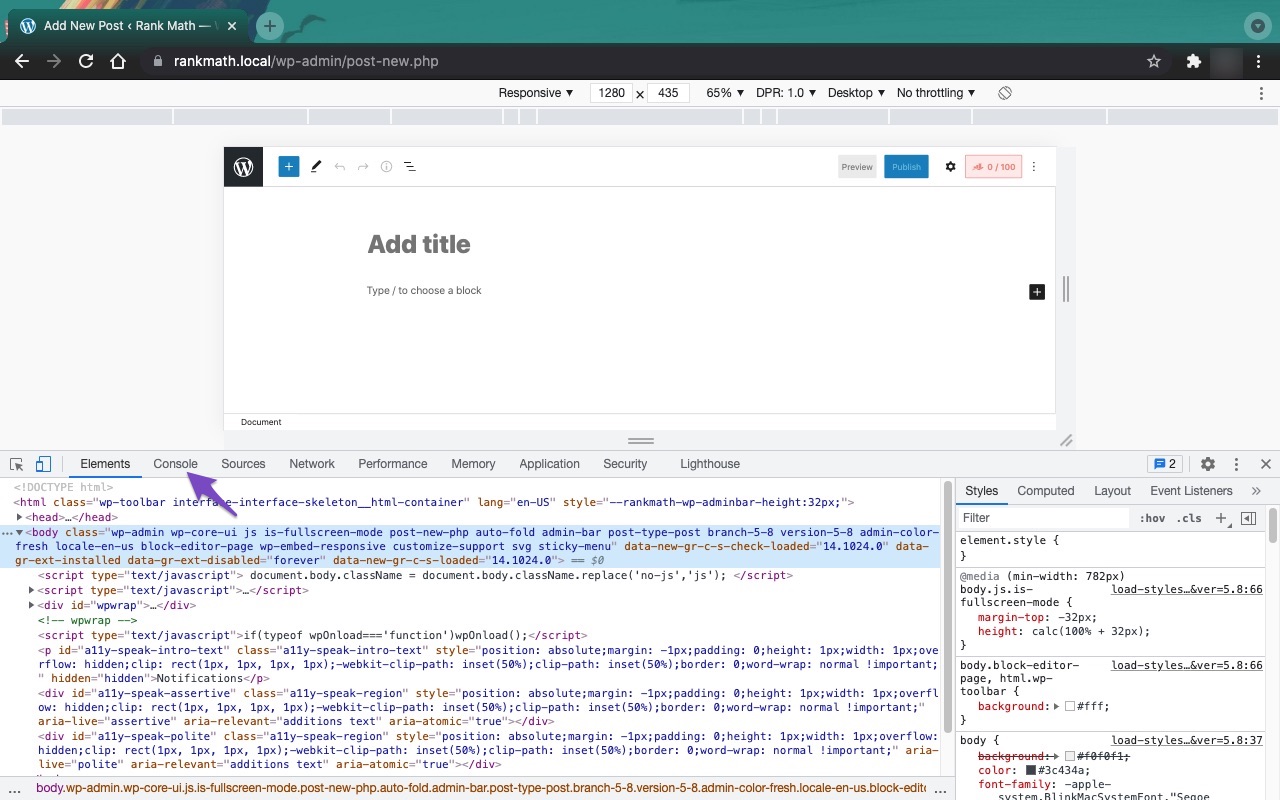
If you see any errors related to JavaScript, it may indicate a conflict with another plugin or theme. You can refer to our knowledgebase article on plugin conflicts for further troubleshooting steps.
If the issue persists, please reply to your ticket with any error details you find, and a human agent from our support team will take over and assist you further.
Thank you for your patience!
Sources:
Why Your SEO Title, Description & Focus Keyword Aren’t Being Saved » Rank MathHello,
I have updated the sensitive data as requested. Can you please check further?
Thank you.
Hello,
Thank you for contacting Rank Math support, and sorry for the inconvenience this may have caused.
We wanted to login to your website but the email address you provided is incorrect.
Please check and provide the correct login details so we can check for you.
In the meantime, the most likely reason your keyword or metadata is not saving is either because of a plugin conflict.
Follow this guide to troubleshoot this issue: https://rankmath.com/kb/meta-data-not-saving/
We hope this helps you solve the problem. If you still can’t update the keyword, please let us know. We’re always happy to help.
Thank you for choosing Rank Math.
I have checked it and it is right, log into the dashboard with the username “admin” and the password is in the sensitive data
Hello,
We investigated this on your website and confirm that your focus keywords are being saved without any issue on both your posts and your products. Please see this video:
Please check again on your end and let us know if we missed anything.
Thank you for your patience and cooperation
Hi, please stay with me. There is no proplem in the posts or products .please
Navigate to products > CATEGORIES > choose anyone and click edit navigate to the bottom where you will find the rankmath section try saving any keyword, it will say that it has saved successfully but IT’S NOTHello,
We’ve replicated the issue and escalated it to our development team for resolution. We will update you here as soon as we have more information.
Thank you for choosing Rank Math.
Hello,
The FTP details are failing with the error:
Connection attempt failed with "EAI_NONAME - Neither nodename nor servname provided, or not known".
could you please correct them so we may troubleshoot further.We look forward to having this issue resolved.
Thank you.
Hello,
I have updated the sensitive data as requested. Can you please check further?
Thank you.
Hello,
It looks like your database has issues and you will need to repair it.
We got these error types when we tried to update a category’s description, even when RankMath was disabled.
WordPress database error Duplicate entry 0 for key PRIMARY for query INSERT INTO.....Thank you.
Hello,
In addition to the above, please reach out to your hosting company and share the error above with them. They should be able to repair the database and resolve the issue.
Let us know how it goes.
Hello,
Since we did not hear back from you for 15 days, we are assuming that you found the solution. We are closing this support ticket.
If you still need assistance or any other help, please feel free to open a new support ticket, and we will be more than happy to assist.
Thank you.
-



The ticket ‘My keywords not saving in woocommerce products categories’ is closed to new replies.