Hello,
I’m sorry to hear that you are facing difficulties connecting your website to Google Search Console via Rank Math. Thank you for providing detailed information about the steps you have taken so far.
Based on the information you provided, it seems like you have already tried the recommended steps of deleting the app’s permissions and reconnecting. Since you are still experiencing issues, I recommend following these additional steps:
- Test Connections: In Rank Math SEO, navigate to General Settings > Analytics. Click on the Test Connections option at the top right of the Analytics settings. This will validate the existing connections with Google Analytics. If there is a glitch in the connection, you will see a red signal. Simply reconnect with your Google account as shown in the image below:
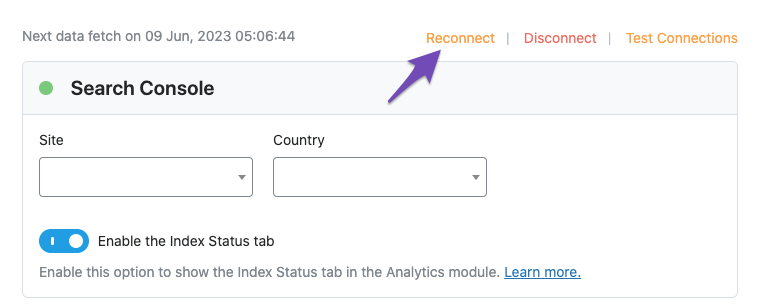
- Open a Support Ticket: If the issue persists even after reconnecting your Google account or if you continue to see a red signal when validating the connection, I recommend opening a support ticket here and sharing the error log with the Rank Math support team.
I hope these additional steps help resolve the issue you are facing with connecting your website to Google Search Console via Rank Math. If you need further assistance, please feel free to reach out.
Best regards.
Sources:
What to Do When Rank Math Analytics Shows Zero Search Traffic » Rank Math
Resolving Rank Math Analytics Related Issues » Rank Math
I have tried to press reconnect since it is showing as Red instead of green `
Hello,
In this case, please follow the steps below to create a troubleshooting log so that we can check the issue further:
Step #1.
First, add the following filter to your website:
add_filter( 'rank_math/analytics/log_response', '__return_true' );
Here is a guide you can follow to add the filter:
https://rankmath.com/kb/wordpress-hooks-actions-filters/
Step #2.
After adding the filter, please run the pending Scheduled Action from your WordPress Dashboard > Tools > Scheduled Actions > Pending:
If in your case, you do not see the Scheduled Actions menu, then you can try visiting the following URL:
https://yourdomain.com/wp-admin/tools.php?page=action-scheduler&status=pending
Ensure that you replace yourdomain.com with your own domain in the above link.

Step #3.
When some actions have completed running, please check the Analytics log under /wp-content/uploads/rank-math and share that with us.
You can use a tool like Dropbox/Pastebin for debug log files and share the generated links here.
Looking forward to helping you.
Hello,
I have updated the sensitive data as requested. Can you please check further?
Thank you.
Hello,
As requested we have deleted/blocked your account on Rank Math. From today, you won’t be able to access the member area on Rank Math. Of course, we’re very sorry to see you go.
Hope that helps.




