Hello,
Thank you for reaching out to us regarding the issue with your blog meta descriptions not displaying in Google search results. We understand the importance of having accurate meta descriptions for your blog posts.
To address this concern, we recommend checking a few key areas to ensure that your meta descriptions are set up correctly and are being picked up by Google:
-
Check What You Have Set Using Rank Math: Verify that you have correctly added the meta descriptions using Rank Math. You can follow the steps outlined in this guide: Check What You Have Set Using Rank Math.
-
Ensure Your Schema Settings Are Valid: Make sure that the Schema settings in Rank Math are configured correctly. You can refer to this guide for detailed instructions: Ensure Your Schema Settings Are Valid.
-
Check the Title/Description Set in the Page’s Source Code: It’s essential to confirm that your title and description are properly set up in the page source code. You can use the method described in this guide: Check the Title/Description Set in the Page’s Source Code.
By following these steps, you can ensure that your meta descriptions are correctly configured and increase the chances of Google displaying them in the search results.
If after checking these areas, the issue persists, please feel free to reply to this ticket, and our support team will assist you further.
Best regards,
Rank Math Support Team
Sources:
Google Shows A Different Meta Title/Description For My Site » Rank Math
How to Show Images in the Search Results » Rank Math
Homepage SEO Settings via Meta Title and Description
Dear Rank Math Support Team,
Thank you for providing the detailed guides. We have thoroughly checked all the areas you mentioned, including:
Meta Descriptions Using Rank Math: We verified that all meta descriptions are correctly added and saved using Rank Math, following the steps in the provided guide.
Schema Settings: We ensured that our Schema settings in Rank Math are configured correctly as per the instructions in your guide.
Title/Description in Page Source Code: We confirmed that the title and meta descriptions are correctly set up in the page source code using the method described in the guide.
Despite ensuring that all settings are accurately configured, we are still experiencing the issue where the meta descriptions are not visible in Google search results for our blog posts on shipturtle.com.
We would appreciate further assistance in resolving this matter as the meta descriptions are crucial for our SEO strategy. Please let us know if there are any additional steps we can take or if you need any further information from our end.
Thank you for your continued support.
Hello,
We’ve checked some of your blog posts, and the max-snippet robots meta tag is set to 1.
The Max Snippet option can be found on our Rank Math SEO Controls inside the page under the advanced tab, and you should set it to -1, which means no limit/unlimited
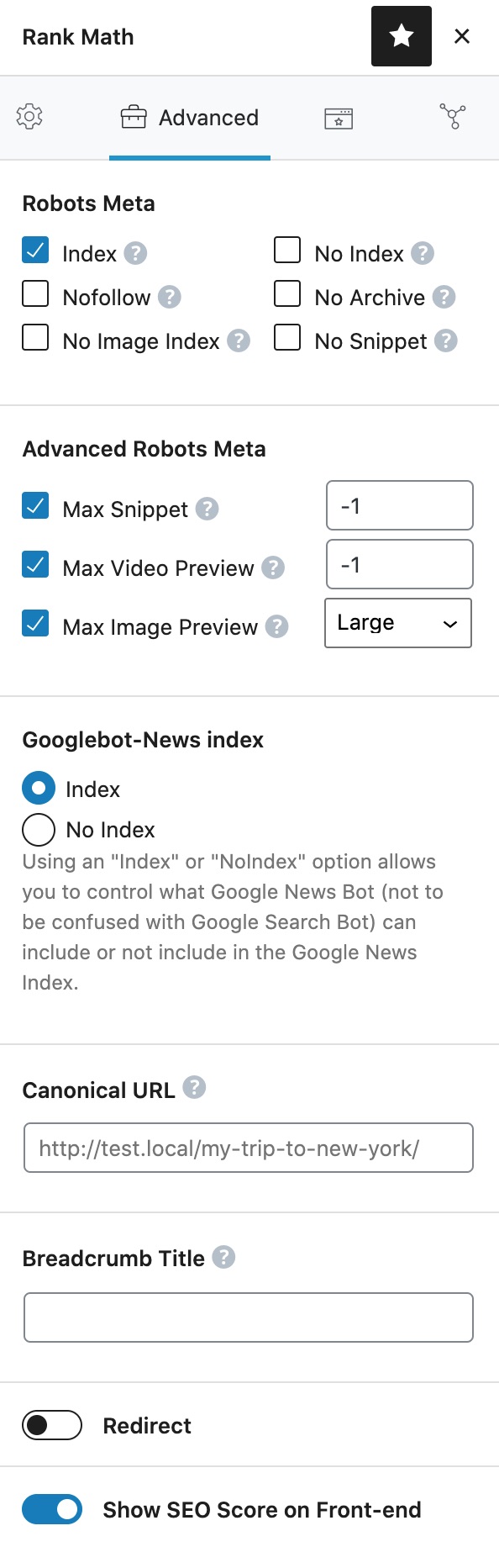
Here’s a link for more information:
https://rankmath.com/kb/advanced-tab/#max-snippet
Hope that helps.
Dear Rank Math Support Team,
Thank you for your response and for pointing out the issue with the max-snippet robots meta tag.
We have looked for the Max Snippet option as suggested, but we are unable to find these settings. For your reference, here is a screenshot of the backend editor for one of our blog pages: https://tinyurl.com/22jwqo9k
Could you please guide us further on how to locate and adjust the Max Snippet settings? Any additional instructions or a step-by-step guide would be greatly appreciated.
Thank you for your continued support and assistance.
Hello,
Please note that some options are only available when you enable the Advanced Mode in Rank Math. If it’s not showing, you must have chosen to use Easy Mode.
You can follow the steps in this link to switch to Advanced Mode:
https://rankmath.com/kb/advanced-mode/
Also, ensure that you have set the default Max Snippet on your WordPress dashboard > Rank Math > Titles & Meta > Global Meta

And in Titles & Meta > Post > Post Advanced Robots Meta

Looking forward to helping you.
Dear Rank Math Support Team,
Thank you for your guidance on switching to Advanced Mode.
We have followed all the steps provided in the link to activate Advanced Mode. The advanced tab is now visible in the posts, and we have set the Max Snippet option to -1 as instructed. Here is the screenshot for your reference: https://tinyurl.com/24hpqzfr
However, the problem persists. The meta descriptions are still not visible for our blog posts when searched on Google.
We would appreciate any further assistance you can provide to resolve this issue.
Thank you for your continued support.
Hello,
Please note that it may take some time for Google to update the meta information on the SERP so please give it some time.
We checked the post’s page source and the correct max snippet value has been added:

Looking forward to helping you.
Dear Rank Math Support Team,
Thank you for confirming that the correct max snippet value has been added and for letting us know that it may take some time for Google to update the meta information on the SERP.
Could you please provide an estimate of how much time it typically takes for these changes to reflect in Google search results? This will help us manage our expectations.
Thank you for your continued support.
Hello,
Unfortunately, there’s no definite time for Google to crawl your site.
According to Google guidelines, crawling can take anywhere from a few days to a few weeks. The crawling and indexing of the website depend on the authority and crawl budget of the website.
You may need to give some time for search engines to recrawl your site to reflect the changes on the search results pages.
Looking forward to helping you.
Hello,
Since we did not hear back from you for 15 days, we are assuming that you found the solution. We are closing this support ticket.
If you still need assistance or any other help, please feel free to open a new support ticket, and we will be more than happy to assist.
Thank you.




