Hello,
I apologize for the issue you are facing with your website not being indexed due to the "noindex" tag error message. Thank you for providing the details about your website and RankMath settings.
To address this issue, please follow these steps:
- Check Rank Math Metabox:
- Open the post/page in the WordPress Editor.
- Ensure that the Robots Meta is set to "Index" in the Rank Math Metabox.
- Update the page/post if needed.

- Check Rank Math’s Titles & Meta Settings:
- Go to Rank Math SEO → Titles & Meta tab.
- Confirm that the settings are as per your preference.
- Change the Robots Meta tag to "Index" if needed.
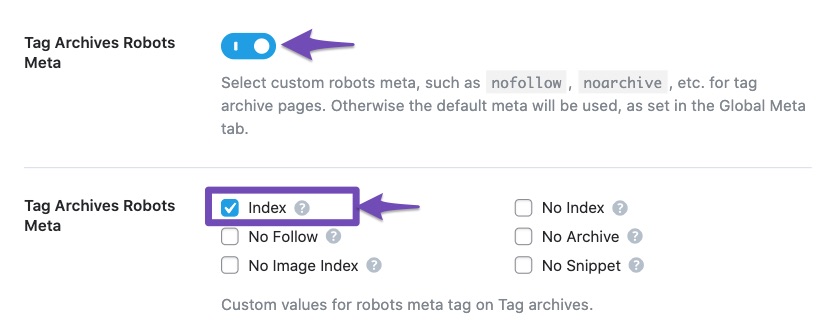
- Search Engine Visibility:
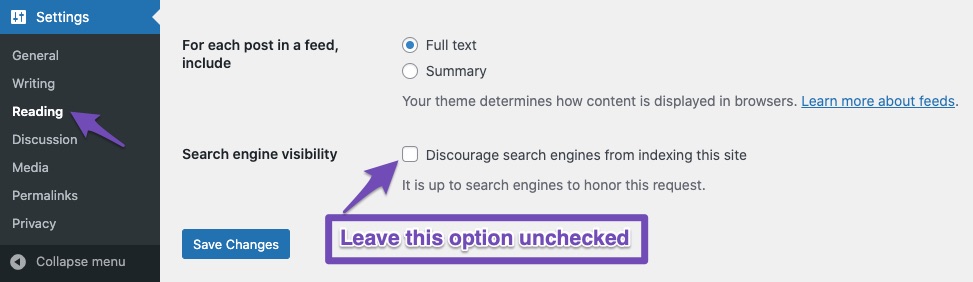
- Go to Settings → Reading in your WordPress dashboard.
- Ensure that the checkbox "Discourage search engines from indexing this site" is unchecked.
- Save Changes if any modifications are made.
If after following these steps the issue persists, please reply to this ticket, and a human agent from the Rank Math Support team will assist you further.
We appreciate your patience and understanding as we work to resolve this matter for you.
Thank you!
Sources:
Fix Excluded by NoIndex Tag – Google Search Console Status » Rank Math
Discovered – Currently Not Indexed in Google Search Console » Rank Math
Check all, but without any success
Hello,
Thank you for your query and we are so sorry about the trouble this must have caused.
We checked your website and the robots meta is already set to index as you can see from this screenshot:

In this case, please submit your website to your Google Search Console’s URL inspection tool and validate the fix.
Let us know how that goes. Looking forward to helping you.
Sorry, I wasn’t precise enough. These page links cannot be retrieved by Google:
/category-sitemap.xml
/page-sitemap.xml
/post-sitemap.xml
Hello,
We understand your concern about the sitemap being set as ‘noindex’, but we assure you that this is how it should be.
The reason is that we don’t want Google to index the sitemap itself, we only want them to index the pages and posts that are listed on the sitemap. The sitemap is just a way to tell Google what pages and posts you have on your website, not a page that you want to show up in search results.
The important thing is that your pages and posts are set to ‘index’, which means that they are eligible to appear in Google search results.
You can check this by looking at the Rank Math settings on each page or post, or by using the Google URL Inspection tool.
To make sure that Google knows about your sitemap and can crawl your pages and posts, you need to submit your sitemap to Google Search Console.
This is a simple process that you can follow by using our tutorial: https://rankmath.com/kb/submit-sitemap-to-google/
Hope that helps, and please do not hesitate to let us know if you need our assistance with anything else.
Thank you for your reply.
I have gone through this tutorial, here is my feedback:
to 2. I already configured the setup a few weeks ago. I assumed that I didn’t actually have to do anything (automatically)
Conclusion: I received an error message for the above-mentioned sitemaps, see above.
I have now submitted this manually (1.3.) and was immediately confirmed as “successful”!
Why did it not work automatically (2.)?
Hello,
Rank Math will submit your sitemap index automatically to Google if you have connected Rank Math with your Google Search Console account using the URL-prefix property.
When you connect Rank Math with Search Console, please ensure that you are not connecting via a domain property but rather a URL prefix and that you have verified the correct version of your website on the Google Search Console (HTTP or HTTPS, www or non-www).
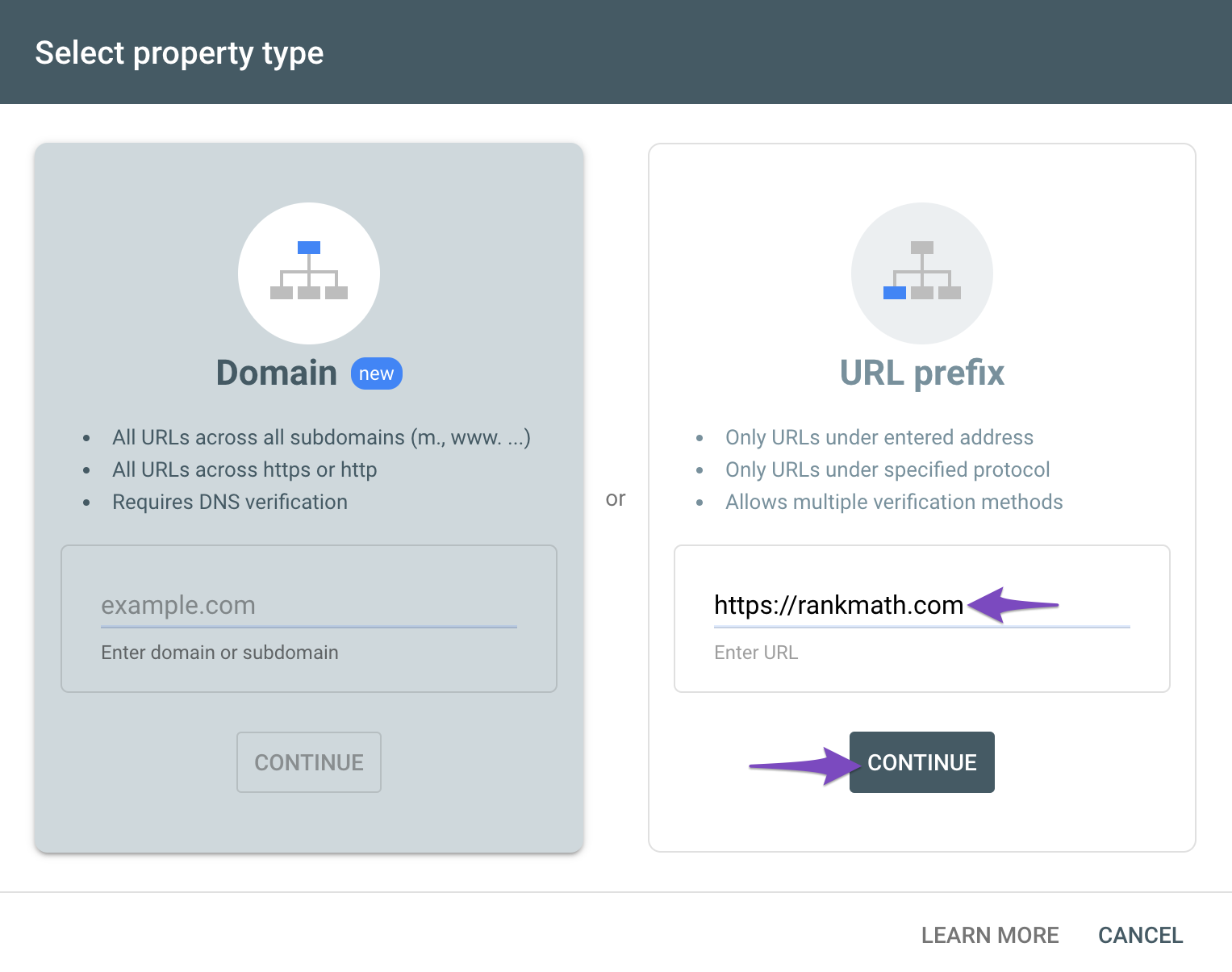
The URL-prefix property helps keep your sitemap in sync with Google Search Console as we submit it automatically for you.
Here is a guide you can follow to connect Rank Math to Google Search Console: https://rankmath.com/kb/connect-your-google-account/
Hope this helps and please don’t hesitate to let us know if you have any other questions.
Thank you.
Hello,
Since we did not hear back from you for 15 days, we are assuming that you found the solution. We are closing this support ticket.
If you still need assistance or any other help, please feel free to open a new support ticket, and we will be more than happy to assist.
Thank you.





