
-
I tried registering my website in the search console following the setup wizard, once signing in with the google account , site is not registered in the search console

-
Hello,
I’m sorry to hear that you are facing issues registering your website in the Search Console. To ensure your website is properly registered, please follow these steps:
- Make sure you have a Google account. If not, create one.
- Open the Google Search Console and log in with your Google account.
- Click on the property dropdown menu at the top-left corner of the dashboard and then click on Add property.
- Enter your website URL in the URL Prefix property type and click on Continue.
If you encounter any issues during this process, please let us know, and we will be happy to assist further.
Thank you for reaching out to us.
Sources:
How to Verify Your Website on Google » Rank Math
How to Connect Your Google Account With Rank Math SEO » Rank Math
Troubleshooting the “Couldn’t Fetch” Error in Google Search Console » Rank Math
How to Add User to Google Search Console » Rank MathVerification is failing on manual registration using HTML tag method
Ownership verification failed
Verification method:
HTML tag
Failure reason:
We couldn’t find your verification meta tag.
Please fix your implementation and reverify, or use another verification method.WordPress database error: [Table ‘vallisre_wp890.wp_rank_math_analytics_objects’ doesn’t exist]
DELETE FROM wp_rank_math_analytics_objects WHERE object_type = ‘post’ AND object_id = 1757WordPress database error: [Table ‘vallisre_wp890.wp_rank_math_analytics_objects’ doesn’t exist]
DELETE FROM wp_rank_math_analytics_objects WHERE object_type = ‘post’ AND object_id = 1758Warning: Cannot modify header information – headers already sent by (output started at /home/vallisre/public_html/wp-includes/class-wpdb.php:1854) in /home/vallisre/public_html/wp-admin/includes/misc.php on line 1439
Warning: Cannot modify header information – headers already sent by (output started at /home/vallisre/public_html/wp-includes/class-wpdb.php:1854) in /home/vallisre/public_html/wp-includes/functions.php on line 7099
Warning: Cannot modify header information – headers already sent by (output started at /home/vallisre/public_html/wp-includes/class-wpdb.php:1854) in /home/vallisre/public_html/wp-admin/admin-header.php on line 9
Hello,
Thank you for contacting Rank Math support, and sorry for any inconvenience that might have been caused due to that.
Please carefully follow the steps here in detail: https://rankmath.com/kb/google-site-verification/
If the issue persists, please share your website URL with us so we can further check it on our end.
Concerning the database error, please head over to your WordPress Dashboard > Rank Math > Status & Tools > Database tools and click on the button “Re-create Missing Database Tables”.
Hope that helps, and please do not hesitate to let us know if you need our assistance with anything else.
Thanks for the support. The “Re-create Missing Database Tables” is not found under that section. The Database list down only the info of the DB connection. Had attached the RankMath details too as shown in WP.
Database
Extension mysqli
Server version 8.0.37
Client version ******
Database username ********
Database host *******
Database name *******
Table prefix wp_
Database charset *****
Database collation ******
Max allowed packet size ******
Max connections number ******System Info
Copy System Info to ClipboardRank Math
Version 1.0.223
Database version 1
Plugin subscription plan Free
Content AI Plan Free
Content AI Credits 750
Content AI Refresh Date 2024-08-09 8:45 am
Active modules link-counter, analytics, seo-analysis, sitemap, rich-snippet, content-ai, instant-indexing, local-seo
Google Refresh token Token exists
Google Permission
Search Console: Given
Database Table: 404 Log Not found
Database Table: Redirection Not found
Database Table: Redirection Cache Not found
Database Table: Internal Link *** KB
Database Table: Internal Link Meta *** KB
Database Table: Google Search Console Not found
Database Table: Flat Posts Not found
Database Table: Inspections Not foundHello,
Please note that some options are only available when you enable the Advanced Mode in Rank Math.
If this option is not available in your dashboard, you must have chosen to use the Easy Mode. Please navigate to WordPress Dashboard → Rank Math SEO → Dashboard. In the top-right corner, click on Advanced Mode as shown below:
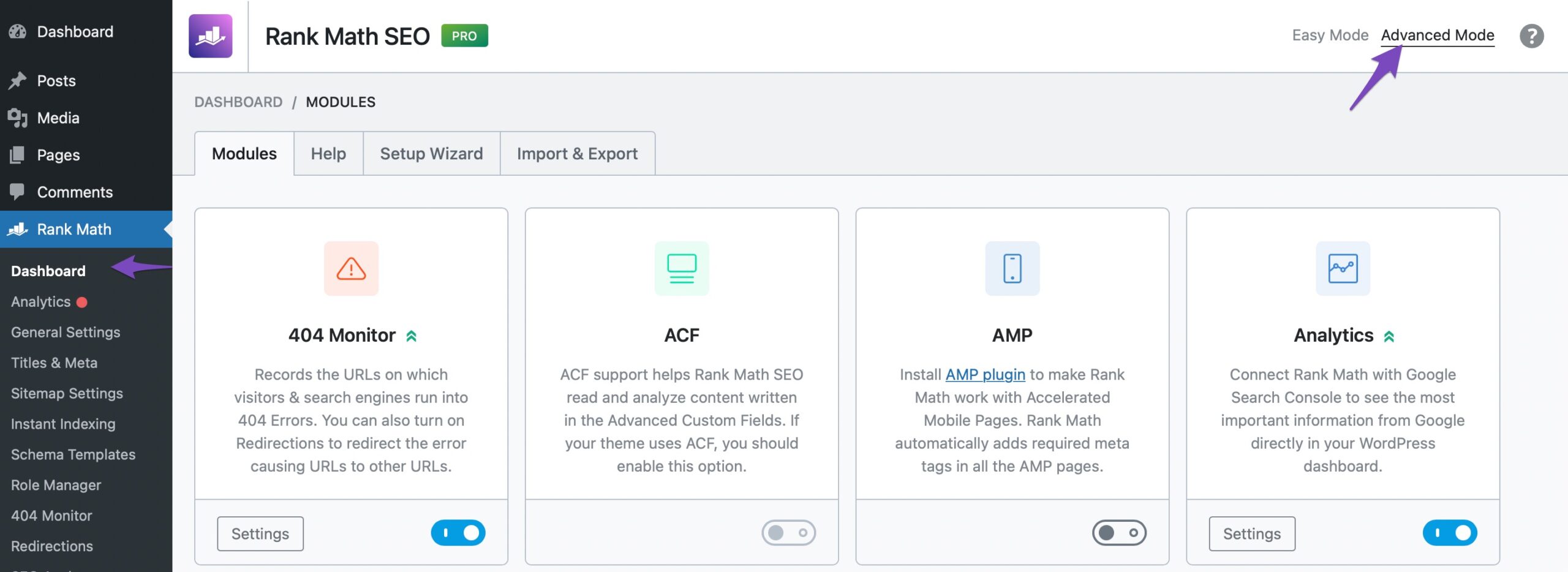
Once you’ve enabled Advanced Mode, check the option again. You can access all the available options in Rank Math.
Here is more information about the advanced mode in our Knowledge Base article: https://rankmath.com/kb/advanced-mode/
Hope that helps and don’t hesitate to get in touch if you have any other questions.
Thank you.
Website is now registered to GSC.Thanks for the support!
Hello,
We are super happy that this resolved your issue. If you have any other questions in the future, know that we are here to help you.
If you don’t mind us asking, could you please leave us a review (if you haven’t already) on
https://wordpress.org/support/plugin/seo-by-rank-math/reviews/#new-postabout your overall experience with Rank Math? We appreciate your time and patience.
If you do have another question in the future, please feel free to create a new forum topic, and it will be our pleasure to assist you again.
Thank you.



The ticket ‘Website not registered to search console’ is closed to new replies.