Hello,
I’m sorry to hear that you are facing difficulty finding the "Set Limit" button for your connected site in the Content AI settings. To assist you better, could you please confirm if you are looking for the "Set Limit" button in the Client Management dashboard or in the Rank Math plugin settings within your WordPress admin area?
If you are referring to the Client Management dashboard, you can find the "Set Limit" button against the website’s Content AI Credits option. Here is a screenshot for reference:
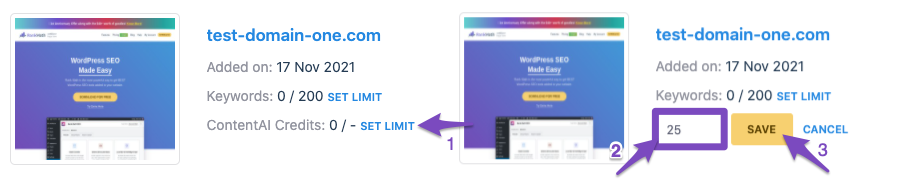
If you are referring to the Rank Math plugin settings in your WordPress admin area, after setting the credit limit in the Client Management dashboard, you should see the set credit limit reflected under Rank Math SEO → General Settings → Content AI.
Please check these locations, and if you still can’t find the "Set Limit" button, feel free to provide more details so we can assist you accordingly.
Looking forward to helping you further.
Sources:
Client Management » Rank Math
How to Set a Keyword Tracking Limit Per Website in the Business License » Rank Math
Hello,
Thank you for contacting support.
That is only available for the Business and Agency subscriptions of the PRO plugin. For all other users, the credits are automatically assigned to all the websites connected to the account.
You can head over to WordPress Dashboard > Rank Math SEO > General Settings > Content AI and click the little circling arrow to refresh the credit count.
Don’t hesitate to get in touch if you have any other questions.
It says:Could not generate. Please try again later.
I try later again and i write again if dont work
Hello,
We can check that you have the PRO plugin installed on the site, but you don’t have a PRO plan in this account. Please share the email address of your PRO account so we can merge your accounts or disable the PRO plugin to use the Content AI.
Looking forward to helping you.
Hello,
Since we did not hear back from you for 15 days, we are assuming that you found the solution. We are closing this support ticket.
If you still need assistance or any other help, please feel free to open a new support ticket, and we will be more than happy to assist.
Thank you.





