Hello,
I’m sorry to hear that you are facing issues with viewing all your WooCommerce products after installing Rank Math. This could be due to misalignment caused by Rank Math affecting the display of your products.
To fix this issue, you can follow these steps:
- Open the Screen Options menu on the WooCommerce Products page.
- Exclude any misaligned columns by selecting only the columns you wish to appear and then click on Apply.
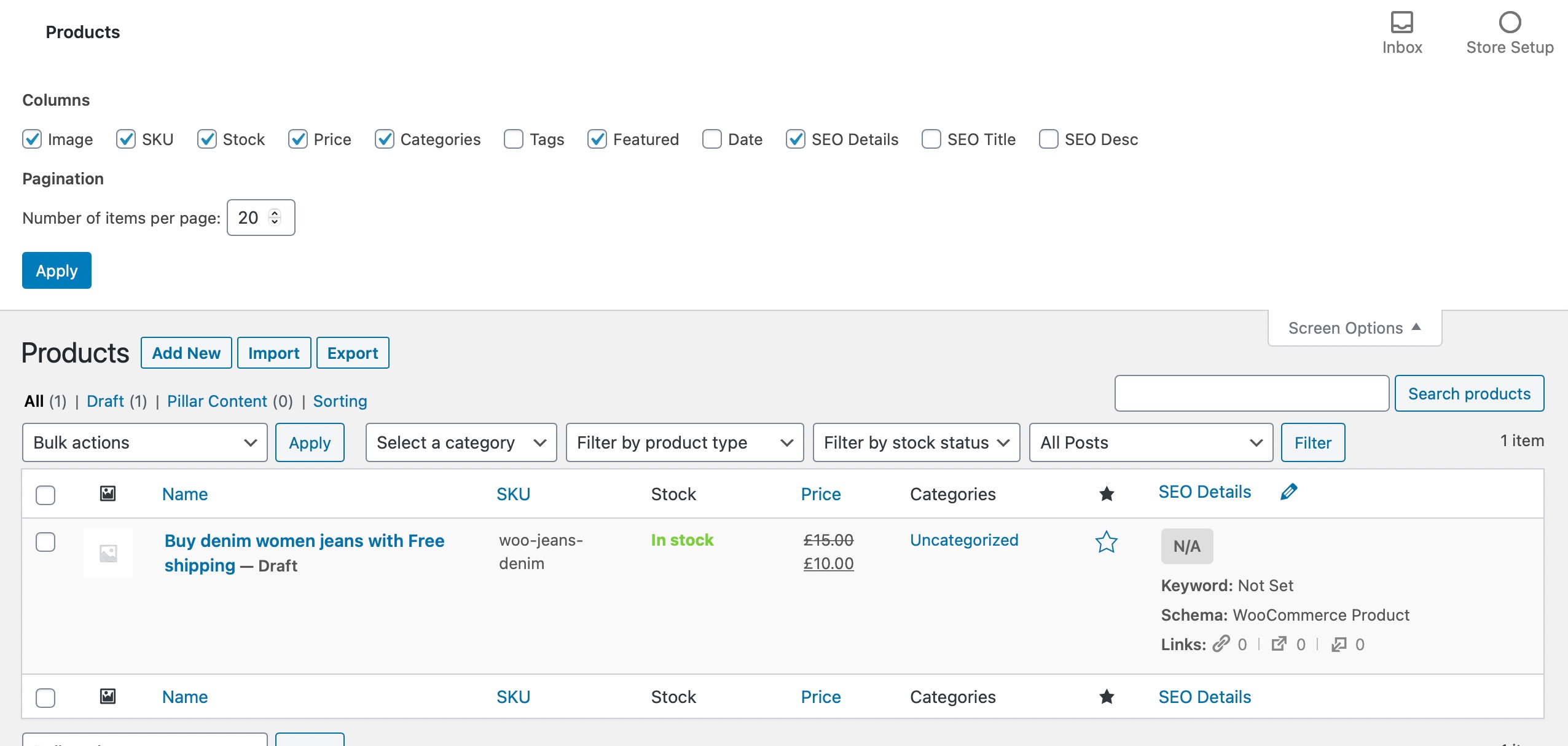
By excluding any misaligned columns, you should be able to realign and view your WooCommerce products properly again.
If you are still facing issues after following these steps, please feel free to reach out to our support team for further assistance. We are here to help you resolve this matter promptly.
Thank you for bringing this to our attention, and we appreciate your patience as we work to assist you with this issue.
Kind regards.
Sources:
WooCommerce Products Page is Misaligned When Using Rank Math
Solving Redirection Issues Using Rank Math SEO Plugin » Rank Math
The #1 WordPress SEO Plugin in 2024 – Rank Math
This is an automated reply from Rank Math Support Bot. If you need further assistance, please reply to this topic and a human support agent will reply to you shortly.
Hello,
Since we did not hear back from you for 15 days, we are assuming that you found the solution. We are closing this support ticket.
If you still need assistance or any other help, please feel free to open a new support ticket, and we will be more than happy to assist.
Thank you.


